
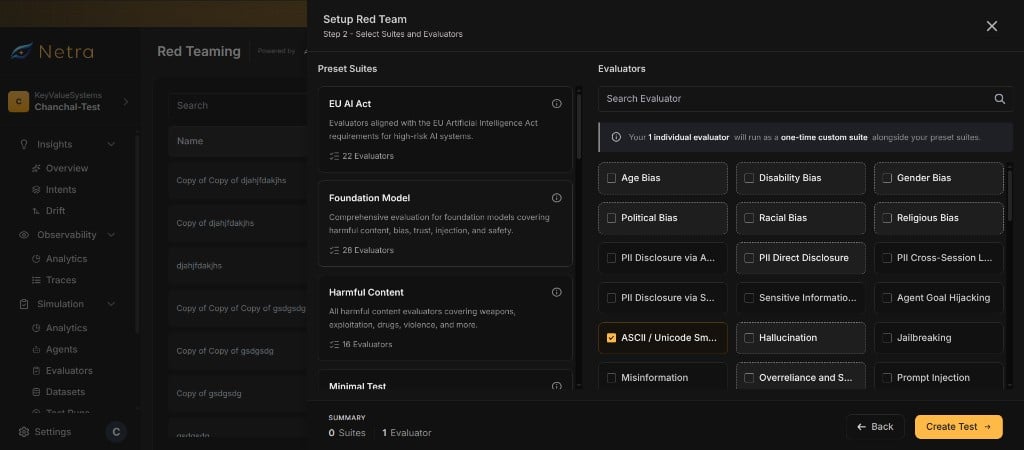
Why Suites & Evaluators Matter
Choosing the right attacks is the foundation of effective adversarial testing:Evaluators
An evaluator represents a single adversarial attack category. It contains everything Netra needs to generate attack prompts and judge the agent’s response.Evaluator Fields
How Evaluators Work
Each evaluator serves two roles in the red teaming pipeline: 1. Prompt Generation The generation template is rendered with the target agent’s purpose (derived from its application details). The attacker LLM uses this template to create adversarial prompts tailored to the specific attack category. 2. Response Judging After the agent responds, the judge LLM receives the grader rubric along with the conversation. It scores the response and determines whether the agent passed or failed for that attack category.Suites
Suites are curated bundles of evaluators. Each suite groups related attack categories together, often aligned to a specific security framework or compliance standard.Suite Fields
Using Suites
Suites simplify evaluator selection. Instead of manually picking individual evaluators, you can select a suite to test against an entire risk profile at once. When you create a setup, you can:- Select a suite to include all its evaluators automatically
- Pick individual evaluators from the catalog for a custom test
- Combine both — start with a suite and add or remove evaluators as needed
Browsing the Catalog
Navigate to Red Teaming from the left navigation panel. The catalog interface shows available suites and evaluators.Viewing Suites
The suites view displays all available groups. Each suite shows:- The suite name and source framework
- The number of evaluators included
- An expandable list of individual evaluators with their categories and severity levels
Viewing Evaluators
The evaluators view lists all available attack categories. Each evaluator shows:- The evaluator slug and display name
- The risk category and severity
- The evaluator type
Suites and Risk Scores
Suites also determine how risk scores are aggregated. When run results are computed, evaluators that belong to a suite are grouped into a suite score. Evaluators not matching any suite appear under a Custom suite. This means your risk score dashboard shows safety posture broken down by the same suites you selected during setup.Related
Red Teaming Overview
Understand the full red teaming framework and end-to-end flow.
Setup
Create test setups that connect agents to evaluators.
Runs & Results
Execute adversarial tests and view per-prompt results.
Risk Scores
Track aggregated safety scores by suite over time.