This cookbook walks you through adding full observability to a Retrieval-Augmented Generation (RAG) pipeline—tracing every stage from document ingestion to answer generation, tracking costs, and monitoring performance.

Open in Google Colab

Run the complete observability notebook in your browser

What You’ll Learn

Prerequisites:

High-Level Concepts

RAG Architecture

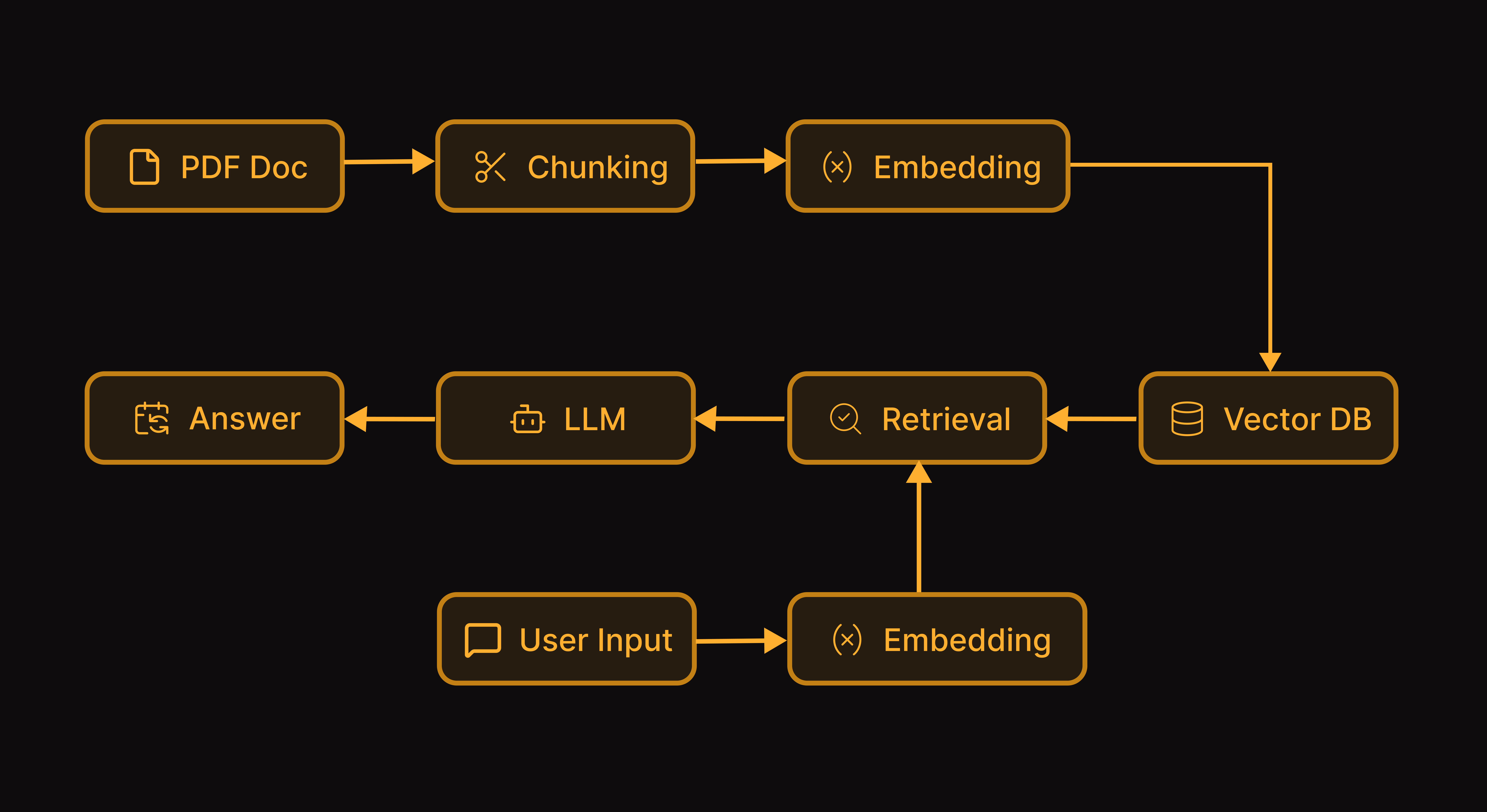
A RAG chatbot works in two phases: Ingestion (one-time):
  1. Load and chunk the PDF into smaller text segments
  2. Generate embeddings for each chunk
  3. Store embeddings in a vector database
Query (per question):
  1. Convert the user’s question to an embedding
  2. Find the most similar chunks (retrieval)
  3. Pass retrieved chunks + question to an LLM
  4. Return the generated answer
RAG Pipeline Architecture

Why Observability Matters for RAG

RAG systems can fail silently in multiple ways:
ProblemSymptomWhat Tracing Reveals
Poor chunkingIncomplete answersChunk sizes, content boundaries
Wrong retrievalIrrelevant answersSimilarity scores, retrieved chunks
HallucinationFabricated infoContext vs. generated content
High costsBudget overrunsToken usage per stage

Creating the Chat Agent

Let’s build the RAG chatbot first, then add tracing.

Installation

Start by installing the required packages. We’ll use OpenAI for embeddings and generation, ChromaDB as our vector store, and a PDF parsing library.
pip install netra-sdk openai chromadb pypdf reportlab

Environment Setup

Configure your API keys. You’ll need both an OpenAI key for the LLM operations and a Netra key for observability.
export NETRA_API_KEY="your-netra-api-key"
export NETRA_OTLP_ENDPOINT="your-netra-otlp-endpoint"
export OPENAI_API_KEY="your-openai-api-key"

Loading and Chunking Documents

The first step in any RAG pipeline is extracting text from your documents and splitting it into manageable chunks. We use overlapping chunks to ensure context isn’t lost at chunk boundaries—this helps when relevant information spans multiple segments.
# Import required libraries
from pypdf import PdfReader
from typing import List, Dict, Optional
import chromadb
from openai import OpenAI
import uuid

# Initialize clients
openai_client = OpenAI()
chroma_client = chromadb.Client()

def load_pdf(file_path: str) -> str:
    """Extract text from a PDF file."""
    reader = PdfReader(file_path)
    text = ""
    for page in reader.pages:
        text += page.extract_text() + "\n"
    return text

def chunk_text(text: str, chunk_size: int = 1000, overlap: int = 200) -> List[str]:
    """Split text into overlapping chunks."""
    chunks = []
    start = 0
    while start < len(text):
        end = start + chunk_size
        chunk = text[start:end]
        chunks.append(chunk)
        start = end - overlap
    return chunks

Generating Embeddings and Indexing

Next, we convert each chunk into a vector embedding and store it in ChromaDB. These embeddings capture the semantic meaning of each chunk, allowing us to find relevant content based on meaning rather than just keywords.
def generate_embeddings(texts: List[str]) -> List[List[float]]:
    """Generate embeddings for a list of texts."""
    response = openai_client.embeddings.create(
        model="text-embedding-3-small",
        input=texts
    )
    return [item.embedding for item in response.data]

# Load and chunk the PDF
pdf_text = load_pdf("document.pdf")
chunks = chunk_text(pdf_text, chunk_size=1000, overlap=200)
print(f"Created {len(chunks)} chunks")

# Generate embeddings and store in ChromaDB
collection = chroma_client.create_collection(name="pdf_qa")
embeddings = generate_embeddings(chunks)
collection.add(
    documents=chunks,
    embeddings=embeddings,
    ids=[f"chunk_{i}" for i in range(len(chunks))]
)
print(f"Stored {len(chunks)} chunks in vector database")

Building the Query Pipeline

Now we implement the core RAG logic: given a user question, retrieve the most relevant chunks from our vector store, then pass them as context to the LLM to generate an answer. The top_k parameter controls how many chunks we retrieve—more chunks provide more context but also increase cost and latency.
def retrieve_chunks(query: str, top_k: int = 3) -> List[Dict]:
    """Retrieve the most relevant chunks for a query."""
    query_embedding = generate_embeddings([query])[0]
    results = collection.query(
        query_embeddings=[query_embedding],
        n_results=top_k,
        include=["documents", "distances"]
    )

    retrieved = []
    for i, doc in enumerate(results["documents"][0]):
        retrieved.append({
            "content": doc,
            "similarity_score": 1 - results["distances"][0][i]  # Convert distance to similarity
        })
    return retrieved

def generate_answer(query: str, context_chunks: List[Dict]) -> str:
    """Generate an answer using the retrieved context."""
    context = "\n\n".join([chunk["content"] for chunk in context_chunks])

    response = openai_client.chat.completions.create(
        model="gpt-4o-mini",
        messages=[
            {
                "role": "system",
                "content": """You are a helpful assistant that answers questions based on the provided context.
                Only use information from the context to answer. If the answer is not in the context, say so."""
            },
            {
                "role": "user",
                "content": f"Context:\n{context}\n\nQuestion: {query}"
            }
        ]
    )
    return response.choices[0].message.content

# Test the query pipeline
test_query = "What is the main topic of this document?"
retrieved_chunks = retrieve_chunks(test_query, top_k=3)
answer = generate_answer(test_query, retrieved_chunks)
print(f"Answer: {answer}")

Adding Session Support

For production use, we wrap everything in a class that maintains conversation history and session state. This enables multi-turn conversations where the chatbot remembers previous exchanges, and allows us to track usage per user and session.
class PDFChatbot:
    def __init__(self, pdf_path: str):
        self.pdf_path = pdf_path
        self.conversation_history = []
        self.session_id = str(uuid.uuid4())
        self._setup_vector_store()

    def _setup_vector_store(self):
        """Initialize the vector store with PDF content."""
        pdf_text = load_pdf(self.pdf_path)
        self.chunks = chunk_text(pdf_text)
        embeddings = generate_embeddings(self.chunks)

        self.collection = chroma_client.create_collection(
            name=f"pdf_{self.session_id}"
        )
        self.collection.add(
            documents=self.chunks,
            embeddings=embeddings,
            ids=[f"chunk_{i}" for i in range(len(self.chunks))]
        )

    def chat(self, query: str, user_id: Optional[str] = None) -> Dict:
        """Process a chat message and return the response."""
        # Retrieve relevant chunks
        retrieved = self._retrieve(query)

        # Build conversation context
        context = "\n\n".join([chunk["content"] for chunk in retrieved])

        # Generate response
        messages = [
            {
                "role": "system",
                "content": f"""You are a helpful assistant answering questions about a PDF document.
                Use the following context to answer questions. If the answer is not in the context, say so.

                Context:
                {context}"""
            }
        ]

        # Add conversation history
        for msg in self.conversation_history[-6:]:  # Last 3 exchanges
            messages.append(msg)

        messages.append({"role": "user", "content": query})

        response = openai_client.chat.completions.create(
            model="gpt-4o-mini",
            messages=messages
        )

        answer = response.choices[0].message.content

        # Update conversation history
        self.conversation_history.append({"role": "user", "content": query})
        self.conversation_history.append({"role": "assistant", "content": answer})

        return {
            "query": query,
            "answer": answer,
            "retrieved_chunks": retrieved,
            "session_id": self.session_id,
            "user_id": user_id,
            "token_usage": {
                "prompt_tokens": response.usage.prompt_tokens,
                "completion_tokens": response.usage.completion_tokens,
                "total_tokens": response.usage.total_tokens
            }
        }

    def _retrieve(self, query: str, top_k: int = 3) -> List[Dict]:
        """Retrieve relevant chunks."""
        query_embedding = generate_embeddings([query])[0]
        results = self.collection.query(
            query_embeddings=[query_embedding],
            n_results=top_k,
            include=["documents", "distances"]
        )

        retrieved = []
        for i, doc in enumerate(results["documents"][0]):
            retrieved.append({
                "content": doc,
                "similarity_score": 1 - results["distances"][0][i]
            })
        return retrieved

# Usage
chatbot = PDFChatbot("document.pdf")
response = chatbot.chat("What is the main topic?", user_id="user-123")
print(response["answer"])

Tracing the Agent

Now let’s add Netra observability to see what’s happening inside the RAG pipeline. The good news: with auto-instrumentation, you get full visibility with minimal code changes.

Initializing Netra

Add these imports and initialization at the very top of your script, before any other code. Auto-instrumentation captures all OpenAI and ChromaDB operations automatically—no decorators or manual spans required.
# Add these imports at the top, before other imports
from netra import Netra
from netra.instrumentation.instruments import InstrumentSet

# Initialize Netra before any other code
Netra.init(
    app_name="pdf-qa-chatbot",
    environment="development",
    trace_content=True,
    instruments={
        InstrumentSet.OPENAI,
        InstrumentSet.CHROMA,
    }
)

# Now continue with the rest of your imports and code from earlier sections
# from pypdf import PdfReader
# from typing import List, Dict, Optional
# ...
What gets auto-traced with zero code changes:
  • OpenAI chat completions with model, tokens, cost, and latency
  • OpenAI embeddings with token counts
  • ChromaDB queries and inserts with timing
  • Full prompts and responses (when trace_content=True)

What Gets Auto-Traced

With the initialization above, your existing code from the Creating the Chat agent section is automatically traced. Here’s what appears in your Netra dashboard:

Document Ingestion

The generate_embeddings() call to OpenAI and collection.add() to ChromaDB are captured automatically.
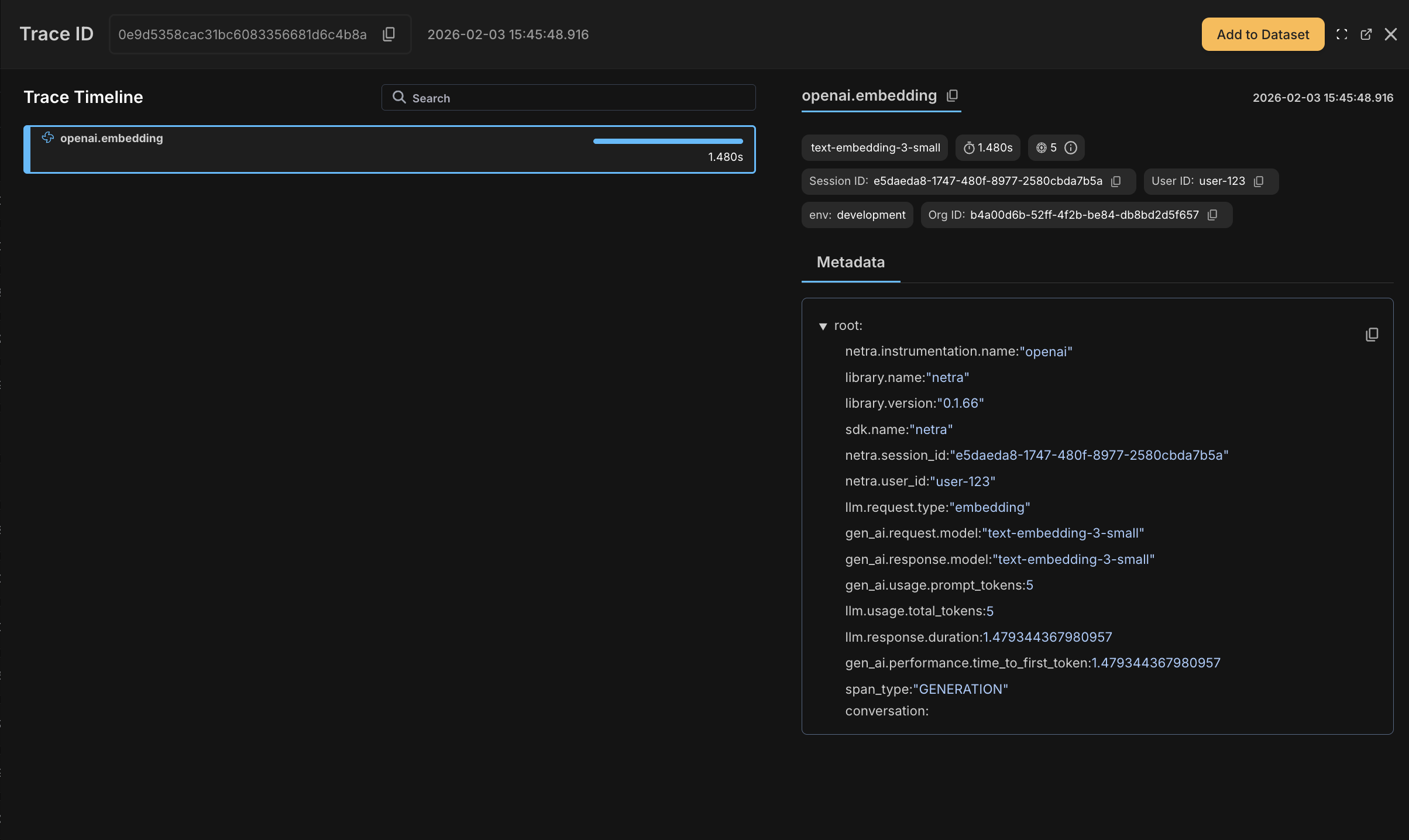
Ingestion trace showing OpenAI embeddings and ChromaDB operations

Retrieval Operations

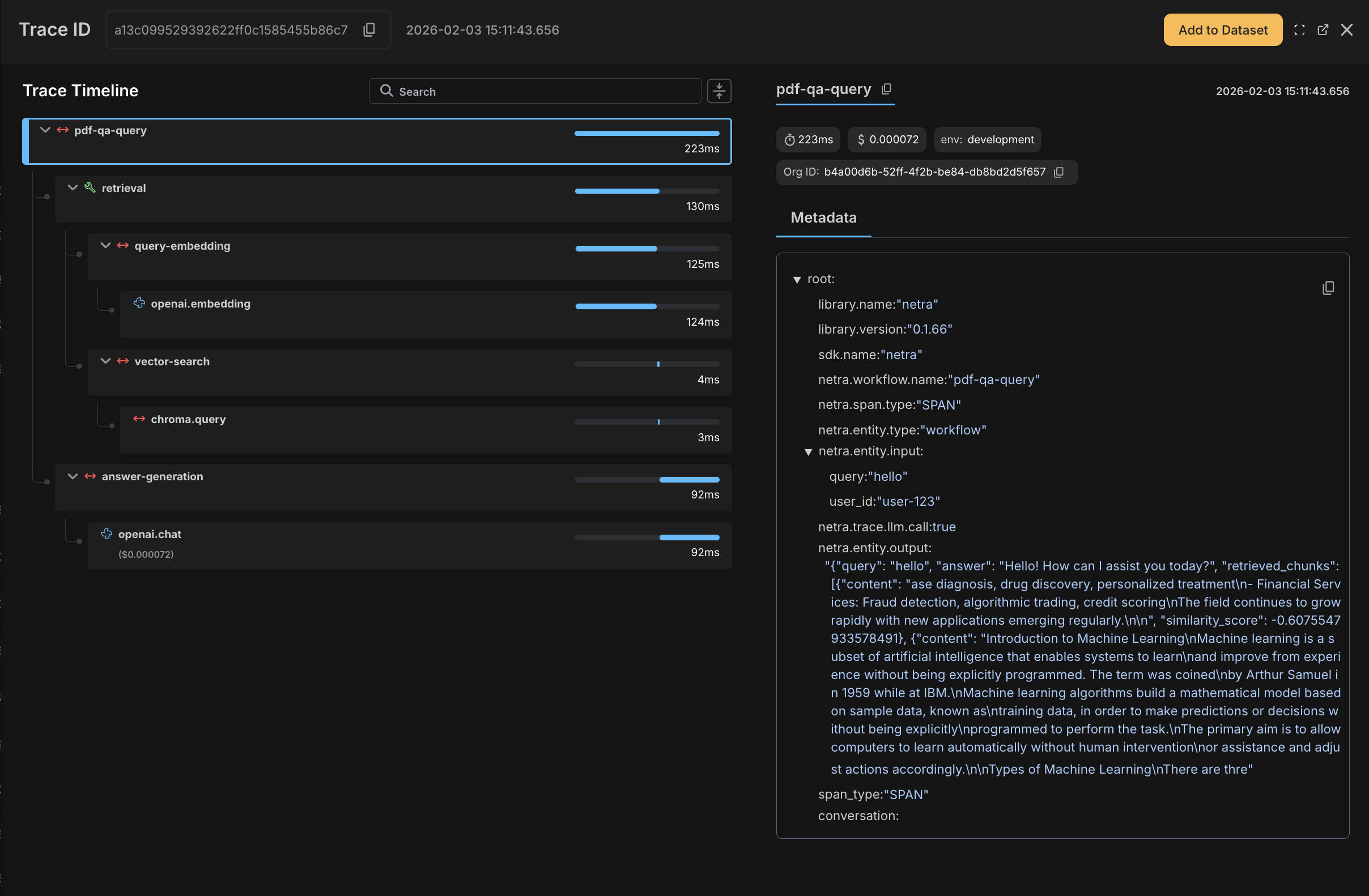
Query embedding generation and vector search operations appear as child spans with timing and metadata.
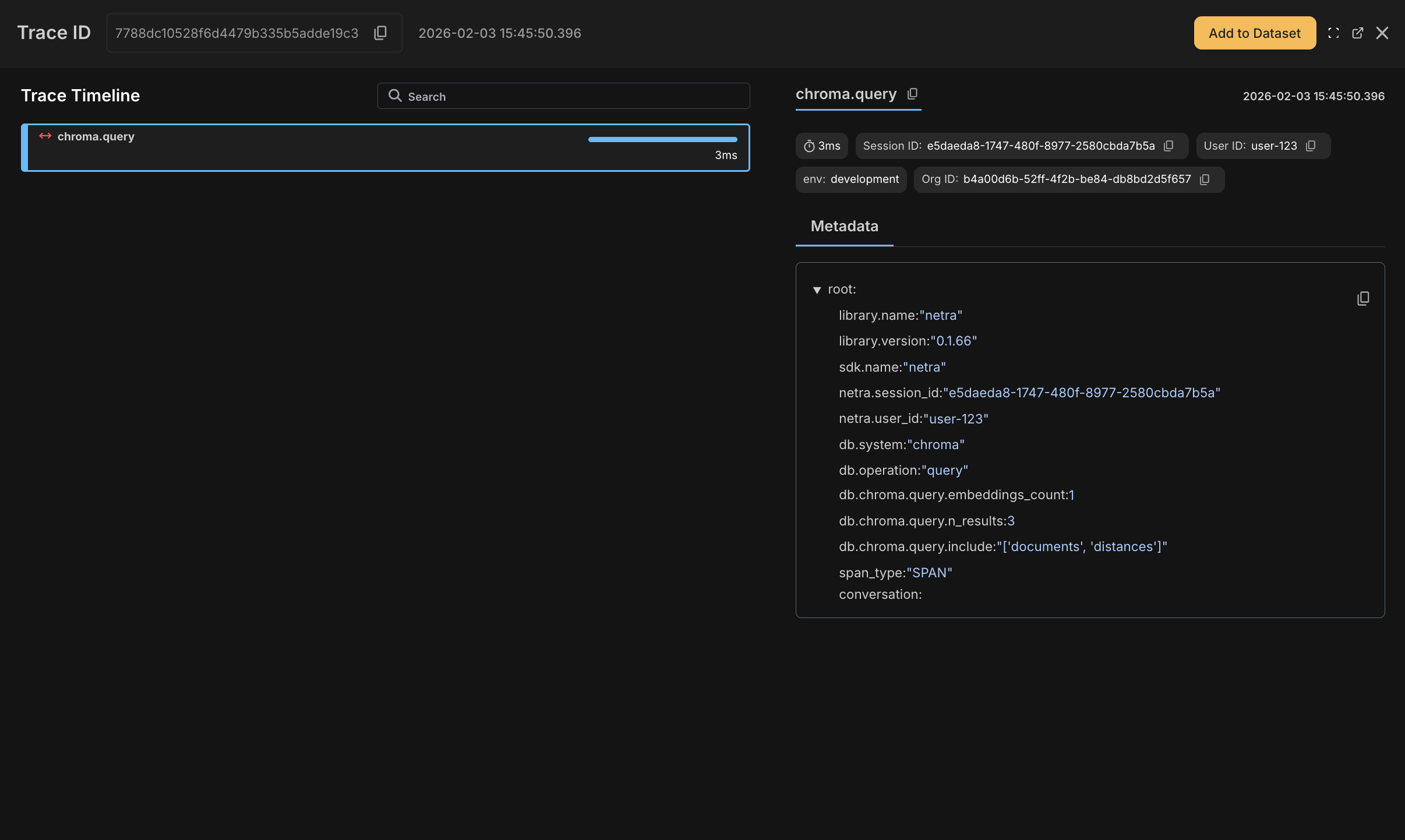
Retrieval trace showing embedding and search spans

LLM Generation

OpenAI chat completions are fully traced with model, tokens, cost, latency, and full prompt/response content.
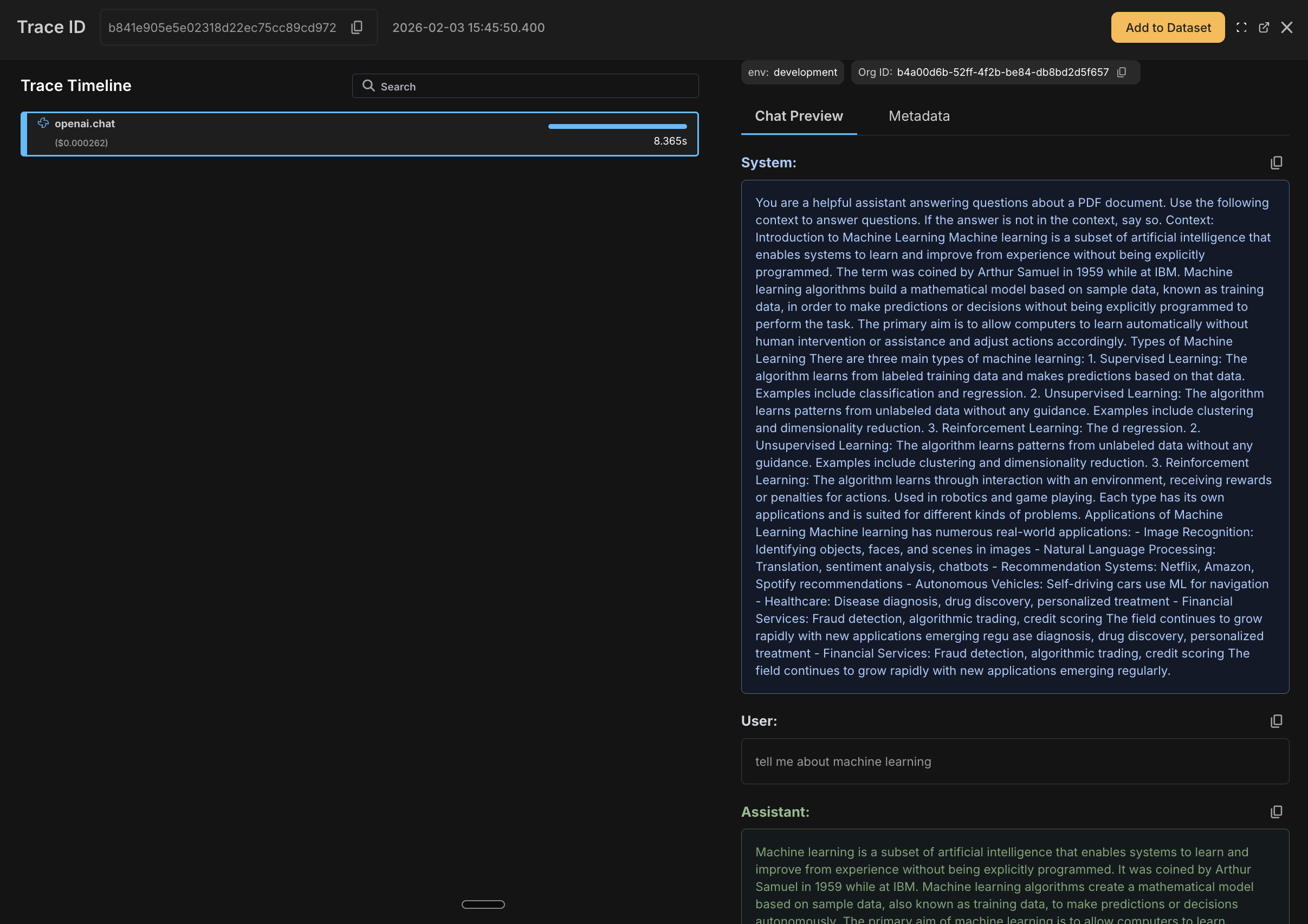
Generation trace showing OpenAI chat completion details

Adding User and Session Tracking

To analyze usage per user and track conversation flows, add user and session context to your existing PDFChatbot class. This is the one piece that requires explicit code—everything else is auto-traced. Simply add these two lines in your chat method:
# Modify the chat method in your existing PDFChatbot class:
def chat(self, query: str, user_id: Optional[str] = None) -> Dict:
    """Process a chat message and return the response."""
    # Add these two lines to enable user and session tracking
    Netra.set_session_id(self.session_id)
    if user_id:
        Netra.set_user_id(user_id)

    # Rest of the method remains the same
    retrieved = self._retrieve(query)
    context = "\n\n".join([chunk["content"] for chunk in retrieved])
    # ... (rest of your existing code)

What You’ll See in the Dashboard

After running the chatbot, you’ll see traces in the Netra dashboard with:
  • OpenAI spans showing model, tokens, cost, and full prompt/response
  • ChromaDB spans showing query timing and results
  • User and session IDs attached to all spans for filtering

Using Decorators

Auto-instrumentation handles most cases of tracing but if you want to bring in more structure, you can use decorators. Use decorators to create parent spans that group related operations. This is useful when you want to see a single trace for an entire pipeline rather than individual OpenAI/ChromaDB calls.
DecoratorUse Case
@workflowTop-level pipeline or request handler
@taskDiscrete unit of work within a workflow
@spanFine-grained tracing for specific operations
import os
import uuid
from typing import List, Dict, Optional
from pypdf import PdfReader
import chromadb
from openai import OpenAI

from netra import Netra
from netra.decorators import workflow, task, span
from netra.instrumentation.instruments import InstrumentSet

# Initialize Netra with auto-instrumentation
Netra.init(
    app_name="pdf-qa-chatbot",
    environment="development",
    trace_content=True,
    instruments={
        InstrumentSet.OPENAI,
        InstrumentSet.CHROMA,
    }
)

# Initialize clients
openai_client = OpenAI()
chroma_client = chromadb.Client()


def generate_embeddings(texts: List[str]) -> List[List[float]]:
    """Generate embeddings for a list of texts."""
    response = openai_client.embeddings.create(
        model="text-embedding-3-small",
        input=texts
    )
    return [item.embedding for item in response.data]


@task(name="load-pdf")
def load_pdf(file_path: str) -> str:
    """Extract text from a PDF file."""
    reader = PdfReader(file_path)
    text = ""
    for page in reader.pages:
        text += page.extract_text() + "\n"
    return text


@task(name="chunk-text")
def chunk_text(text: str, chunk_size: int = 1000, overlap: int = 200) -> List[str]:
    """Split text into overlapping chunks."""
    chunks = []
    start = 0
    while start < len(text):
        end = start + chunk_size
        chunk = text[start:end]
        chunks.append(chunk)
        start = end - overlap
    return chunks


class PDFChatbot:
    """A RAG-based chatbot for answering questions about PDF documents."""

    def __init__(self, pdf_path: str):
        self.pdf_path = pdf_path
        self.session_id = str(uuid.uuid4())
        self.collection = None
        self.chunks: List[str] = []
        self.conversation_history: List[Dict] = []

    @task(name="document-ingestion")
    def initialize(self):
        """Initialize the vector store with PDF content."""
        pdf_text = load_pdf(self.pdf_path)
        self.chunks = chunk_text(pdf_text)
        embeddings = generate_embeddings(self.chunks)

        self.collection = chroma_client.create_collection(name=f"pdf_{self.session_id[:8]}")
        self.collection.add(
            documents=self.chunks,
            embeddings=embeddings,
            ids=[f"chunk_{i}" for i in range(len(self.chunks))]
        )

    @workflow(name="pdf-qa-query")
    def chat(self, query: str, user_id: Optional[str] = None) -> Dict:
        """Process a chat message and return the response."""
        Netra.set_session_id(self.session_id)
        if user_id:
            Netra.set_user_id(user_id)

        retrieved = self._retrieve(query)
        answer, response = self._generate_answer(query, retrieved)

        # Update conversation history
        self.conversation_history.append({"role": "user", "content": query})
        self.conversation_history.append({"role": "assistant", "content": answer})

        return {"query": query, "answer": answer, "retrieved_chunks": retrieved}

    @task(name="retrieval")
    def _retrieve(self, query: str, top_k: int = 3) -> List[Dict]:
        """Retrieve relevant chunks."""
        query_embedding = self._get_query_embedding(query)
        retrieved = self._vector_search(query_embedding, top_k)
        return retrieved

    @span(name="query-embedding")
    def _get_query_embedding(self, query: str) -> List[float]:
        """Generate embedding for the query."""
        return generate_embeddings([query])[0]

    @span(name="vector-search")
    def _vector_search(self, query_embedding: List[float], top_k: int) -> List[Dict]:
        """Search vector database for relevant chunks."""
        results = self.collection.query(
            query_embeddings=[query_embedding],
            n_results=top_k,
            include=["documents", "distances"]
        )
        return [{"content": doc, "similarity_score": 1 - results["distances"][0][i]}
                for i, doc in enumerate(results["documents"][0])]

    @span(name="answer-generation")
    def _generate_answer(self, query: str, retrieved: List[Dict]):
        """Generate answer using retrieved context."""
        context = "\n\n".join([chunk["content"] for chunk in retrieved])
        messages = [
            {"role": "system", "content": f"Use this context to answer: {context}"},
            {"role": "user", "content": query}
        ]
        response = openai_client.chat.completions.create(model="gpt-4o-mini", messages=messages)
        return response.choices[0].message.content, response


# Usage
chatbot = PDFChatbot("document.pdf")
chatbot.initialize()

response = chatbot.chat("What is the main topic?", user_id="user-123")
print(response["answer"])

Netra.shutdown()
Decorator traces

Summary

You’ve built a fully observable RAG pipeline with Netra. Your chatbot now has:
  • End-to-end tracing across document ingestion, retrieval, and generation
  • Cost and performance tracking at each pipeline stage
  • User and session tracking for usage analytics
  • Debugging capabilities to trace issues back to specific chunks and prompts
With this foundation, you can identify bottlenecks, optimize costs, and debug issues in your RAG system with confidence.

See Also

Last modified on February 11, 2026