
Why Risk Scores Matter
Individual pass/fail results are useful for debugging, but risk scores answer the bigger questions:Understanding Risk Scores
Risk scores are computed from all completed runs for a given setup.Score Fields
How Scores Are Computed
Each evaluator produces individual pass/fail results per adversarial prompt. Scores are built up from these results in three layers:
Results with error or cancelled status are excluded from score computation.
Scores are tracked across runs to show trends over time — whether your agent’s safety posture is improving or degrading.
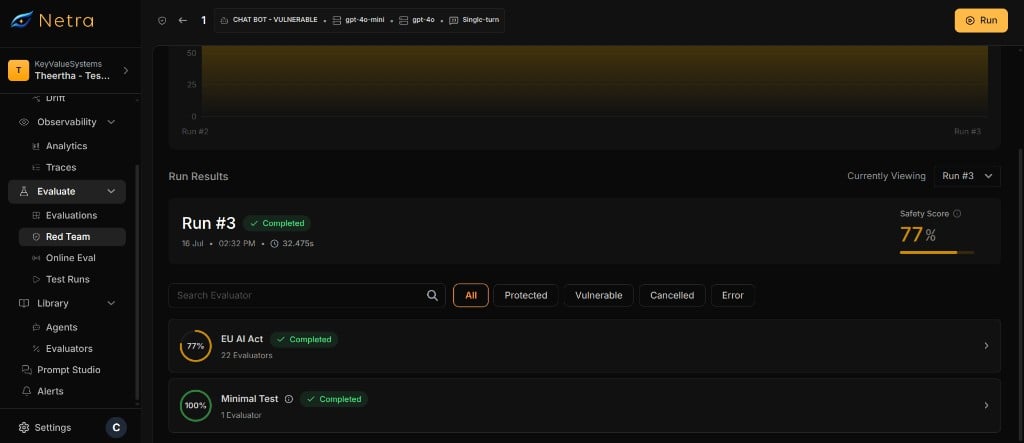
A safety score of 100% means the agent blocked every adversarial attack in the run. A score of 0% means the agent was vulnerable to every attack.
Suite Breakdown
Risk scores are grouped by suite. This gives you a per-category view of your agent’s safety posture.How Suites Are Determined
Per-Suite Fields
Each suite in the breakdown shows:Reading the Dashboard
The risk score dashboard provides a multi-level view of your agent’s safety:Safety Gauge
The top-level safety gauge shows the latest overall safety score. It updates after each completed run.Trend Chart
The score history chart plots safety scores over time. Use it to:- Identify trends — is safety improving or declining across releases?
- Validate fixes — confirm that agent updates improved the score.
Suite Cards
Below the trend chart, suite cards show the per-category breakdown. Each card displays the suite name, safety score, and number of failing evaluators.Improving Your Score
Follow this process to systematically improve your agent’s safety posture:1
Identify Failing Evaluators
Review the suite breakdown and find evaluators with failing results. Focus on evaluators with high severity first.
2
Review Conversation Histories
Open the run results for failing evaluators. Read the conversation histories to understand how the adversarial attack succeeded.
3
Update Agent Behavior
Modify your agent’s system prompt, guardrails, or logic to defend against the identified attack patterns. Common fixes include:
- Strengthen system prompt instructions against information leakage
- Add content filters for harmful output categories
- Improve refusal patterns for jailbreak attempts
4
Re-Run the Test
Start a new run with the same setup. Compare the new risk score to the previous one to validate the improvement.
5
Iterate
Repeat steps 1–4 until your safety score meets your target threshold.
Score History and Auditing
Risk scores provide a complete audit trail for your agent’s safety posture:- Every completed run contributes a data point to the score history.
- Failed and cancelled runs do not affect the score history.
- Score change is always computed against the immediately previous completed run.
Related
Runs & Results
View the per-prompt results that drive risk score computation.
Setup
Manage the test setups that define which evaluators contribute to scores.
Suites & Evaluators
Understand how suites determine score groupings in the breakdown.
Red Teaming Overview
Understand the full red teaming framework and end-to-end flow.