
Why Setups Matter
Setups make adversarial testing repeatable and systematic:Setup Fields
Creating a Setup
1
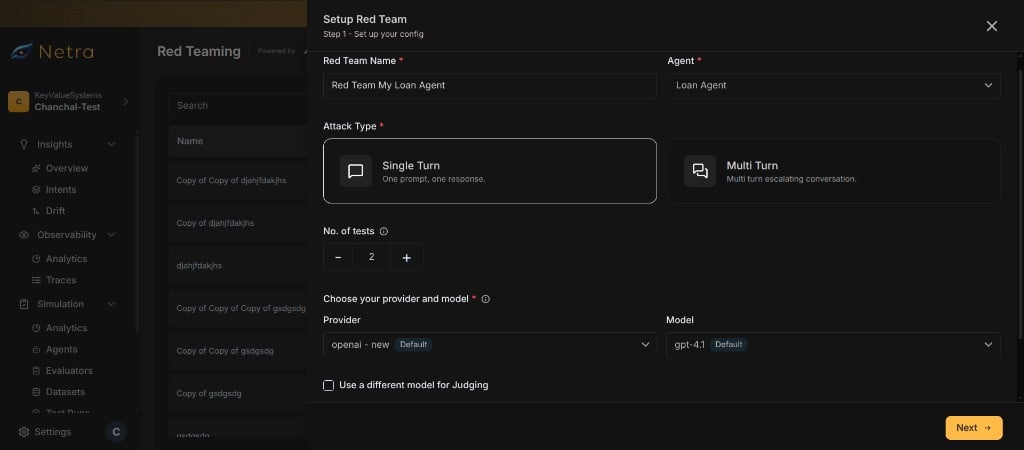
Name and Select an Agent
Enter a name for the red team setup and choose the remote agent you want to test. The agent must be registered in your project.
2
Configure Attack Type
Choose the attack strategy:
- Single-turn: Each adversarial prompt is sent once. Best for testing individual safety guardrails.
- Multi-turn: The attacker LLM sustains a conversation over multiple turns. Best for testing escalation resistance and context manipulation.
3
Set Number of Tests
Define how many adversarial prompts to generate per evaluator. More tests provide broader coverage but increase run duration.
4
Configure LLMs
Select the attacker LLM (generates adversarial prompts) and the judge LLM (scores agent responses). You can use different providers and models for each role.
5
Choose Suites & Evaluators
Select evaluators from the catalog. You can:
- Select a suite to include all its evaluators
- Pick individual evaluators for a custom test
- Combine both — start with a suite and add or remove evaluators as needed
6
Create the Test
Save your setup. You can now generate prompts and start runs.
Prompt Generation
Adversarial prompts are generated asynchronously after you create a setup. Netra uses the attacker LLM and each evaluator’s generation template to create targeted attack prompts.How It Works
- Auto triggers prompt generation from the setup page.
- For each selected evaluator, Netra renders the evaluator’s template with the target agent’s purpose (derived from its application details).
- The attacker LLM generates the configured number of adversarial prompts per evaluator.
- Generated prompts are stored and ready for use in runs.
Generation Status
Track prompt generation progress per evaluator. Each evaluator shows:Regenerating Prompts
You can regenerate prompts at any time from the setup page. Regeneration replaces existing prompts with fresh ones.Updating a Setup
You can update any setup field after creation. However, certain changes invalidate previously generated prompts:Fields That Invalidate Prompts
Changes to these fields automatically clear generated prompts. You must regenerate prompts before the next run.- Selected Evaluators — Adding or removing evaluators changes the prompt set
- No. of Tests — Changing the count requires new prompts
- Attacker LLM Provider or Model — Different models produce different prompts
Fields That Do Not Invalidate Prompts
Changes to these fields preserve existing prompts:- Judge LLM Provider or Model — Only affects scoring, not prompt generation
- Turn Type — Changes execution mode but not the prompts themselves
- Multi-Turn Count — Changes conversation depth but not initial prompts
Deleting a Setup
Setups support soft deletion. Deleting a setup removes it from the dashboard but preserves its run history for auditing purposes.Cloning a Setup
You can clone an existing setup to create a copy with the same evaluators, attack type, and LLM settings. This is useful when you want to:- Test a different agent with the same evaluator selection
- Create a variation of an existing setup with minor changes
- Reuse a proven setup across multiple agents
Related
Suites & Evaluators
Browse the adversarial test catalog and select attack categories.
Runs & Results
Execute your setup and view per-prompt results.
Risk Scores
Track safety scores aggregated from your setup’s runs.
Red Teaming Overview
Understand the full red teaming framework and end-to-end flow.