
Span Types
Netra supports five span types, each designed to categorize specific kinds of operations:When to Use Each Type
Span (Default)- General-purpose operations that don’t fit other categories
- Business logic and data processing
- Workflow orchestration steps
- OpenAI, Anthropic, or other LLM completions
- Image generation (DALL-E, Stable Diffusion)
- Text-to-speech or speech-to-text operations
- Converting text to vectors for similarity search
- Embedding API calls (OpenAI embeddings, Cohere embed)
- Document embedding pipelines
- External API calls
- Database operations
- File system operations
- Any function that performs a specific action
- AI agents making autonomous decisions
- ReAct-style reasoning loops
- Multi-step task execution
- Agent frameworks (LangGraph, CrewAI, AutoGen)
Specifying Span Types
When creating manual spans, specify the type using theas_type parameter:
Auto-instrumentation automatically assigns the correct span type based on the operation. For example, OpenAI chat completions are automatically marked as
GENERATION spans.Viewing Spans in Netra
Netra displays spans within the Trace Timeline as a hierarchical view of all operations executed during a request. Selecting a span highlights it in the timeline and surfaces its details in the Metadata panel, allowing you to inspect execution context without leaving the trace. Different span types are visually distinguished to help you quickly identify agent execution, model generations, and tool calls.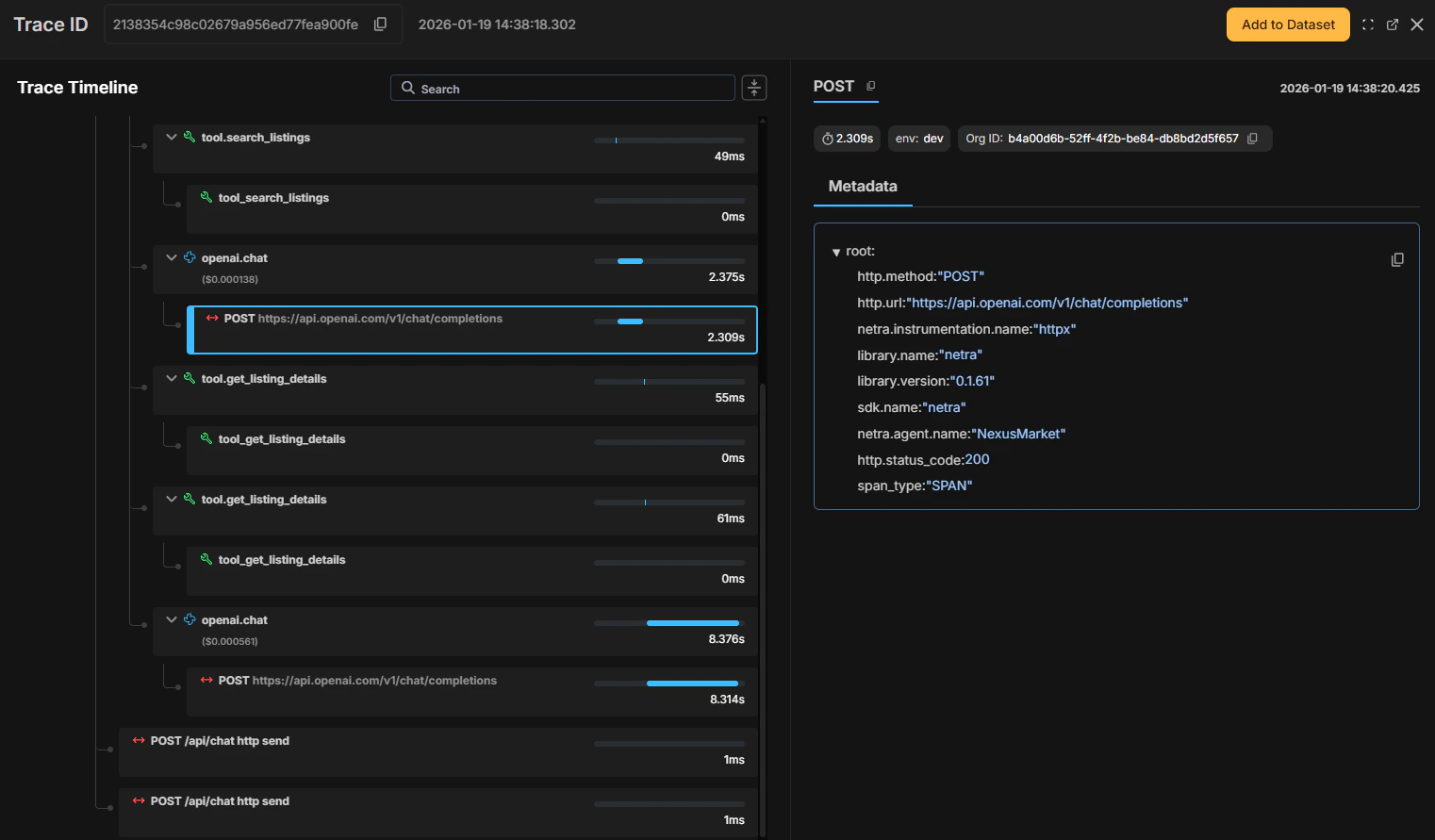
Span Attributes
Each span in Netra captures attributes in the Metadata panel. Some attributes are common across all span types, while others are specific to certain types.
Generation spans also show additional data in Chat Preview including system prompt, user input, and assistant response.
Custom Attributes
You can add custom attributes to any span for additional context usingset_attribute() / setAttribute(). See Manual Tracing for detailed examples of working with span attributes.
Adding Spans to Evaluations
Spans can be added to an evaluation using Add to Evaluation for reuse in evaluations and testing workflows. This is useful for:- Building evaluations from production data
- Creating test cases for regression testing
- Analyzing specific types of operations
Learn More
- Manual Tracing - Create custom spans with full control
- Decorators - Use decorators for cleaner instrumentation
- Auto Instrumentation - Zero-code tracing for supported libraries