
Open in Google Colab
The complete notebook for tracing a RAG pipeline is available here
What You’ll Learn
This cookbook guides you through 5 key stages of building a production-ready RAG system:1. Build the RAG Pipeline
Create a complete RAG chatbot that loads PDFs, chunks documents, generates embeddings, and retrieves relevant context for answering questions.
2. Add Comprehensive Tracing
Instrument every stage—chunking, embedding, retrieval, and generation—with Netra spans to capture the full execution flow.
3. Track Costs & Performance
Monitor token usage, API costs, and latency at each step to identify bottlenecks and optimize your pipeline.
4. Build Evaluation Suite
Create LLM-as-Judge evaluators for retrieval quality, answer correctness, and faithfulness detection.
5. Run Systematic Quality Checks
Build test datasets and run evaluations to measure quality over time and catch regressions before they reach production.
Prerequisites
- Python 3.9+ or Node.js 18+
- OpenAI API key
- Netra API key (Steps mentioned here)
High-Level Concepts
RAG Architecture
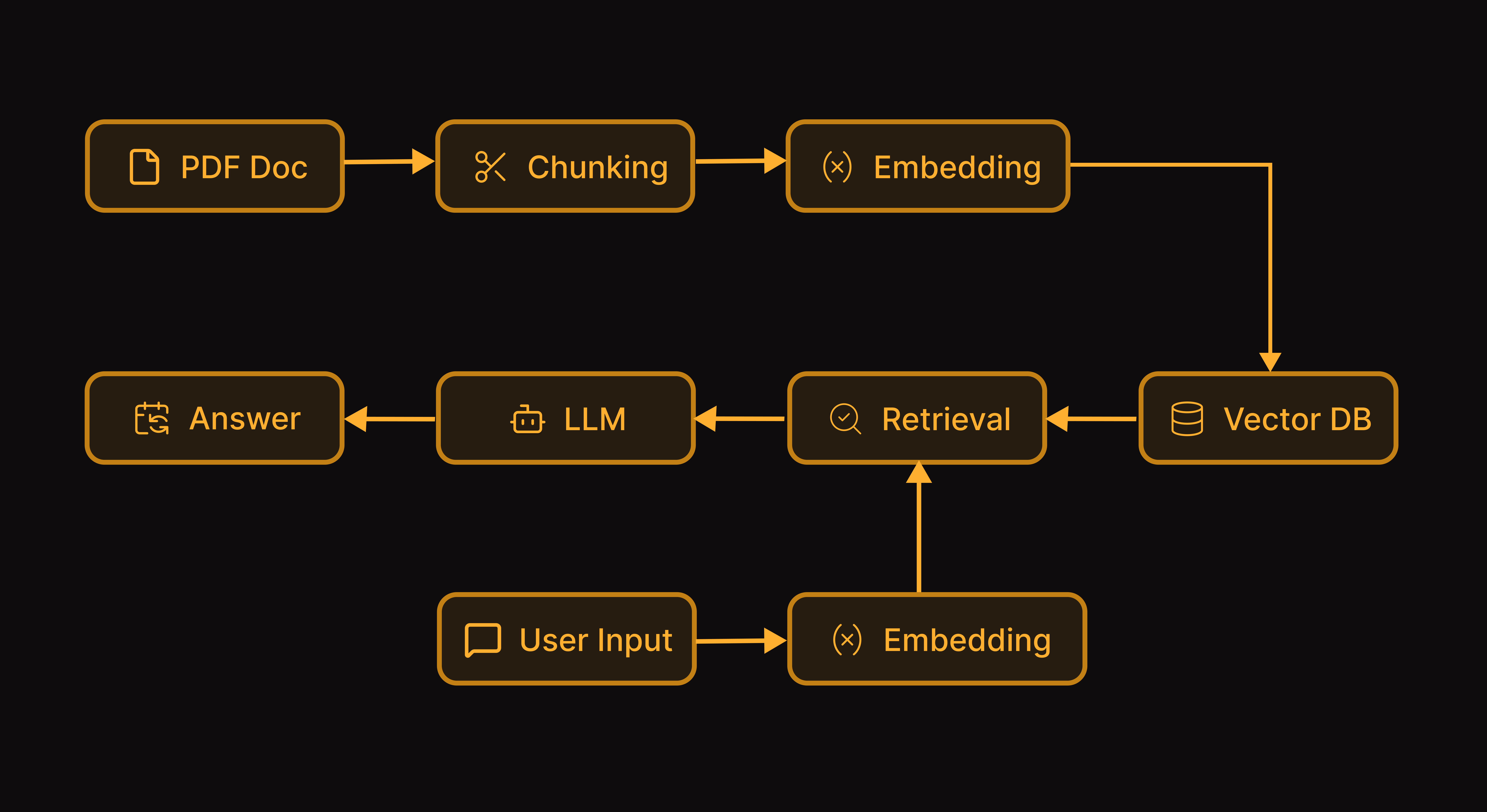
A RAG chatbot works in two phases: Ingestion (one-time):- Load and chunk the PDF into smaller text segments
- Generate embeddings for each chunk
- Store embeddings in a vector database
- Convert the user’s question to an embedding
- Find the most similar chunks (retrieval)
- Pass retrieved chunks + question to an LLM
- Return the generated answer
Why Observability Matters for RAG
RAG systems can fail silently in multiple ways:| Problem | Symptom | What Tracing Reveals |
|---|---|---|
| Poor chunking | Incomplete answers | Chunk sizes, content boundaries |
| Wrong retrieval | Irrelevant answers | Similarity scores, retrieved chunks |
| Hallucination | Fabricated info | Context vs. generated content |
| High costs | Budget overruns | Token usage per stage |
Why Evaluation Matters for RAG
Spot-checking a few queries isn’t enough. Systematic evaluation lets you:- Measure retrieval quality (did we find the right chunks?)
- Verify answer correctness (does it match the PDF?)
- Detect hallucinations (is it grounded in context?)
- Track quality over time as you iterate on prompts and parameters
Creating the Chat Agent
Let’s build the RAG chatbot first, then add tracing and evaluation.Installation
Start by installing the required packages. We’ll use OpenAI for embeddings and generation, ChromaDB as our vector store, and a PDF parsing library.Environment Setup
Configure your API keys. You’ll need both an OpenAI key for the LLM operations and a Netra key for observability.Loading and Chunking Documents
The first step in any RAG pipeline is extracting text from your documents and splitting it into manageable chunks. We use overlapping chunks to ensure context isn’t lost at chunk boundaries—this helps when relevant information spans multiple segments.Generating Embeddings and Indexing
Next, we convert each chunk into a vector embedding and store it in ChromaDB. These embeddings capture the semantic meaning of each chunk, allowing us to find relevant content based on meaning rather than just keywords.Building the Query Pipeline
Now we implement the core RAG logic: given a user question, retrieve the most relevant chunks from our vector store, then pass them as context to the LLM to generate an answer. Thetop_k parameter controls how many chunks we retrieve—more chunks provide more context but also increase cost and latency.
Adding Session Support
For production use, we wrap everything in a class that maintains conversation history and session state. This enables multi-turn conversations where the chatbot remembers previous exchanges, and allows us to track usage per user and session.Tracing the Agent
Now let’s add Netra observability to see what’s happening inside the RAG pipeline. The good news: with auto-instrumentation, you get full visibility with minimal code changes.Initializing Netra
Add these two lines at application startup. Auto-instrumentation captures all OpenAI and ChromaDB operations automatically—no decorators or manual spans required.What Gets Auto-Traced
With the initialization above, your existing code from the Creating the Chat agent section is automatically traced. Here’s what appears in your Netra dashboard:Document Ingestion
Thegenerate_embeddings() call to OpenAI and collection.add() to ChromaDB are captured automatically.
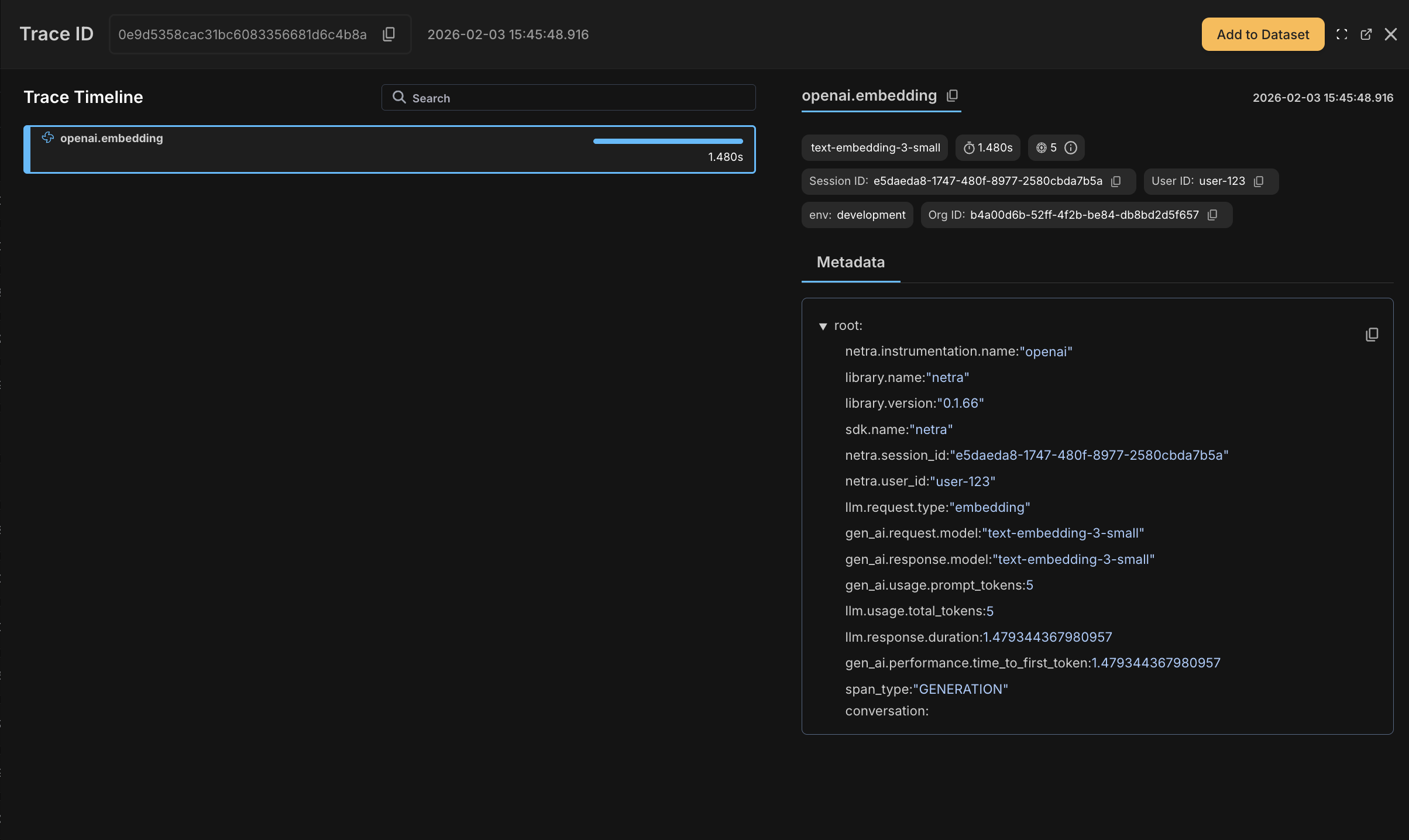
Retrieval Operations
Query embedding generation and vector search operations appear as child spans with timing and metadata.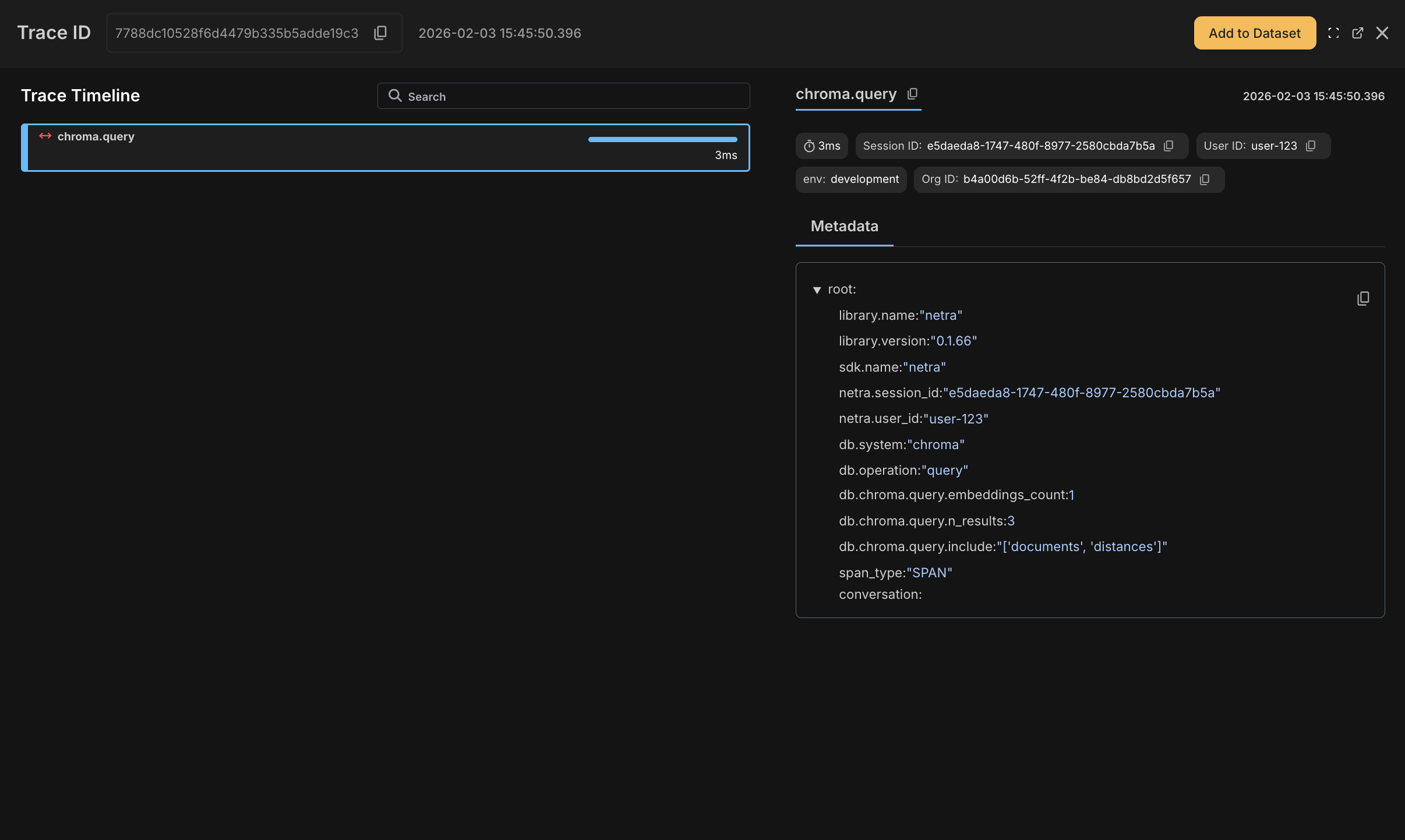
LLM Generation
OpenAI chat completions are fully traced with model, tokens, cost, latency, and full prompt/response content.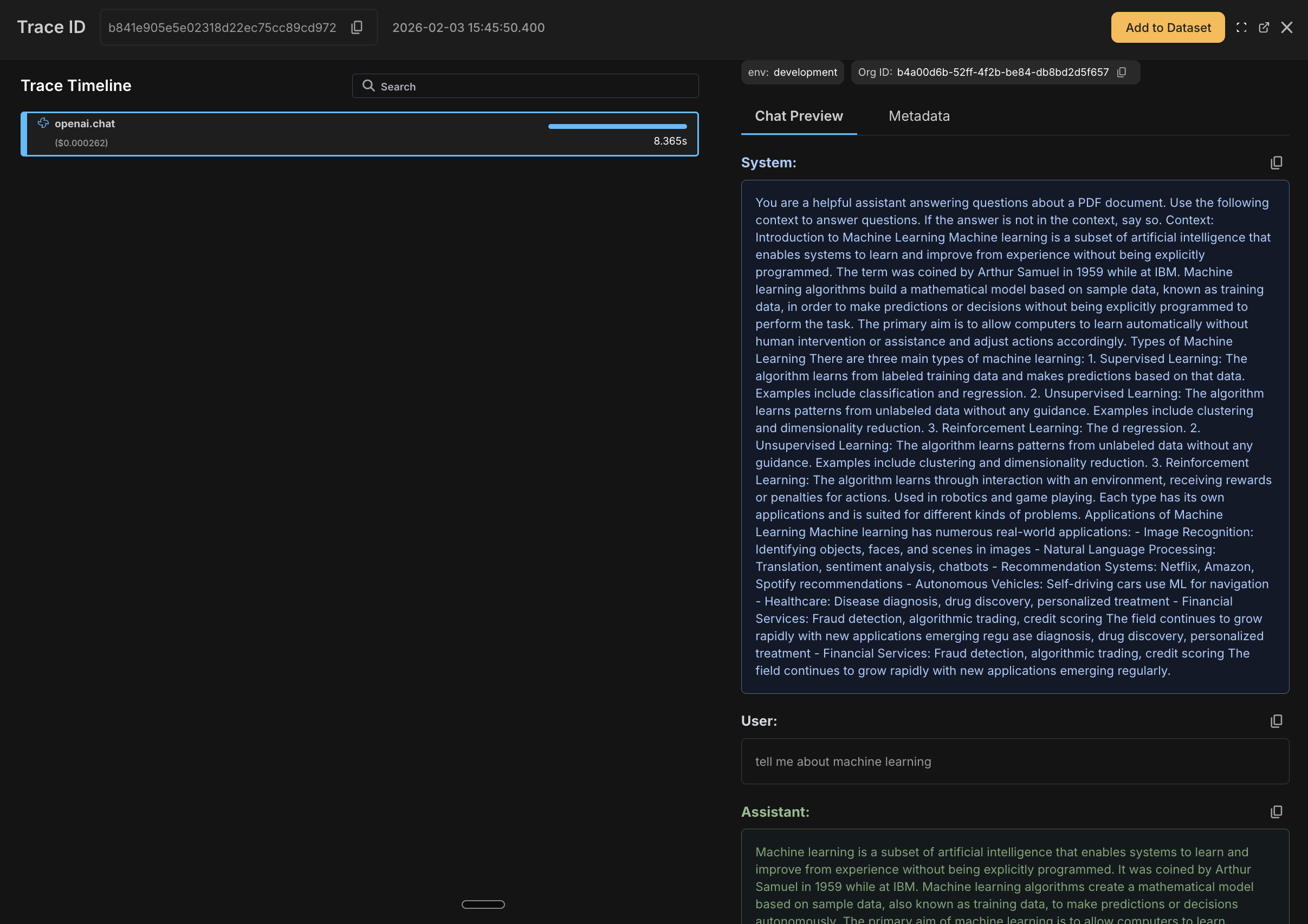
Adding User and Session Tracking
To analyze usage per user and track conversation flows, add user and session context. This is the one piece that requires explicit code—everything else is auto-traced.What You’ll See in the Dashboard
After running the chatbot, you’ll see traces in the Netra dashboard with:- OpenAI spans showing model, tokens, cost, and full prompt/response
- ChromaDB spans showing query timing and results
- User and session IDs attached to all spans for filtering
Using Decorators
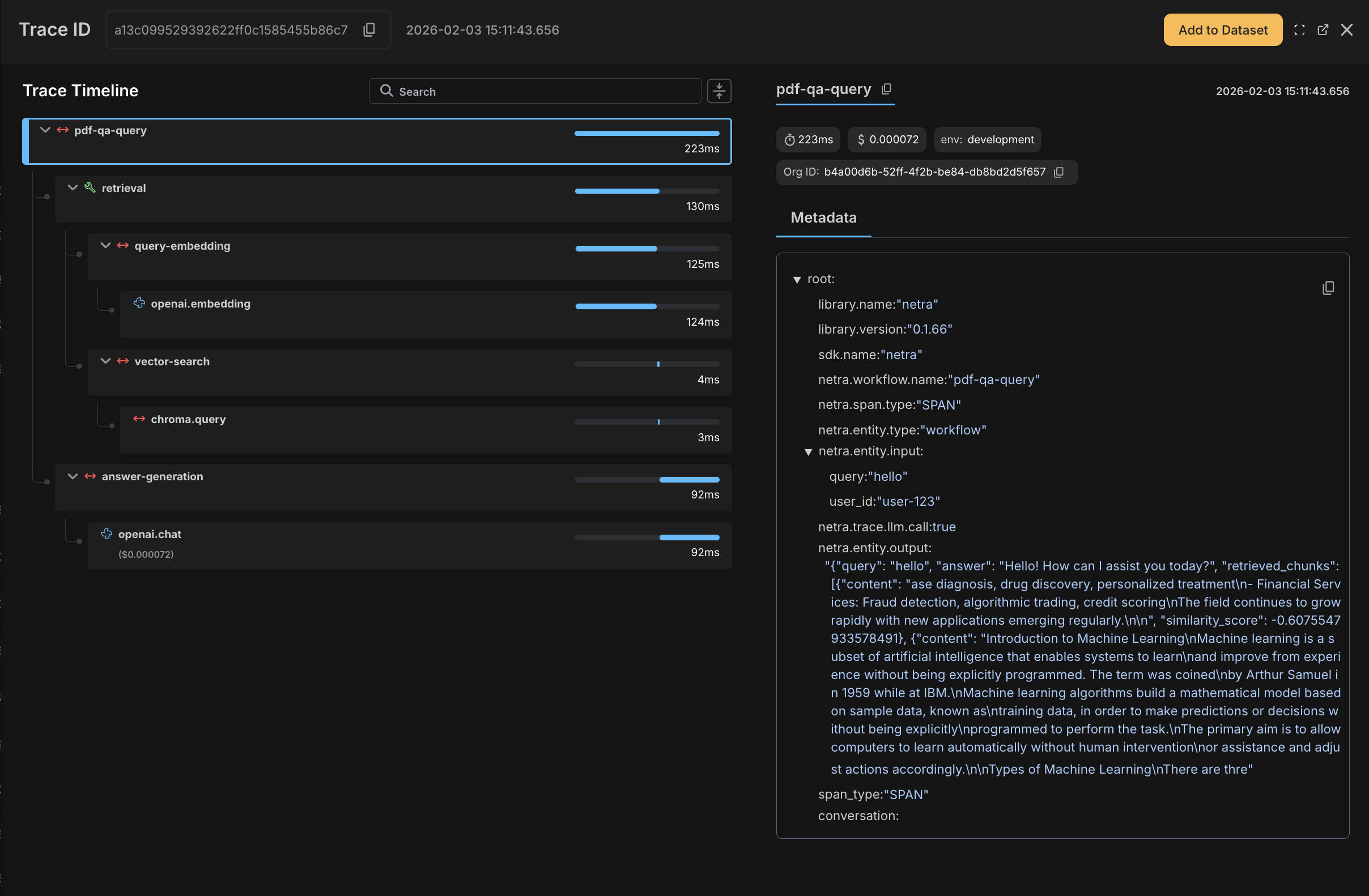
Auto-instrumentation handles most cases of tracing but if you want to bring in more structure, you can use decorators. Use decorators to create parent spans that group related operations. This is useful when you want to see a single trace for an entire pipeline rather than individual OpenAI/ChromaDB calls.| Decorator | Use Case |
|---|---|
@workflow | Top-level pipeline or request handler |
@task | Discrete unit of work within a workflow |
@span | Fine-grained tracing for specific operations |
Complete Example with Decorators
Complete Example with Decorators
Evaluating the Agent
Now let’s set up systematic evaluation to measure and improve RAG quality. While tracing tells you what happened, evaluation tells you how well it worked.Creating a Test Dataset
Start by building a dataset of question-answer pairs from your PDF. Include a mix of straightforward questions, edge cases, and negative tests (questions that shouldn’t be answerable from the document). You can create this through the Netra dashboard either by adding to the dataset from the traces page or by creating a dataset from the datasets tab.Defining Evaluators
Create evaluators in the Netra dashboard under Evaluation → Evaluators → Add Evaluator. For RAG pipelines, we recommend three evaluators that cover different failure modes. You can use the built-in templates to get started quickly:Context Relevance
Use the Context Relevance template to check whether the retrieved chunks contain information relevant to answering the question. Low scores here indicate a retrieval problem—you might need to adjust chunk size, overlap, or the number of retrieved chunks.| Setting | Value |
|---|---|
| Template | Context Relevance |
| Output Type | Numerical |
| Pass Criteria | score >= 0.7 |
Answer Correctness
Use the Answer Correctness template to compare the generated answer against the expected answer. It catches cases where the retrieval was good but the LLM misinterpreted or missed information.| Setting | Value |
|---|---|
| Template | Answer Correctness |
| Output Type | Numerical |
| Pass Criteria | score >= 0.7 |
Faithfulness
Use the Faithfulness template to check whether the answer is grounded in the retrieved context. High correctness but low faithfulness indicates the model is “getting lucky” by using its training data rather than the provided context—a reliability risk.| Setting | Value |
|---|---|
| Template | Faithfulness |
| Output Type | Numerical |
| Pass Criteria | score >= 0.8 |
Running Evaluation Experiments
With your dataset and evaluators configured, use Netra’s built-in evaluation API to run test suites. Therun_test_suite method fetches test cases from your dataset and executes your task function against each one.
Analyzing Results and Iterating
After running evaluations, review results in Evaluation → Test Runs. Look for patterns in failures:| Low Score In | Likely Cause | How to Fix |
|---|---|---|
| Retrieval Quality | Wrong chunks retrieved | Increase top_k, reduce chunk size, add overlap |
| Answer Correctness | LLM misinterprets context | Improve system prompt, lower temperature |
| Faithfulness | Model hallucinates | Add explicit grounding instructions, use stronger model |
- Pass/Fail rates for each evaluator
- Score distributions across test cases
- Trace links for debugging failures
- Cost and latency metrics per test run
Summary
You’ve built a fully observable RAG pipeline with systematic evaluation. Your chatbot now has:- End-to-end tracing across document ingestion, retrieval, and generation
- Cost and performance tracking at each pipeline stage
- Quality evaluation using Context Relevance, Answer Correctness, and Faithfulness metrics
- Debugging capabilities to trace failures back to specific chunks and prompts