This cookbook shows you how to add complete observability to CrewAI multi-agent pipelines—tracing agent-to-agent handoffs, measuring individual agent performance, and tracking per-agent costs.

Open in Google Colab

Run the complete notebook in your browser
All company names (ContentCraft) and scenarios in this cookbook are entirely fictional and used for demonstration purposes only.

What You’ll Learn

Trace Agent Handoffs

Capture the message flow between agents as tasks pass through the pipeline

Track Per-Agent Costs

Monitor token usage and costs for each agent role to identify cost drivers

Debug Multi-Agent Flows

Understand why agents made specific decisions and where quality degrades

Compare Configurations

Run experiments with different model assignments to find the cost/quality sweet spot
Prerequisites:
  • Python >=3.10, <3.14
  • OpenAI API key
  • Netra API key (Get started here)
  • CrewAI installed

Why Trace Multi-Agent Systems?

Multi-agent systems introduce complexity that single-agent workflows don’t have:
Failure ModeSymptomWhat Tracing Reveals
Agent bottleneckPipeline slowWhich agent takes longest
Handoff failureContext lostMessage content between agents
Cost explosionBudget exceededWhich agent uses most tokens
Quality degradationPoor outputWhere quality drops in pipeline
Model mismatchInconsistent resultsWhich model for which role
Without per-agent visibility, you can’t optimize individual roles or identify where the pipeline breaks down.

CrewAI Architecture

CrewAI organizes multi-agent work into three components:
ComponentDescriptionExample
AgentAutonomous unit with role, goal, backstoryResearch Specialist, Content Writer
TaskWork item with description and expected output”Research the topic”, “Write the draft”
CrewTeam of agents executing tasksContent creation team
Processes:
  • Sequential: Tasks execute one after another (A → B → C)
  • Hierarchical: Manager agent delegates to workers

Building an Example Pipeline

Installation

pip install netra-sdk crewai crewai-tools openai langchain-openai

Environment Setup

export NETRA_API_KEY="your-netra-api-key"
export NETRA_OTLP_ENDPOINT="your-netra-otlp-endpoint"
export OPENAI_API_KEY="your-openai-api-key"

Define the Agents

Create a 4-agent content pipeline: Researcher → Writer → Editor → SEO:
from crewai import Agent
from langchain_openai import ChatOpenAI

def create_agents(config: dict = None):
    """Create the content team agents with configurable models."""
    config = config or {
        "researcher": "gpt-4o",
        "writer": "gpt-4o",
        "editor": "gpt-3.5-turbo",
        "seo": "gpt-3.5-turbo",
    }

    researcher = Agent(
        role="Research Specialist",
        goal="Gather accurate facts, statistics, and expert opinions",
        backstory="Expert researcher with 10 years of experience in content research.",
        llm=ChatOpenAI(model=config["researcher"]),
        verbose=True,
    )

    writer = Agent(
        role="Content Writer",
        goal="Write engaging, well-structured blog articles",
        backstory="Professional copywriter with expertise in compelling content.",
        llm=ChatOpenAI(model=config["writer"]),
        verbose=True,
    )

    editor = Agent(
        role="Quality Editor",
        goal="Polish articles for clarity, grammar, and flow",
        backstory="Senior editor with a keen eye for detail.",
        llm=ChatOpenAI(model=config["editor"]),
        verbose=True,
    )

    seo_specialist = Agent(
        role="SEO Optimizer",
        goal="Optimize content for search engines",
        backstory="SEO expert who balances keywords with readability.",
        llm=ChatOpenAI(model=config["seo"]),
        verbose=True,
    )

    return {
        "researcher": researcher,
        "writer": writer,
        "editor": editor,
        "seo": seo_specialist,
    }

Define the Tasks

Create tasks that chain together:
from crewai import Task

def create_tasks(agents: dict, topic: str):
    """Create the content pipeline tasks."""

    research_task = Task(
        description=f"Research the topic: '{topic}'. Find key facts and statistics.",
        expected_output="Research brief with facts, statistics, and sources",
        agent=agents["researcher"],
    )

    writing_task = Task(
        description="Write a 800-1000 word blog article based on the research.",
        expected_output="Draft blog article in markdown format",
        agent=agents["writer"],
        context=[research_task],
    )

    editing_task = Task(
        description="Edit the article for grammar, flow, and clarity.",
        expected_output="Polished blog article with improved clarity",
        agent=agents["editor"],
        context=[writing_task],
    )

    seo_task = Task(
        description="Optimize the article for SEO with meta description and keywords.",
        expected_output="SEO-optimized article with metadata",
        agent=agents["seo"],
        context=[editing_task],
    )

    return [research_task, writing_task, editing_task, seo_task]

Create the Crew

from crewai import Crew, Process

def run_content_crew(topic: str, config: dict = None):
    """Execute the content creation pipeline."""
    agents = create_agents(config)
    tasks = create_tasks(agents, topic)

    crew = Crew(
        agents=list(agents.values()),
        tasks=tasks,
        process=Process.sequential,
        verbose=True,
    )

    return crew.kickoff()

Adding Netra Observability

Initialize Netra with Auto-Instrumentation

Netra provides auto-instrumentation for CrewAI that captures agent execution automatically:
from netra import Netra
from netra.instrumentation.instruments import InstrumentSet

# Initialize Netra with CrewAI and OpenAI instrumentation
Netra.init(
    app_name="contentcraft",
    environment="development",
    trace_content=True,
    instruments={InstrumentSet.CREWAI, InstrumentSet.OPENAI},
)
With auto-instrumentation enabled, Netra automatically captures:
  • Agent execution spans with role and backstory
  • Task execution with descriptions and outputs
  • LLM calls with prompts, completions, and token usage
  • Cost calculations per agent

Using the Workflow Decorator

For more control, wrap your pipeline with the @workflow decorator:
from netra.decorators import workflow

@workflow(name="content-pipeline")
def create_article(topic: str, config_name: str = "default", config: dict = None):
    """Run the content creation pipeline with full tracing."""

    # Set custom attributes for filtering and analysis
    Netra.set_custom_attributes(key="topic", value=topic)
    Netra.set_custom_attributes(key="config_name", value=config_name)

    # Run the crew
    result = run_content_crew(topic, config)

    return {
        "topic": topic,
        "config": config_name,
        "output": result.raw,
    }

Adding Custom Span Attributes

Track additional metadata for each pipeline run:
from netra import Netra, SpanType

@workflow(name="content-pipeline-detailed")
def create_article_detailed(topic: str, config_name: str, config: dict):
    """Run pipeline with detailed custom tracing."""

    with Netra.start_span("pipeline-setup") as setup_span:
        setup_span.set_attribute("topic", topic)
        setup_span.set_attribute("config_name", config_name)
        setup_span.set_attribute("model.researcher", config["researcher"])
        setup_span.set_attribute("model.writer", config["writer"])
        setup_span.set_attribute("model.editor", config["editor"])
        setup_span.set_attribute("model.seo", config["seo"])

        agents = create_agents(config)
        tasks = create_tasks(agents, topic)

    with Netra.start_span("pipeline-execution", as_type=SpanType.AGENT) as exec_span:
        crew = Crew(agents=list(agents.values()), tasks=tasks, process=Process.sequential)
        result = crew.kickoff()
        exec_span.set_attribute("output_length", len(result.raw))

    return {"topic": topic, "config": config_name, "output": result.raw}

Viewing Traces in Netra

After running the pipeline, navigate to Observability → Traces in Netra.

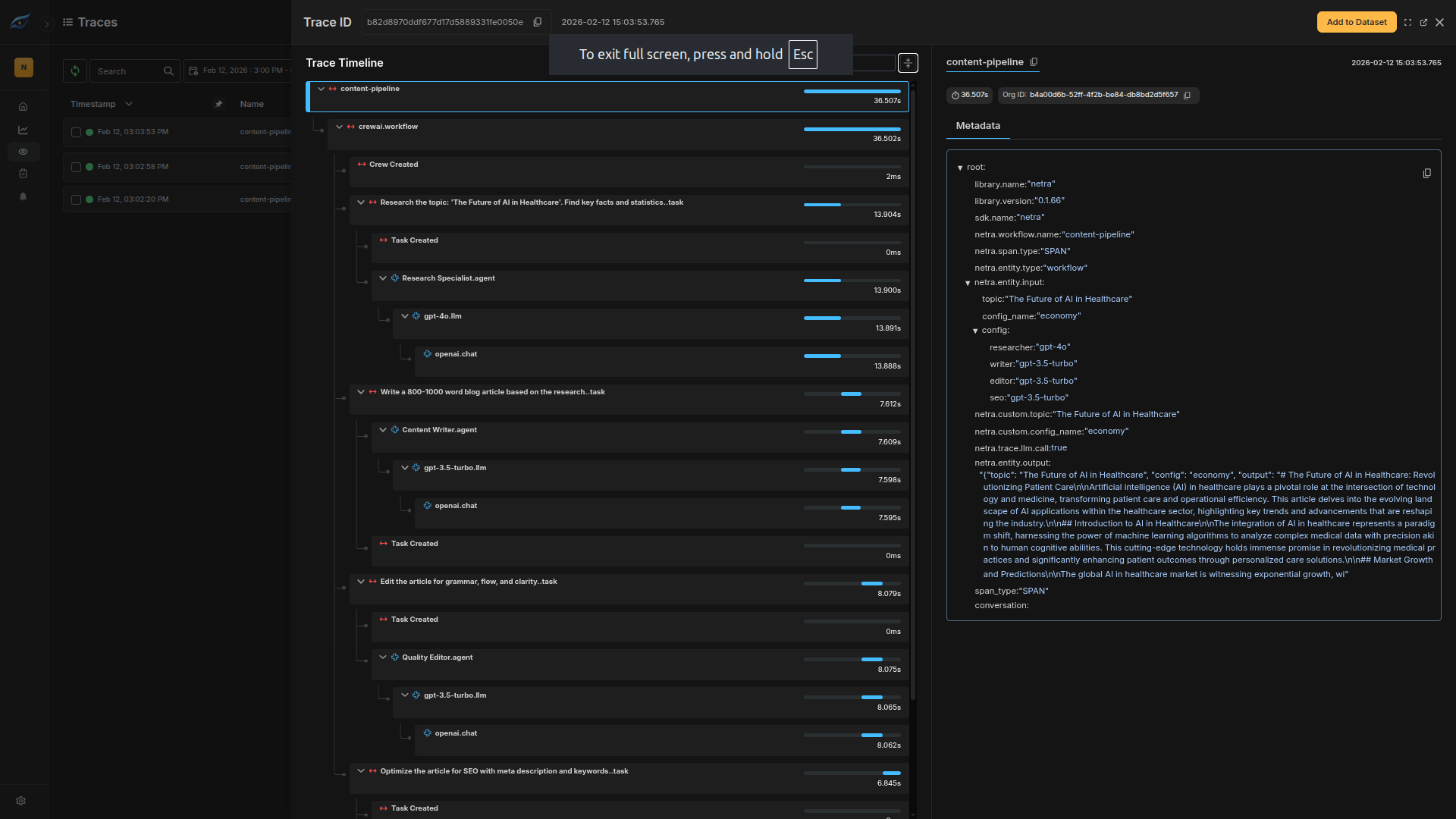
What the Trace Shows

Netra trace view showing multi-agent pipeline
The trace shows:
  • Pipeline span: Overall execution time
  • Agent spans: Each agent’s task execution
  • LLM calls: Nested under each agent with prompts and completions
  • Token usage: Per-agent and total

Running Configuration Experiments

Test different model configurations to find the optimal cost/quality balance.

Define Configurations

CONFIGS = {
    "premium": {
        "researcher": "gpt-4o",
        "writer": "gpt-4o",
        "editor": "gpt-4o",
        "seo": "gpt-4o",
    },
    "budget": {
        "researcher": "gpt-4o",
        "writer": "gpt-4o",
        "editor": "gpt-3.5-turbo",
        "seo": "gpt-3.5-turbo",
    },
    "economy": {
        "researcher": "gpt-4o",
        "writer": "gpt-3.5-turbo",
        "editor": "gpt-3.5-turbo",
        "seo": "gpt-3.5-turbo",
    },
}

Run Experiments

# Test each configuration
for config_name, config in CONFIGS.items():
    print(f"Running {config_name} configuration...")

    result = create_article(
        topic="The Future of AI in Healthcare",
        config_name=config_name,
        config=config,
    )

    print(f"{config_name}: {len(result['output'])} characters")

Compare in Dashboard

After running all configurations, compare costs and latency:
ConfigTotal CostTotal LatencyOutput Quality
Premium~$0.19~45sHighest
Budget~$0.145~40sGood
Economy~$0.085~35sAcceptable

Debugging Multi-Agent Issues

Common Problems and Solutions

ProblemWhat to Look ForSolution
Slow pipelineHigh latency on one agentUse faster model or shorter prompts
Context lost between agentsMissing info in task outputsImprove task descriptions
Editor making no changesLow edit deltaImprove editor prompts
High total costOne agent dominatingDowngrade non-critical agents

Using Traces to Debug

  1. Find slow agents: Sort spans by duration
  2. Trace context flow: Check task outputs passed between agents
  3. Identify cost drivers: Filter by token usage
  4. Compare successful vs failed: Look for pattern differences

Summary

You’ve learned how to add comprehensive observability to CrewAI pipelines:
  • Auto-instrumentation captures agent execution with minimal code
  • Per-agent tracing reveals costs, latency, and token usage
  • Custom attributes enable filtering by topic, config, and more
  • Configuration experiments find the optimal cost/quality balance

Key Takeaways

  1. Multi-agent systems need per-agent visibility to identify bottlenecks
  2. Cost allocation by role reveals which agents benefit from premium models
  3. Trace context flow to debug handoff issues
  4. Use configuration experiments for data-driven model selection

See Also

Last modified on February 12, 2026