This cookbook walks you through building complete multi-tenant observability for a B2B AI platform—tracking costs per customer, monitoring SLAs, and evaluating quality across different tenant tiers.

Open in Google Colab

Run the complete notebook in your browser
All company names (MeetingMind, Apex Legal, Stratex Consulting, TechStart Inc) and scenarios in this cookbook are entirely fictional and used for demonstration purposes only.

What You’ll Learn

This cookbook guides you through 5 key stages of building observable multi-tenant AI applications:

Prerequisites


High-Level Concepts

Why Multi-Tenant Observability Matters

For B2B AI platforms serving multiple customers, generic observability isn’t enough. You need to answer questions like:
QuestionWho AsksWhat You Need
”How much did Customer X use last month?”FinancePer-tenant cost attribution
”Is our Enterprise tier meeting SLAs?”Customer SuccessTenant-filtered latency monitoring
”Are cheaper tiers delivering acceptable quality?”ProductPer-tier quality evaluation
”Which customer is causing the cost spike?”EngineeringReal-time tenant usage breakdown
Netra’s native set_tenant_id() API makes this straightforward—no custom tagging workarounds needed.

The MeetingMind Scenario

MeetingMind is a fictional B2B SaaS platform that provides AI-powered meeting summarization for enterprise teams. The platform serves customers with different needs and budgets:
CustomerIndustryNeedsTier
Apex LegalLaw FirmDetailed transcripts with citationsEnterprise
Stratex ConsultingConsultingAction items and key decisionsProfessional
TechStart IncTech StartupQuick summaries on a budgetStarter
Each tier uses a different model and has different SLA commitments:
TierModelLatency SLAFeaturesPrice
EnterpriseGPT-4P95 < 2sFull summary + action items + decisions$0.10/meeting
ProfessionalGPT-4-turboP95 < 3sSummary + action items$0.05/meeting
StarterGPT-3.5-turboBest effortSummary only$0.01/meeting

Building the Meeting Summarizer

First, we build the core agent before adding observability. This separation makes it easier to understand the business logic independently from instrumentation.

Installation

pip install netra-sdk openai

Environment Setup

Configure your API keys for both OpenAI (for the LLM) and Netra (for observability).
export NETRA_API_KEY="your-netra-api-key"
export OPENAI_API_KEY="your-openai-api-key"

Tenant Configuration

We define the tier configurations that determine which model and features each customer gets. This configuration drives both the business logic and the observability setup.
from dataclasses import dataclass
from typing import List, Optional

@dataclass
class TenantConfig:
    """Configuration for a tenant's service tier."""
    tenant_id: str
    tier: str
    model: str
    features: List[str]
    latency_sla_ms: Optional[int]

# Tenant configurations
TENANT_CONFIGS = {
    "apex-legal": TenantConfig(
        tenant_id="apex-legal",
        tier="enterprise",
        model="gpt-4",
        features=["summary", "action_items", "decisions"],
        latency_sla_ms=2000
    ),
    "stratex-consulting": TenantConfig(
        tenant_id="stratex-consulting",
        tier="professional",
        model="gpt-4-turbo",
        features=["summary", "action_items"],
        latency_sla_ms=3000
    ),
    "techstart-inc": TenantConfig(
        tenant_id="techstart-inc",
        tier="starter",
        model="gpt-3.5-turbo",
        features=["summary"],
        latency_sla_ms=None  # Best effort
    ),
}

The MeetingSummarizer Class

The core summarizer takes a meeting transcript and returns structured output based on the tenant’s tier. Higher tiers get more detailed analysis.
from openai import OpenAI
from typing import Dict, Any
import json

class MeetingSummarizer:
    """Multi-tenant meeting summarization agent."""

    def __init__(self, tenant_id: str):
        if tenant_id not in TENANT_CONFIGS:
            raise ValueError(f"Unknown tenant: {tenant_id}")

        self.config = TENANT_CONFIGS[tenant_id]
        self.client = OpenAI()

    def _build_prompt(self, transcript: str) -> str:
        """Build the prompt based on tenant tier features."""
        feature_instructions = []

        if "summary" in self.config.features:
            feature_instructions.append("- **Summary**: A concise 2-3 sentence summary of the meeting")

        if "action_items" in self.config.features:
            feature_instructions.append("- **Action Items**: A list of tasks assigned, with owner and deadline if mentioned")

        if "decisions" in self.config.features:
            feature_instructions.append("- **Decisions**: Key decisions made during the meeting")

        features_text = "\n".join(feature_instructions)

        return f"""Analyze the following meeting transcript and extract the requested information.

**Required Output:**
{features_text}

**Meeting Transcript:**
{transcript}

Respond in JSON format with keys matching the requested sections (summary, action_items, decisions).
"""

    def summarize(self, transcript: str, user_id: str = None) -> Dict[str, Any]:
        """Summarize a meeting transcript."""
        prompt = self._build_prompt(transcript)

        response = self.client.chat.completions.create(
            model=self.config.model,
            messages=[
                {
                    "role": "system",
                    "content": "You are an expert meeting analyst. Extract key information accurately and concisely. Always respond with valid JSON."
                },
                {"role": "user", "content": prompt}
            ],
            temperature=0.1,
            response_format={"type": "json_object"}
        )

        result = json.loads(response.choices[0].message.content)

        return {
            "tenant_id": self.config.tenant_id,
            "tier": self.config.tier,
            "model": self.config.model,
            "user_id": user_id,
            "result": result,
            "usage": {
                "prompt_tokens": response.usage.prompt_tokens,
                "completion_tokens": response.usage.completion_tokens,
                "total_tokens": response.usage.total_tokens
            }
        }

Testing the Summarizer

Let’s test the summarizer with a sample meeting transcript to verify it works before adding observability.
# Sample meeting transcript
SAMPLE_TRANSCRIPT = """
Meeting: Q4 Planning Session
Date: January 15, 2026
Attendees: Alice (PM), Bob (Engineering), Carol (Design)

Alice: Let's review our Q4 priorities. We need to ship the new dashboard by March.
Bob: The backend is 80% complete. We need two more weeks for the API endpoints.
Carol: I can have the designs finalized by Friday.
Alice: Great. Bob, can you also look into the performance issues reported last week?
Bob: Yes, I'll prioritize that. Should be fixed by Wednesday.
Alice: Perfect. Let's sync again next Monday.
"""

# Test with different tenants
for tenant_id in ["apex-legal", "stratex-consulting", "techstart-inc"]:
    summarizer = MeetingSummarizer(tenant_id)
    result = summarizer.summarize(SAMPLE_TRANSCRIPT, user_id="demo-user")

    print(f"\n=== {tenant_id} ({result['tier']}) ===")
    print(f"Model: {result['model']}")
    print(f"Tokens: {result['usage']['total_tokens']}")
    print(f"Result: {json.dumps(result['result'], indent=2)}")
You’ll notice that:
  • Enterprise (Apex Legal) gets summary, action items, AND decisions
  • Professional (Stratex Consulting) gets summary and action items
  • Starter (TechStart Inc) gets summary only

Adding Observability

Now we instrument the agent to capture per-tenant metrics. The key differentiator with Netra is the native set_tenant_id() API—all subsequent traces are automatically attributed to that tenant.

Initializing Netra

Initialize Netra at application startup with your app name and environment. We enable auto-instrumentation for OpenAI to capture LLM calls automatically.
import os
from netra import Netra
from netra.instrumentation.instruments import InstrumentSet

Netra.init(
    app_name="meetingmind",
    headers=f"x-api-key={os.getenv('NETRA_API_KEY')}",
    environment="production",
    trace_content=True,
    instruments=set([InstrumentSet.OPENAI]),
)

Setting Tenant Context

The most important step: call set_tenant_id() at the start of each request. This associates all traces with the customer, enabling per-tenant filtering across the entire Netra platform.
from netra import Netra

def handle_request(tenant_id: str, user_id: str, transcript: str):
    """Handle an incoming summarization request with tenant context."""
    # Set tenant context - all traces will be attributed to this tenant
    Netra.set_tenant_id(tenant_id)

    # Set user context for per-user analytics within the tenant
    Netra.set_user_id(user_id)

    # Set session ID if this is part of a conversation
    session_id = f"{tenant_id}-{user_id}-session"
    Netra.set_session_id(session_id)

    # Add custom attributes for additional filtering
    config = TENANT_CONFIGS[tenant_id]
    Netra.set_custom_attributes(key="tier", value=config.tier)
    Netra.set_custom_attributes(key="model", value=config.model)

    # Now run the summarization - traces are automatically attributed
    summarizer = MeetingSummarizer(tenant_id)
    return summarizer.summarize(transcript, user_id)
Set the tenant ID early in your request lifecycle—typically in middleware or at the start of request handling. This ensures all traces within that request are properly attributed.

The TracedMeetingSummarizer Class

For comprehensive observability, we wrap the summarizer with explicit spans that capture the full pipeline: prompt construction, LLM generation, and response parsing.
from netra import Netra, SpanType, UsageModel
import time

class TracedMeetingSummarizer:
    """Multi-tenant meeting summarizer with full Netra instrumentation."""

    def __init__(self, tenant_id: str):
        if tenant_id not in TENANT_CONFIGS:
            raise ValueError(f"Unknown tenant: {tenant_id}")

        self.config = TENANT_CONFIGS[tenant_id]
        self.client = OpenAI()

    def summarize(self, transcript: str, user_id: str = None) -> Dict[str, Any]:
        """Summarize a meeting transcript with full tracing."""
        # Set tenant context
        Netra.set_tenant_id(self.config.tenant_id)
        if user_id:
            Netra.set_user_id(user_id)

        Netra.set_custom_attributes(key="tier", value=self.config.tier)

        with Netra.start_span("meeting-summarization") as parent_span:
            parent_span.set_attribute("tenant_id", self.config.tenant_id)
            parent_span.set_attribute("tier", self.config.tier)
            parent_span.set_attribute("model", self.config.model)

            start_time = time.time()

            # Build the prompt
            with Netra.start_span("prompt-construction") as prompt_span:
                prompt = self._build_prompt(transcript)
                prompt_span.set_attribute("transcript_length", len(transcript))
                prompt_span.set_attribute("features", ",".join(self.config.features))
                prompt_span.set_success()

            # Generate the response
            with Netra.start_span("llm-generation", as_type=SpanType.GENERATION) as gen_span:
                gen_span.set_model(self.config.model)
                gen_span.set_llm_system("openai")
                gen_span.set_prompt(prompt)

                response = self.client.chat.completions.create(
                    model=self.config.model,
                    messages=[
                        {
                            "role": "system",
                            "content": "You are an expert meeting analyst. Extract key information accurately and concisely. Always respond with valid JSON."
                        },
                        {"role": "user", "content": prompt}
                    ],
                    temperature=0.1,
                    response_format={"type": "json_object"}
                )

                # Track token usage and cost
                prompt_tokens = response.usage.prompt_tokens
                completion_tokens = response.usage.completion_tokens

                # Calculate cost based on model
                cost = self._calculate_cost(prompt_tokens, completion_tokens)

                gen_span.set_usage([
                    UsageModel(
                        model=self.config.model,
                        cost_in_usd=cost,
                        usage_type="chat",
                        units_used=prompt_tokens + completion_tokens
                    )
                ])

                gen_span.set_attribute("tokens.prompt", prompt_tokens)
                gen_span.set_attribute("tokens.completion", completion_tokens)
                gen_span.set_attribute("cost.usd", cost)
                gen_span.set_success()

            # Parse the response
            with Netra.start_span("response-parsing") as parse_span:
                result = json.loads(response.choices[0].message.content)
                parse_span.set_attribute("keys_extracted", list(result.keys()))
                parse_span.set_success()

            # Record total latency
            latency_ms = (time.time() - start_time) * 1000
            parent_span.set_attribute("latency_ms", latency_ms)

            # Check SLA compliance
            if self.config.latency_sla_ms:
                sla_met = latency_ms <= self.config.latency_sla_ms
                parent_span.set_attribute("sla_met", sla_met)
                if not sla_met:
                    parent_span.add_event("sla-breach", {
                        "actual_ms": latency_ms,
                        "sla_ms": self.config.latency_sla_ms
                    })

            parent_span.set_success()

            return {
                "tenant_id": self.config.tenant_id,
                "tier": self.config.tier,
                "model": self.config.model,
                "user_id": user_id,
                "result": result,
                "latency_ms": latency_ms,
                "cost_usd": cost,
                "usage": {
                    "prompt_tokens": prompt_tokens,
                    "completion_tokens": completion_tokens,
                    "total_tokens": prompt_tokens + completion_tokens
                }
            }

    def _build_prompt(self, transcript: str) -> str:
        """Build the prompt based on tenant tier features."""
        feature_instructions = []

        if "summary" in self.config.features:
            feature_instructions.append("- **Summary**: A concise 2-3 sentence summary of the meeting")

        if "action_items" in self.config.features:
            feature_instructions.append("- **Action Items**: A list of tasks assigned, with owner and deadline if mentioned")

        if "decisions" in self.config.features:
            feature_instructions.append("- **Decisions**: Key decisions made during the meeting")

        features_text = "\n".join(feature_instructions)

        return f"""Analyze the following meeting transcript and extract the requested information.

**Required Output:**
{features_text}

**Meeting Transcript:**
{transcript}

Respond in JSON format with keys matching the requested sections (summary, action_items, decisions).
"""

    def _calculate_cost(self, prompt_tokens: int, completion_tokens: int) -> float:
        """Calculate cost based on model pricing."""
        # Pricing per 1M tokens (as of 2024)
        pricing = {
            "gpt-4": {"input": 30.0, "output": 60.0},
            "gpt-4-turbo": {"input": 10.0, "output": 30.0},
            "gpt-3.5-turbo": {"input": 0.5, "output": 1.5},
        }

        model_pricing = pricing.get(self.config.model, pricing["gpt-3.5-turbo"])
        input_cost = (prompt_tokens / 1_000_000) * model_pricing["input"]
        output_cost = (completion_tokens / 1_000_000) * model_pricing["output"]

        return input_cost + output_cost

Simulating Multi-Tenant Traffic

To see the tenant dashboard in action, let’s simulate requests from all three customers. This generates real data that you can view in Netra.
import random

def simulate_multi_tenant_traffic():
    """Simulate requests from multiple tenants."""
    # Request distribution by tenant
    requests = [
        ("apex-legal", 5),        # Enterprise: fewer, higher value
        ("stratex-consulting", 10), # Professional: moderate volume
        ("techstart-inc", 20),     # Starter: high volume, lower cost
    ]

    users_per_tenant = {
        "apex-legal": ["[email protected]", "[email protected]"],
        "stratex-consulting": ["[email protected]", "[email protected]", "[email protected]"],
        "techstart-inc": ["[email protected]", "[email protected]"],
    }

    results = []

    for tenant_id, num_requests in requests:
        print(f"\nProcessing {num_requests} requests for {tenant_id}...")
        summarizer = TracedMeetingSummarizer(tenant_id)

        for i in range(num_requests):
            user_id = random.choice(users_per_tenant[tenant_id])
            result = summarizer.summarize(SAMPLE_TRANSCRIPT, user_id)
            results.append(result)
            print(f"  Request {i+1}/{num_requests}: {result['latency_ms']:.0f}ms, ${result['cost_usd']:.6f}")

    # Summary
    print("\n=== Traffic Summary ===")
    by_tenant = {}
    for r in results:
        tid = r["tenant_id"]
        if tid not in by_tenant:
            by_tenant[tid] = {"count": 0, "cost": 0, "latency": []}
        by_tenant[tid]["count"] += 1
        by_tenant[tid]["cost"] += r["cost_usd"]
        by_tenant[tid]["latency"].append(r["latency_ms"])

    for tenant_id, stats in by_tenant.items():
        avg_latency = sum(stats["latency"]) / len(stats["latency"])
        print(f"{tenant_id}: {stats['count']} requests, ${stats['cost']:.4f} total, {avg_latency:.0f}ms avg latency")

    # Flush traces to Netra
    Netra.shutdown()

simulate_multi_tenant_traffic()
After running this simulation, navigate to Observability → Tenants in Netra. You’ll see all three customers with their trace counts, session counts, and total costs—instantly filterable and sortable.
Netra Tenants dashboard showing Apex Legal, Stratex Consulting, and TechStart Inc with their respective costs and trace counts

Cost Attribution & Usage Tracking

Netra provides two ways to access per-tenant cost and usage data: programmatically via the SDK, or visually through the dashboard.

Querying Usage via API

Use the get_tenant_usage() API to retrieve aggregated metrics for any tenant within a time range. This is useful for building custom dashboards, integrating with internal tools, or exporting data.
from netra import Netra

def get_tenant_usage_data(tenant_id: str, start_time: str, end_time: str):
    """Retrieve usage data for a tenant."""
    usage = Netra.usage.get_tenant_usage(
        tenant_id=tenant_id,
        start_time=start_time,
        end_time=end_time,
    )

    if usage:
        return {
            "tenant_id": usage.tenant_id,
            "token_count": usage.token_count,
            "request_count": usage.request_count,
            "session_count": usage.session_count,
            "total_cost": usage.total_cost,
        }
    return None

# Example: Get January usage for a tenant
usage = get_tenant_usage_data(
    tenant_id="apex-legal",
    start_time="2026-01-01T00:00:00.000Z",
    end_time="2026-01-31T23:59:59.000Z",
)
print(f"Apex Legal January usage: {usage['request_count']} requests, ${usage['total_cost']:.4f}")

Viewing Usage in the Dashboard

For quick access without writing code, navigate to Observability → Tenants in the Netra dashboard. This view provides:
  • Tenant list with aggregated metrics (traces, sessions, cost)
  • Time range filtering to analyze specific periods
  • Sort by cost to identify high-usage customers
  • Click-through to traces for detailed investigation
Netra Tenants dashboard showing per-tenant usage breakdown with cost, sessions, and trace counts

Comparing Usage Across Tenants

You can also query multiple tenants programmatically to compare usage patterns:
def compare_tenant_usage(start_time: str, end_time: str):
    """Compare usage across all tenants."""
    comparison = []

    for tenant_id in TENANT_CONFIGS.keys():
        usage = Netra.usage.get_tenant_usage(
            tenant_id=tenant_id,
            start_time=start_time,
            end_time=end_time,
        )

        if usage:
            comparison.append({
                "tenant_id": tenant_id,
                "tier": TENANT_CONFIGS[tenant_id].tier,
                "requests": usage.request_count,
                "tokens": usage.token_count,
                "sessions": usage.session_count,
                "cost": usage.total_cost,
            })

    return comparison

# Compare January usage across tenants
usage_data = compare_tenant_usage(
    "2026-01-01T00:00:00.000Z",
    "2026-01-31T23:59:59.000Z"
)

for tenant in usage_data:
    print(f"{tenant['tenant_id']}: {tenant['requests']} requests, ${tenant['cost']:.4f}")
Example usage comparison:
TenantTierRequestsTokensSessionsLLM Cost
apex-legalenterprise52,3403$0.0234
stratex-consultingprofessional103,1205$0.0156
techstart-incstarter204,8008$0.0024
Use the API for automated reporting, integration with internal dashboards, or exporting to external systems. Use the UI for quick investigations and ad-hoc analysis.

Session & User Analytics

Understand usage patterns within each tenant to identify power users and optimize resource allocation.

Session Stats per Tenant

Query session-level statistics filtered by tenant to understand conversation patterns.
from netra.dashboard import (
    SessionFilterConfig,
    SessionFilter,
    SessionFilterField,
    SessionFilterOperator,
    SessionFilterType,
    SortField,
    SortOrder,
)

def get_tenant_sessions(tenant_id: str, start_time: str, end_time: str):
    """Get session statistics for a specific tenant."""
    session_stats = Netra.dashboard.get_session_stats(
        start_time=start_time,
        end_time=end_time,
        limit=50,
        filters=[
            SessionFilter(
                field=SessionFilterField.TENANT_ID,
                operator=SessionFilterOperator.EQUALS,
                type=SessionFilterType.STRING,
                value=tenant_id,
            )
        ],
        sort_field=SortField.TOTAL_COST,
        sort_order=SortOrder.DESC,
    )

    print(f"\n=== Sessions for {tenant_id} ===")
    for session in session_stats.sessions:
        print(f"  Session: {session.session_id[:20]}...")
        print(f"    User: {session.user_id}")
        print(f"    Traces: {session.trace_count}")
        print(f"    Cost: ${session.total_cost:.4f}")
        print(f"    Duration: {session.duration_ms}ms")

    return session_stats

# Get sessions for Enterprise tenant
get_tenant_sessions(
    "apex-legal",
    "2026-01-01T00:00:00.000Z",
    "2026-01-31T23:59:59.000Z"
)

Latency Monitoring & SLA Alerts

Enterprise customers pay premium prices for guaranteed performance. You need to monitor and alert when SLAs are breached.

Setting Up Tenant-Specific Alerts

In the Netra dashboard, navigate to Alert Rules and create a new alert with tenant filtering:
1

Create Alert Rule

Click Create Alert Rule and name it “Enterprise Latency SLA Breach”
2

Select Scope and Metric

  • Scope: Trace (monitor end-to-end requests)
  • Metric: Latency
3

Apply Tenant Filter

Add a filter for tenant_id = apex-legal to only monitor Enterprise tier requests
4

Set Threshold

  • Condition: Greater than 2000ms
  • Time Window: 5 minutes (to avoid alerting on single slow requests)
5

Configure Contact Point

Select your Slack channel or email for notifications
Alert rule configuration showing tenant filter for apex-legal with latency threshold of 2000ms
You can create similar alerts for each tier with their respective SLA thresholds:
  • apex-legal (Enterprise): Alert if latency > 2000ms
  • stratex-consulting (Professional): Alert if latency > 3000ms
  • techstart-inc (Starter): No SLA alerts (best effort)

Evaluation - Quality per Tenant

Different tiers use different models. Are cheaper tiers actually delivering acceptable quality? Systematic evaluation answers this question.

Why Evaluate per Tenant?

StakeholderQuestionHow Evaluation Helps
ProductIs GPT-3.5 good enough for Starter tier?Compare quality scores across tiers
FinanceAre we over-serving low-tier customers?Cost vs. quality analysis
Customer SuccessWhich tenants are getting poor quality?Per-tenant quality dashboards
EngineeringDid the prompt change improve quality?Before/after A/B comparison

Creating Evaluators

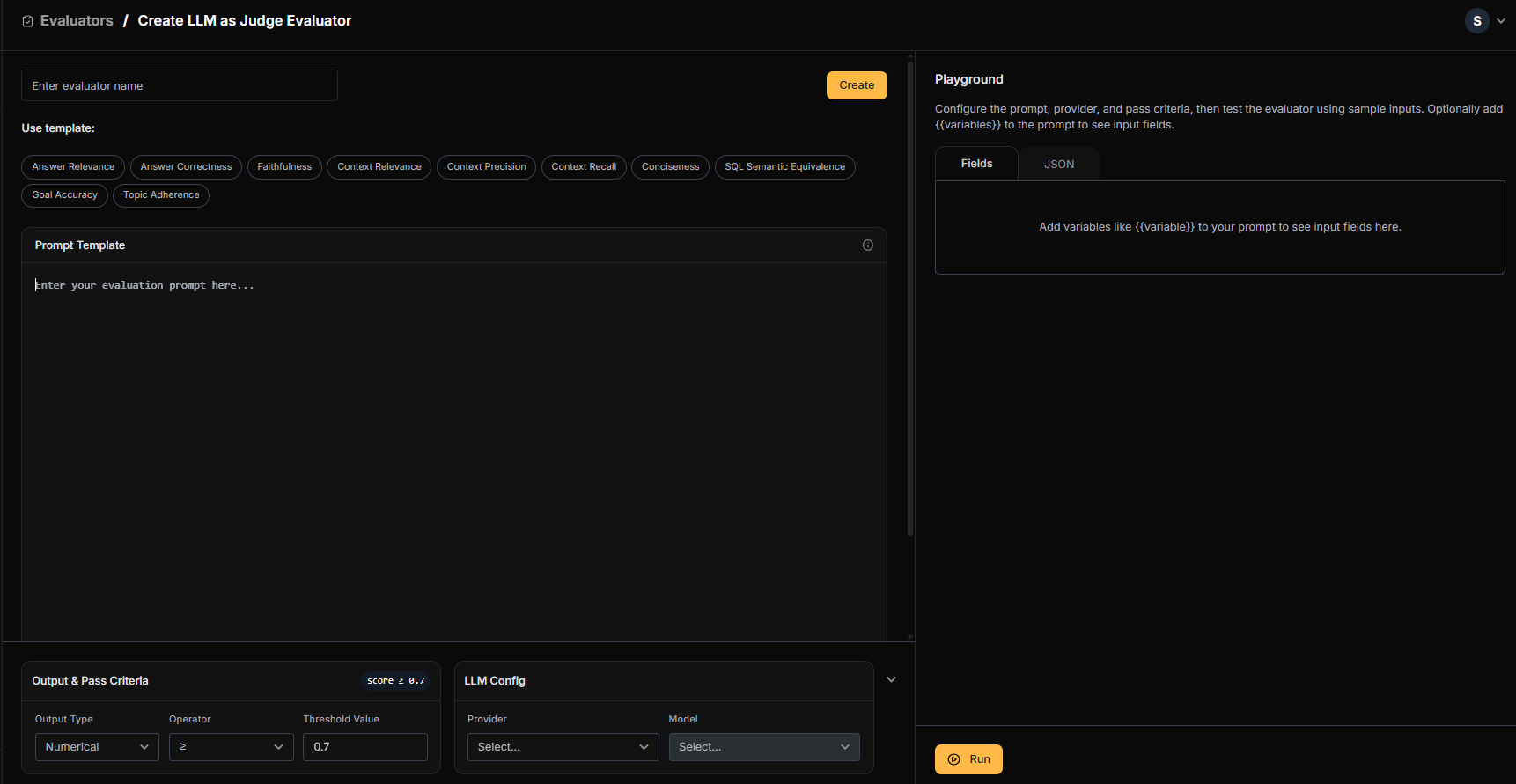
In Netra, navigate to Evaluation → Evaluators. You can choose from the Library of pre-built evaluators or create custom ones.

Using LLM as Judge Templates

From the Library tab, select templates that fit your use case:
TemplateUse ForPass Criteria
Answer CorrectnessCompare generated summary against expected outputscore >= 0.7
ConcisenessEnsure summaries are brief and to the pointscore >= 0.7
Answer RelevanceCheck if the summary addresses the meeting contentscore >= 0.7
Click Add on any template to customize it for your needs. You can adjust the prompt, select your LLM provider (OpenAI, Anthropic, Google, Mistral), and set pass criteria.
LLM as Judge evaluator configuration with prompt template and pass criteria

Using Rule-Based Evaluators

For deterministic checks, use rule-based evaluators from the Library:
EvaluatorUse ForConfiguration
LatencySLA compliance per tierPass if latency < threshold (e.g., 2000ms for Enterprise)
CostBudget monitoring per tenantPass if cost < threshold
JSON EvaluatorValidate output structurePass if output is valid JSON with required fields

Creating a Code Evaluator

For custom business logic like tier-specific validation, create a Code Evaluator:
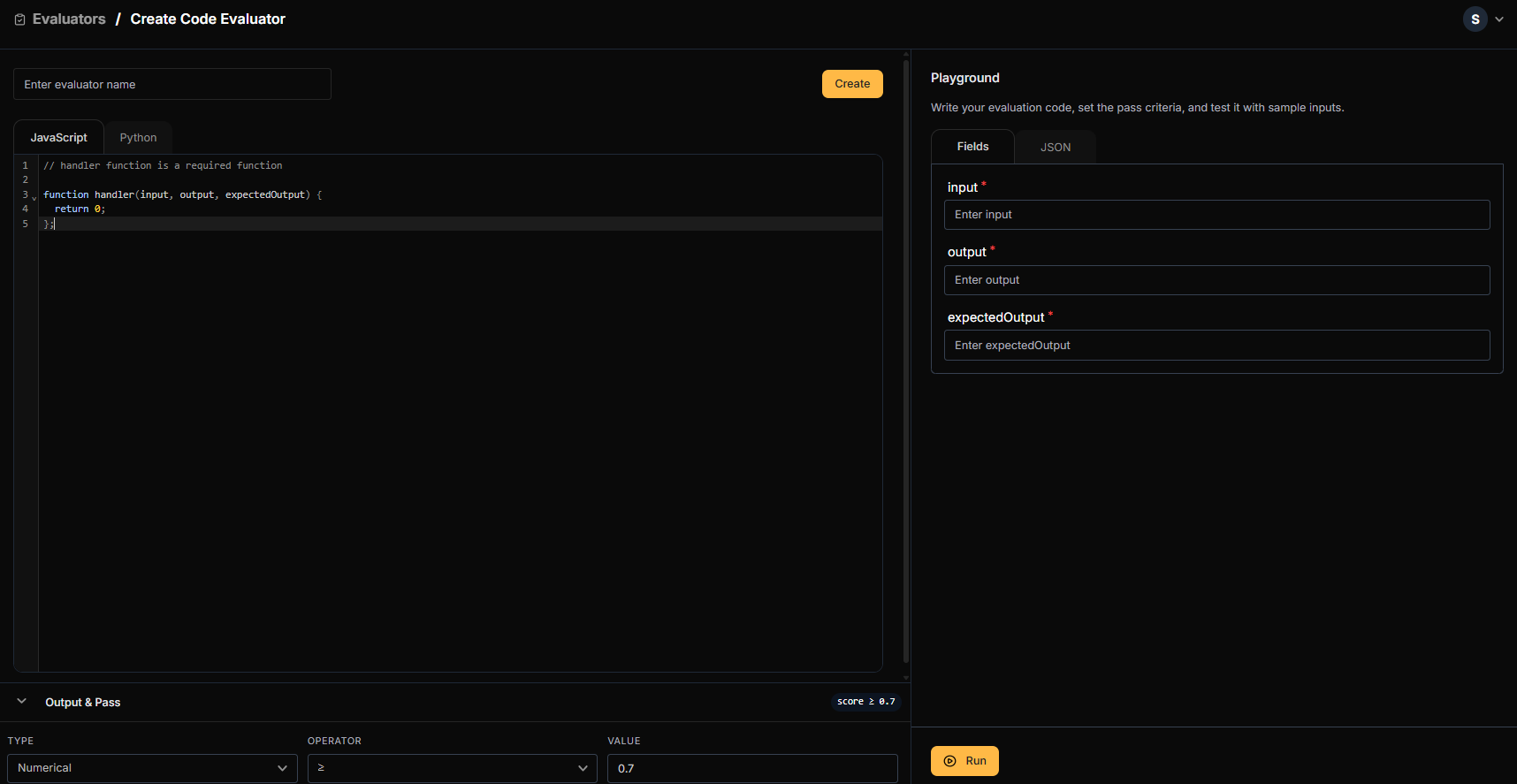
Code Evaluator configuration with JavaScript handler function
Example: Tier Completeness Check
// handler function is required
function handler(input, output, expectedOutput) {
    // Parse the output JSON
    let result;
    try {
        result = JSON.parse(output);
    } catch {
        return 0; // Fail if not valid JSON
    }

    // Check required fields based on tier (passed via expectedOutput or metadata)
    const tier = expectedOutput?.tier || "starter";

    const required = {
        "enterprise": ["summary", "action_items", "decisions"],
        "professional": ["summary", "action_items"],
        "starter": ["summary"],
    };

    const requiredKeys = required[tier] || ["summary"];
    const hasAllKeys = requiredKeys.every(key => key in result);

    return hasAllKeys ? 1 : 0;
}
Set Output Type to Numerical and Pass Criteria to >= 0.7.

Running Evaluations per Tier

Create a test dataset with sample transcripts and run evaluations with different tenant contexts:
def run_tier_evaluation():
    """Run quality evaluation across all tiers."""
    test_transcripts = [
        SAMPLE_TRANSCRIPT,
        # Add more test transcripts here
    ]

    results = {}

    for tenant_id, config in TENANT_CONFIGS.items():
        print(f"\nEvaluating {tenant_id} ({config.tier})...")
        summarizer = TracedMeetingSummarizer(tenant_id)

        tier_results = []
        for transcript in test_transcripts:
            result = summarizer.summarize(transcript)
            tier_results.append(result)

        results[tenant_id] = {
            "tier": config.tier,
            "model": config.model,
            "avg_latency": sum(r["latency_ms"] for r in tier_results) / len(tier_results),
            "avg_cost": sum(r["cost_usd"] for r in tier_results) / len(tier_results),
            "sample_output": tier_results[0]["result"],
        }

    # Print comparison
    print("\n=== Tier Quality Comparison ===")
    for tenant_id, data in results.items():
        print(f"\n{tenant_id} ({data['tier']}):")
        print(f"  Model: {data['model']}")
        print(f"  Avg Latency: {data['avg_latency']:.0f}ms")
        print(f"  Avg Cost: ${data['avg_cost']:.6f}")
        print(f"  Output Keys: {list(data['sample_output'].keys())}")

run_tier_evaluation()
View results in Evaluation → Test Runs to see quality scores side-by-side across tiers.
Evaluation dashboard showing quality scores: Enterprise 94%, Professional 89%, Starter 76%

A/B Testing Models per Tenant Segment

Should you upgrade the Starter tier from GPT-3.5 to GPT-4-turbo? Let’s run an A/B test to find out.

Running the A/B Test

  1. Run the same test cases with GPT-3.5-turbo (current Starter model)
  2. Run the same test cases with GPT-4-turbo (candidate upgrade)
  3. Compare results using Netra’s trace comparison
def run_ab_test(transcript: str):
    """Run A/B test comparing GPT-3.5 vs GPT-4-turbo for Starter tier."""
    # Test with GPT-3.5-turbo (current)
    summarizer_a = TracedMeetingSummarizer("techstart-inc")
    result_a = summarizer_a.summarize(transcript, user_id="ab-test-user")

    # Temporarily override to test GPT-4-turbo
    original_model = TENANT_CONFIGS["techstart-inc"].model
    TENANT_CONFIGS["techstart-inc"].model = "gpt-4-turbo"

    summarizer_b = TracedMeetingSummarizer("techstart-inc")
    result_b = summarizer_b.summarize(transcript, user_id="ab-test-user")

    # Restore original
    TENANT_CONFIGS["techstart-inc"].model = original_model

    print("\n=== A/B Test Results ===")
    print(f"{'Metric':<20} {'GPT-3.5-turbo':<15} {'GPT-4-turbo':<15} {'Delta':<15}")
    print("-" * 65)
    print(f"{'Latency (ms)':<20} {result_a['latency_ms']:<15.0f} {result_b['latency_ms']:<15.0f} {result_b['latency_ms'] - result_a['latency_ms']:+.0f}")
    print(f"{'Cost (USD)':<20} ${result_a['cost_usd']:<14.6f} ${result_b['cost_usd']:<14.6f} {((result_b['cost_usd'] / result_a['cost_usd']) - 1) * 100:+.0f}%")
    print(f"{'Tokens':<20} {result_a['usage']['total_tokens']:<15} {result_b['usage']['total_tokens']:<15}")

    return result_a, result_b

run_ab_test(SAMPLE_TRANSCRIPT)

Using Trace Comparison

In Netra, navigate to Observability → Traces, select traces from both model runs, and click Compare. You’ll see:
MetricGPT-3.5-turboGPT-4-turboDelta
Quality Score76%89%+13%
Avg Latency800ms1200ms+50%
Cost per Request$0.002$0.008+300%
Decision Framework: Is a 13% quality improvement worth a 4x cost increase? For Starter tier customers paying $0.01/meeting, likely not. But for Professional tier upgrades, the math might work out differently.

Summary

You’ve learned how to build comprehensive multi-tenant observability for a B2B AI platform:
CapabilityWhat You BuiltKey Netra Feature
Tenant TrackingPer-customer trace attributionset_tenant_id()
Cost AttributionAccurate billing per customerget_tenant_usage()
SLA MonitoringTier-specific latency alertsAlert Rules with tenant filter
Quality EvaluationPer-tier quality comparisonEvaluators + Datasets
A/B TestingModel comparison per segmentTrace Comparison

Key Takeaways

  1. Native tenant tracking eliminates custom tagging workarounds—just call set_tenant_id() and all traces are attributed automatically
  2. Cost attribution enables accurate billing and identifies which customers drive costs
  3. Per-tenant alerting ensures SLA compliance for premium tiers
  4. Quality evaluation per tier validates that cheaper tiers still deliver acceptable quality
  5. A/B testing helps make data-driven decisions about tier configurations

Learn More

Last modified on February 3, 2026