> ## Documentation Index
> Fetch the complete documentation index at: https://docs.getnetra.ai/llms.txt
> Use this file to discover all available pages before exploring further.
# Python
> Get started with the Netra Python SDK. Install netra-sdk, initialize Netra.init(), and begin tracing LLM calls and monitoring AI applications in minutes.
## Installation
Run the following command to install Netra in your environment
```shellscript pip theme={null}
pip install netra-sdk
```
```shellscript poetry theme={null}
poetry add netra-sdk
```
## Optional Dependencies
Netra SDK supports optional dependencies for enhanced functionality:
### Presidio for PII Detection
To use the PII detection features provided by Netra SDK:
```shellscript pip theme={null}
pip install 'netra-sdk[presidio]'
```
```shellscript poetry theme={null}
poetry add netra-sdk --extras "presidio"
```
If you try to use the PII detection utility in Netra SDK without installing this dependency, you will receive an exception. So, always make sure to install the package if you plan to use this utility.
 ## Initialization
### API Key Configuration
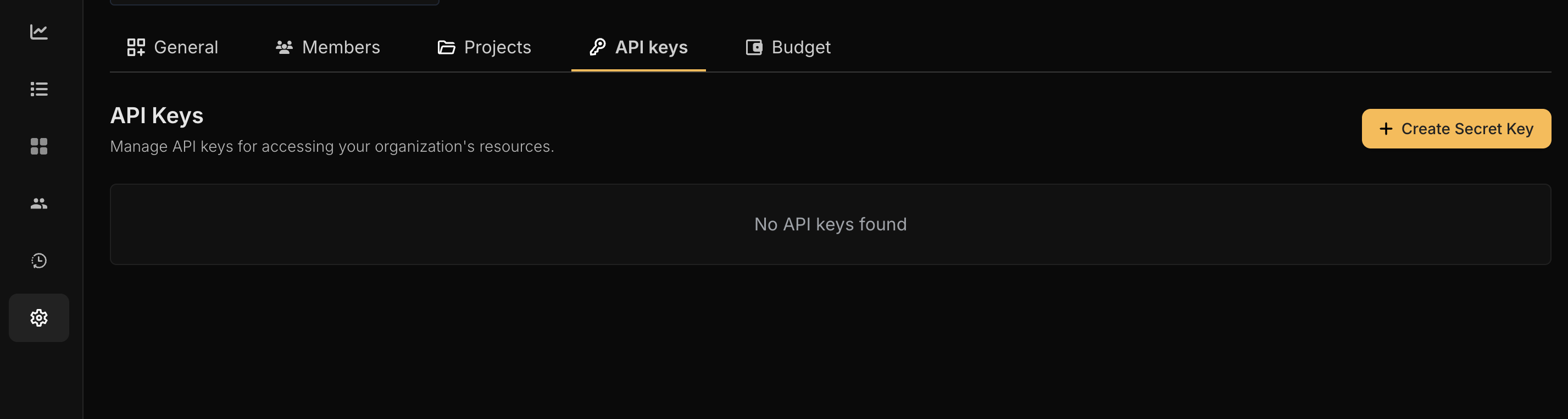
To enable Netra SDK tracing, you need to provide an API key. You can obtain your API key from the Netra [dashboard](https://app.eu.getnetra.ai/login).
## Initialization
### API Key Configuration
To enable Netra SDK tracing, you need to provide an API key. You can obtain your API key from the Netra [dashboard](https://app.eu.getnetra.ai/login).
 ### Environment Variable Configuration
Add the following environment variables to your application to enable Netra SDK tracing. Use the endpoint that matches your selected data region:
```bash US Region theme={null}
export NETRA_OTLP_ENDPOINT="https://api.getnetra.ai/telemetry"
export NETRA_API_KEY="your-api-key-here"
```
```bash EU Region theme={null}
export NETRA_OTLP_ENDPOINT="https://api.eu.getnetra.ai/telemetry"
export NETRA_API_KEY="your-api-key-here"
```
### Code Snippet
Follow the code below to initialize Netra in you application. By default, Netra will instrument all the installed packages.
```python Python theme={null}
from netra import Netra
from netra.instrumentation.instruments import InstrumentSet
# Initialize with default settings
Netra.init(app_name="Your application name")
# Or with custom configuration
api_key = "Your API key"
headers = f"x-api-key={api_key}"
Netra.init(
app_name="Your application name",
headers=headers,
trace_content=True,
environment="Your Application environment"
)
```
Calling `Netra.init()` starts basic tracing, but to get useful insights, it is recommended to add **custom annotations** and **manual instrumentation** around important parts of your code.
## Decorators for Easy Instrumentation
Netra SDK provides decorators like `@workflow`, `@agent`, and `@task` for easy instrumentation of your code. For more details and usage examples, please refer to the [Decorators](/tracing/decorators) section in our documentation.
### Environment Variable Configuration
Add the following environment variables to your application to enable Netra SDK tracing. Use the endpoint that matches your selected data region:
```bash US Region theme={null}
export NETRA_OTLP_ENDPOINT="https://api.getnetra.ai/telemetry"
export NETRA_API_KEY="your-api-key-here"
```
```bash EU Region theme={null}
export NETRA_OTLP_ENDPOINT="https://api.eu.getnetra.ai/telemetry"
export NETRA_API_KEY="your-api-key-here"
```
### Code Snippet
Follow the code below to initialize Netra in you application. By default, Netra will instrument all the installed packages.
```python Python theme={null}
from netra import Netra
from netra.instrumentation.instruments import InstrumentSet
# Initialize with default settings
Netra.init(app_name="Your application name")
# Or with custom configuration
api_key = "Your API key"
headers = f"x-api-key={api_key}"
Netra.init(
app_name="Your application name",
headers=headers,
trace_content=True,
environment="Your Application environment"
)
```
Calling `Netra.init()` starts basic tracing, but to get useful insights, it is recommended to add **custom annotations** and **manual instrumentation** around important parts of your code.
## Decorators for Easy Instrumentation
Netra SDK provides decorators like `@workflow`, `@agent`, and `@task` for easy instrumentation of your code. For more details and usage examples, please refer to the [Decorators](/tracing/decorators) section in our documentation.