> ## Documentation Index
> Fetch the complete documentation index at: https://docs.getnetra.ai/llms.txt
> Use this file to discover all available pages before exploring further.
# Simulations
> Create voice simulation evaluations in Netra. Configure call scenarios, STT/TTS/LLM pipelines, personas, and background noise to test voice agents end-to-end.
Evaluations for voice simulation define the calls you want to test—a simulated persona speaks with your voice agent over a real audio channel while Netra records, transcribes, and evaluates the conversation.
## Why Voice Simulation Evaluations Matter
Voice evaluations test qualities that text simulations cannot reach:
| Benefit | Description |
| ----------------------- | --------------------------------------------------------------------------------- |
| **Real Audio Pipeline** | Exercise your actual STT, reasoning LLM, and TTS stack under realistic conditions |
| **Natural Callers** | Personas speak aloud with configurable pace, accent, and disfluencies |
| **Noise Robustness** | Inject background noise at a controlled level to test real-world resilience |
| **Bounded Calls** | Enforce max duration, silence timeouts, and turn limits per scenario |
## Creating a Voice Evaluation
Open **Evaluate → Evaluations**, click **New Evaluation**, and choose:
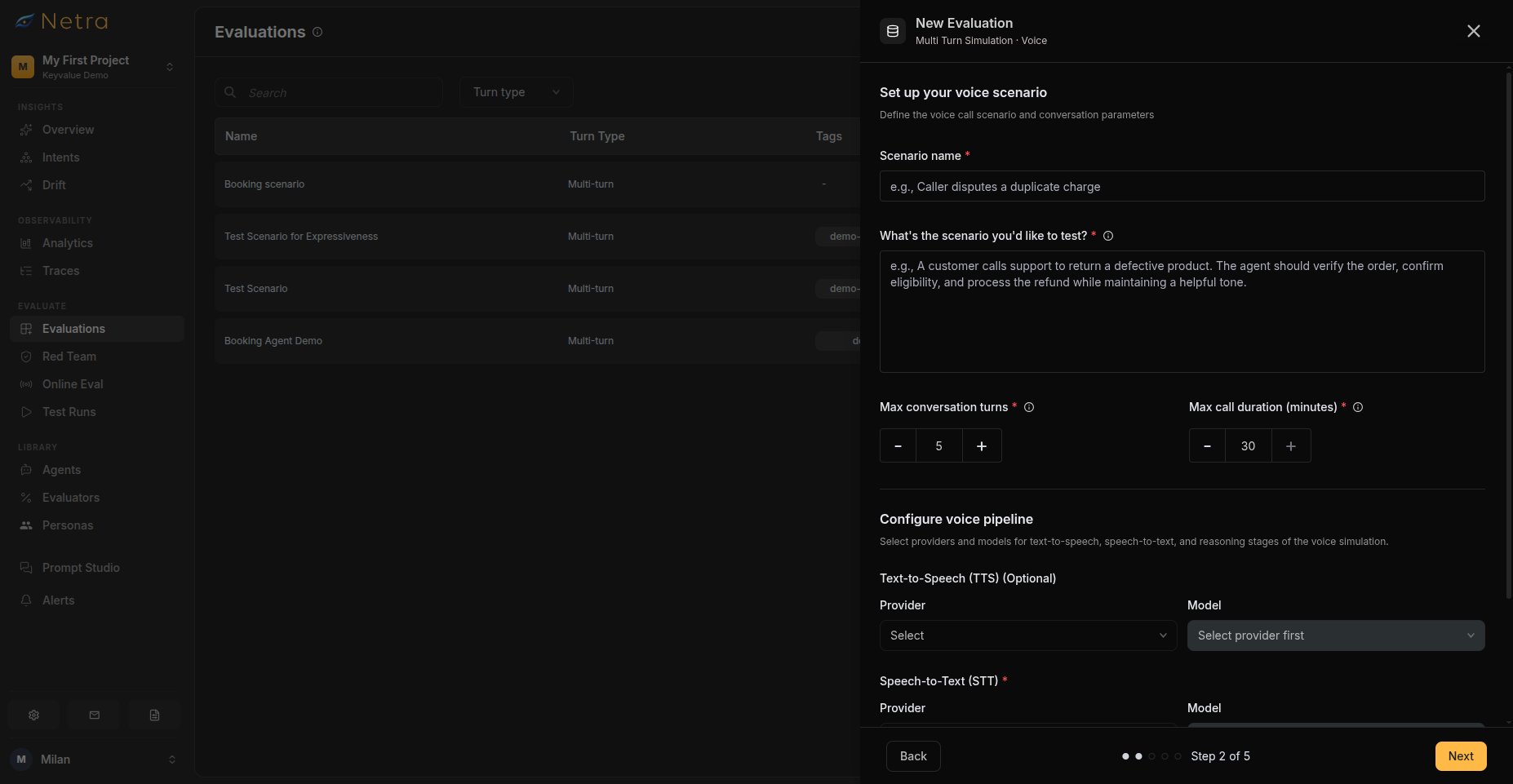 * **Turn Type**: Multi Turn Simulation
* **Simulation Type**: Voice
Build voice simulation scenarios from scratch, one scenario at a time
Import a spreadsheet of voice simulation scenarios in bulk
Generate test cases using AI based on your description
Provide an evaluation name and optional tags, then select **Multi Turn Simulation** as the turn type and **Voice** as the simulation type.
Describe each call you want to simulate:
| Field | Description |
| ------------------------------- | --------------------------------------- |
| **Scenario name** | A short label for the scenario |
| **Scenario description** | What the caller is trying to accomplish |
| **Max conversation turns** | Maximum conversation turns |
| **Max call duration (minutes)** | Maximum call duration in minutes |
Then configure the voice pipeline your agent uses during the call:
| Stage | Required | Description |
| ------------- | -------- | ------------------------------------------------------------------------- |
| **TTS** | No | Text-to-speech provider, model, and voice that speak your agent's replies |
| **STT** | Yes | Speech-to-text provider and model that transcribes the caller |
| **Reasoning** | Yes | The model powering your agent's responses |
Choose an STT provider that matches your callers' accents and languages. You can mix providers across stages—each stage is configured independently.
**Behaviour Instructions** — Describe how the simulated caller should behave: what they open with, how they react, and what they do if the agent struggles.
```
Call about a damaged order and ask for a refund. If asked for
details you were not given, say you do not remember.
```
**Information Available to the Simulated User** — Enter the context data the caller can reference as a **Table**, as **JSON**, or as **Plain Text**.
```json theme={null}
{
"order_number": "ORD-123456",
"purchase_date": "2024-01-15",
"issue": "arrived with a cracked screen"
}
```
**Background Noise** — Choose a background noise clip (cafe, street, office, and more) and set its intensity on a 0-1 scale. Use this to test how well your pipeline copes with realistic environments.
**JSON Validation**: When using JSON format, ensure there are no duplicate
keys. The system validates JSON structure before allowing you to proceed.
Pick the caller persona from your [Personas](/Simulations/voice-simulations/Personas) library. Every scenario requires exactly one persona—the persona defines the caller's voice, speech traits, accent, and language.
Create and manage personas under **Library → Personas** before building voice evaluations.
Select [evaluators](/Evaluators/voice-evaluators) from the library. Alongside the TTS, STT, and Conversational evaluators, voice evaluations can score:
* **TTS quality**: Humanness, Pronunciation Accuracy, Language Accuracy, Speaking Rate / Pace
* **STT accuracy**: Word Error Rate, Transcription Correctness, Time to First Transcript
* **Conversational delivery**: Backchannelling Naturalness, Expressiveness, Speaking Percentage
For each evaluator, rename it, choose the judge provider and model, adjust pass criteria, and fill any configurable variables—such as expected languages, words-per-second range, TTFT limit, or speaking-percentage range.
Review all configurations, then click **Create Evaluation** to finalize.
## Running a Voice Simulation
Open your evaluation, go to the **Test Runs** tab, and click **Run Test Suite**. Select a registered voice agent—your LiveKit-connected application—and start the run. Netra places simulated calls to your agent for every scenario.
* **Turn Type**: Multi Turn Simulation
* **Simulation Type**: Voice
Build voice simulation scenarios from scratch, one scenario at a time
Import a spreadsheet of voice simulation scenarios in bulk
Generate test cases using AI based on your description
Provide an evaluation name and optional tags, then select **Multi Turn Simulation** as the turn type and **Voice** as the simulation type.
Describe each call you want to simulate:
| Field | Description |
| ------------------------------- | --------------------------------------- |
| **Scenario name** | A short label for the scenario |
| **Scenario description** | What the caller is trying to accomplish |
| **Max conversation turns** | Maximum conversation turns |
| **Max call duration (minutes)** | Maximum call duration in minutes |
Then configure the voice pipeline your agent uses during the call:
| Stage | Required | Description |
| ------------- | -------- | ------------------------------------------------------------------------- |
| **TTS** | No | Text-to-speech provider, model, and voice that speak your agent's replies |
| **STT** | Yes | Speech-to-text provider and model that transcribes the caller |
| **Reasoning** | Yes | The model powering your agent's responses |
Choose an STT provider that matches your callers' accents and languages. You can mix providers across stages—each stage is configured independently.
**Behaviour Instructions** — Describe how the simulated caller should behave: what they open with, how they react, and what they do if the agent struggles.
```
Call about a damaged order and ask for a refund. If asked for
details you were not given, say you do not remember.
```
**Information Available to the Simulated User** — Enter the context data the caller can reference as a **Table**, as **JSON**, or as **Plain Text**.
```json theme={null}
{
"order_number": "ORD-123456",
"purchase_date": "2024-01-15",
"issue": "arrived with a cracked screen"
}
```
**Background Noise** — Choose a background noise clip (cafe, street, office, and more) and set its intensity on a 0-1 scale. Use this to test how well your pipeline copes with realistic environments.
**JSON Validation**: When using JSON format, ensure there are no duplicate
keys. The system validates JSON structure before allowing you to proceed.
Pick the caller persona from your [Personas](/Simulations/voice-simulations/Personas) library. Every scenario requires exactly one persona—the persona defines the caller's voice, speech traits, accent, and language.
Create and manage personas under **Library → Personas** before building voice evaluations.
Select [evaluators](/Evaluators/voice-evaluators) from the library. Alongside the TTS, STT, and Conversational evaluators, voice evaluations can score:
* **TTS quality**: Humanness, Pronunciation Accuracy, Language Accuracy, Speaking Rate / Pace
* **STT accuracy**: Word Error Rate, Transcription Correctness, Time to First Transcript
* **Conversational delivery**: Backchannelling Naturalness, Expressiveness, Speaking Percentage
For each evaluator, rename it, choose the judge provider and model, adjust pass criteria, and fill any configurable variables—such as expected languages, words-per-second range, TTFT limit, or speaking-percentage range.
Review all configurations, then click **Create Evaluation** to finalize.
## Running a Voice Simulation
Open your evaluation, go to the **Test Runs** tab, and click **Run Test Suite**. Select a registered voice agent—your LiveKit-connected application—and start the run. Netra places simulated calls to your agent for every scenario.
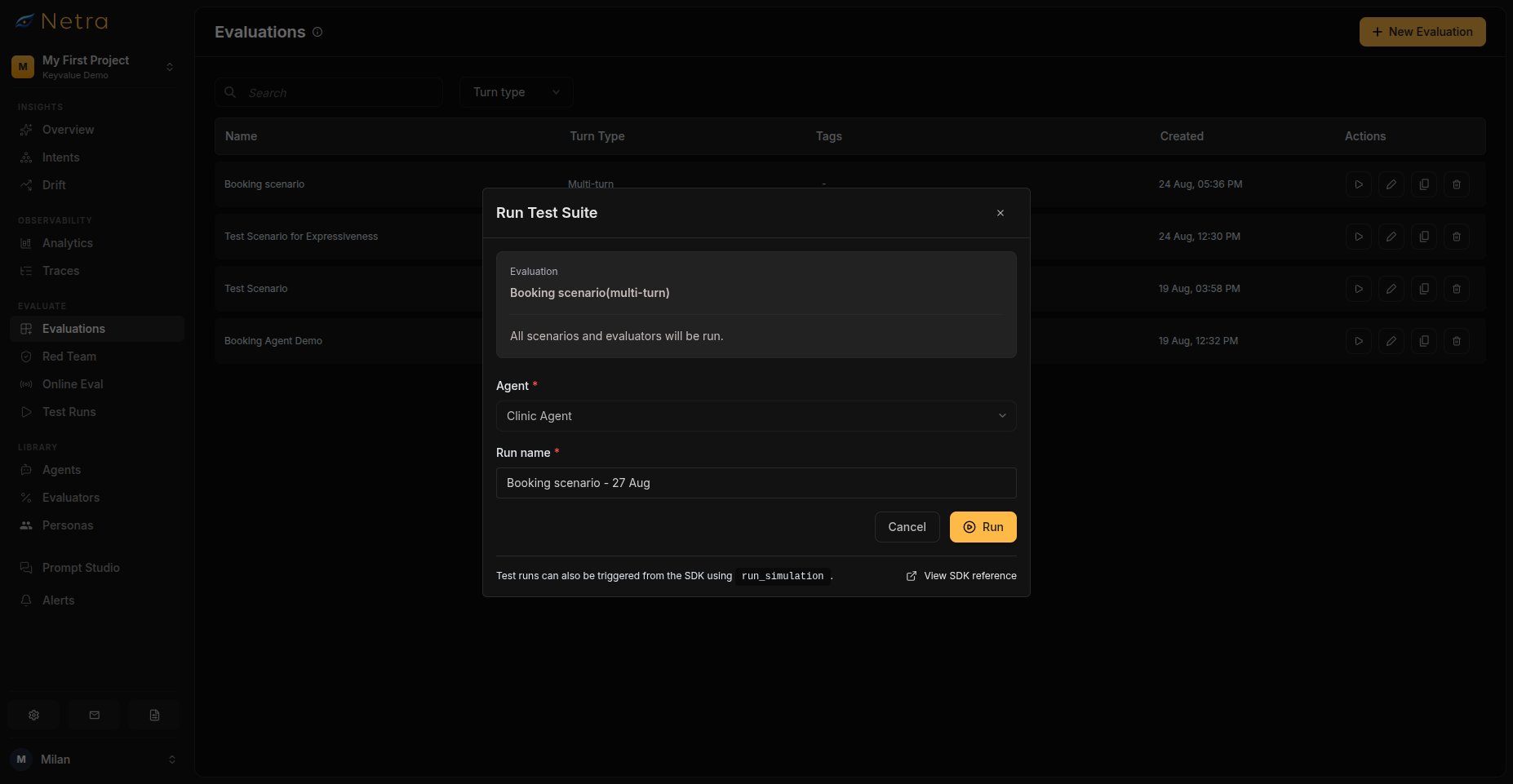 You can also trigger simulations from the SDK. See the SDK reference for [Python](/sdk-reference/simulation/python) and [TypeScript](/sdk-reference/simulation/typescript).
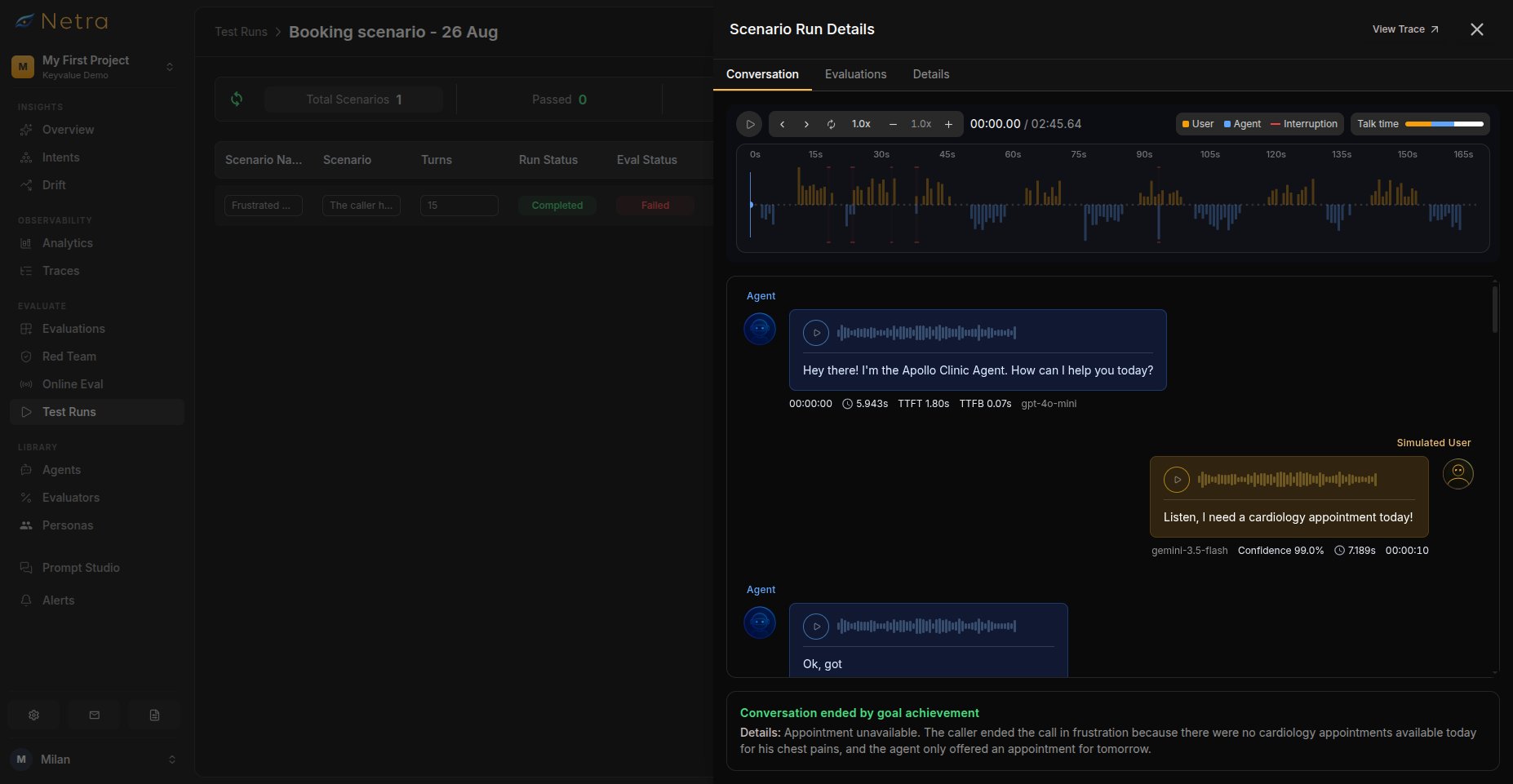
Results appear in [Test Runs](/Simulations/TestRuns) with full transcripts and synced audio playback.
## Managing an Evaluation
Open any voice evaluation to manage it:
You can also trigger simulations from the SDK. See the SDK reference for [Python](/sdk-reference/simulation/python) and [TypeScript](/sdk-reference/simulation/typescript).
Results appear in [Test Runs](/Simulations/TestRuns) with full transcripts and synced audio playback.
## Managing an Evaluation
Open any voice evaluation to manage it:
 | Tab | Description |
| ------------- | ----------------------------------------------------------------------------------------------------------------------------- |
| **Details** | Browse scenarios as cards showing goal, resolved persona name, behavior, turns, and duration. Add more scenarios at any time. |
| **Analytics** | Evaluation analytics for this evaluation—overall health, average score over time, and per-evaluator pass/fail rates |
| **Test Runs** | Runs triggered from this evaluation, with the **Run Test Suite** action |
## Best Practices
### Designing Scenarios
* **One goal per scenario**: Keep each call focused so results are easy to interpret
* **Vary difficulty**: Mix straightforward requests with ambiguous or multi-part ones
* **Test boundaries**: Include scenarios your agent should decline or escalate
### Tuning Realism
* **Start quiet**: Run first passes without background noise, then add it once the basics work
* **Match your users**: Choose personas whose accent, pace, and language resemble real callers
* **Bound the cost**: Cap max duration and turns to keep runs predictable
## Related
* [Simulation Overview](/Simulations/Simulation-overview) - Understand the full simulation framework
* [Personas](/Simulations/voice-simulations/Personas) - Create reusable caller personas
* [Evaluators](/Evaluators/voice-evaluators) - Score audio quality, transcription, and delivery
* [Test Runs](/Simulations/TestRuns) - View transcripts and synced call audio
| Tab | Description |
| ------------- | ----------------------------------------------------------------------------------------------------------------------------- |
| **Details** | Browse scenarios as cards showing goal, resolved persona name, behavior, turns, and duration. Add more scenarios at any time. |
| **Analytics** | Evaluation analytics for this evaluation—overall health, average score over time, and per-evaluator pass/fail rates |
| **Test Runs** | Runs triggered from this evaluation, with the **Run Test Suite** action |
## Best Practices
### Designing Scenarios
* **One goal per scenario**: Keep each call focused so results are easy to interpret
* **Vary difficulty**: Mix straightforward requests with ambiguous or multi-part ones
* **Test boundaries**: Include scenarios your agent should decline or escalate
### Tuning Realism
* **Start quiet**: Run first passes without background noise, then add it once the basics work
* **Match your users**: Choose personas whose accent, pace, and language resemble real callers
* **Bound the cost**: Cap max duration and turns to keep runs predictable
## Related
* [Simulation Overview](/Simulations/Simulation-overview) - Understand the full simulation framework
* [Personas](/Simulations/voice-simulations/Personas) - Create reusable caller personas
* [Evaluators](/Evaluators/voice-evaluators) - Score audio quality, transcription, and delivery
* [Test Runs](/Simulations/TestRuns) - View transcripts and synced call audio