> ## Documentation Index
> Fetch the complete documentation index at: https://docs.getnetra.ai/llms.txt
> Use this file to discover all available pages before exploring further.
# Personas
> Create reusable caller personas for voice simulations in Netra. Define voice, speech traits, accent, and knowledge so every simulated call is realistic.
Personas define who calls your agent during a [voice simulation](/Simulations/voice-simulations/Simulations). A persona bundles a synthetic voice with speech behavior—pace, clarity, timing, disfluencies—and the knowledge the caller can reference. Build your persona library once, then reuse personas across scenarios and evaluations.
## Why Personas Matter
Real callers vary. Personas let you test against that variation systematically:
| Capability | Benefit |
| ---------------------- | ----------------------------------------------------------------------------- |
| **Consistent Callers** | Reuse the exact same caller across runs to isolate what changed in your agent |
| **Speech Variation** | Test fast, vague, rambly, or rapid-fire callers without re-recording anything |
| **Voice Control** | Assign specific TTS voices, accents, and languages per persona |
| **Grounded Knowledge** | Give each persona only the facts that persona would realistically know |
## Personas Dashboard
Navigate to **Library → Personas** from the left navigation panel.
The dashboard shows your personas as cards in a searchable grid:
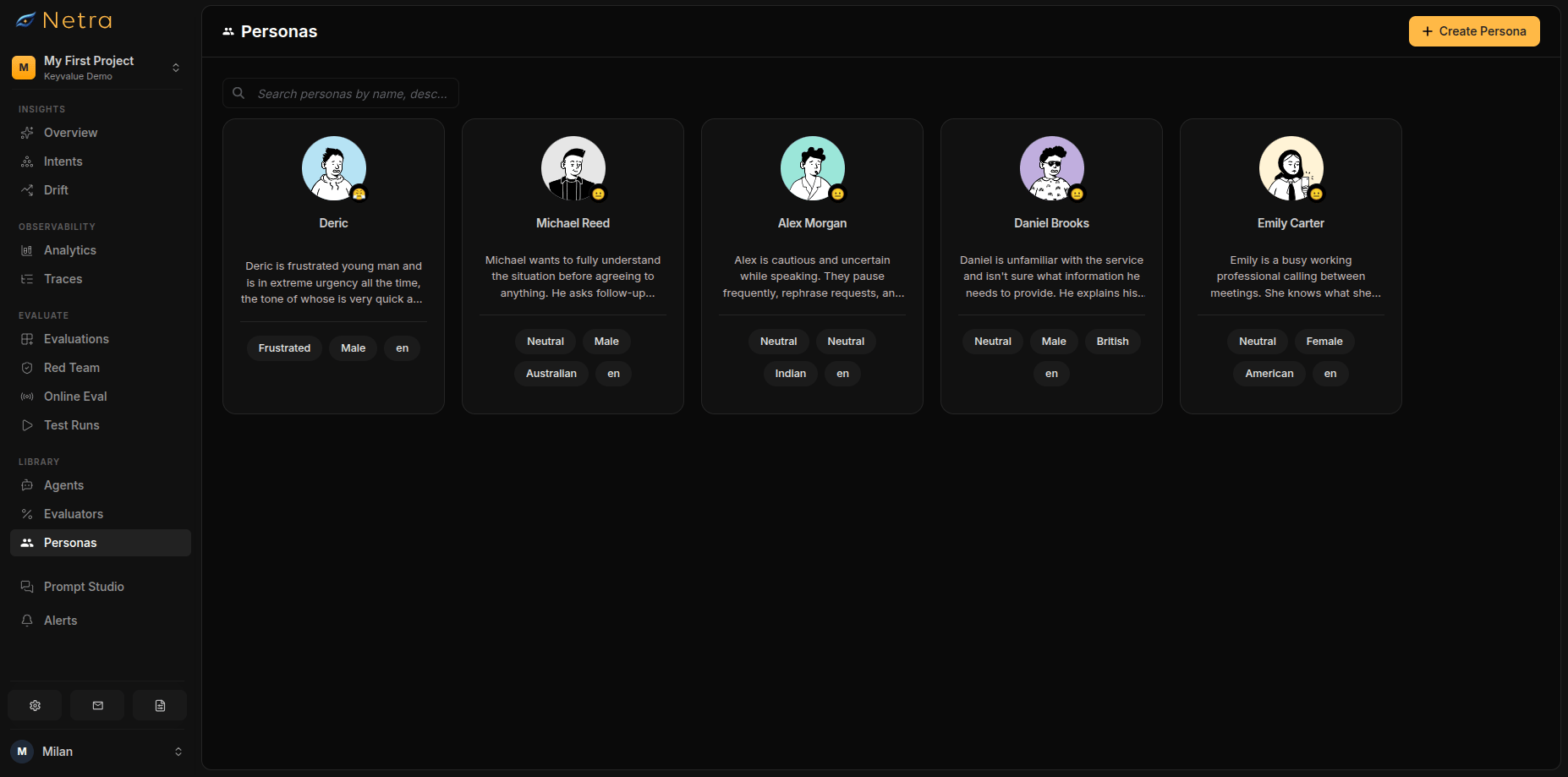 * **Search**: Find personas by name, description, or tag
* **Create**: Open the persona builder
* **Edit / Delete**: Manage existing personas from each card
## Creating a Persona
* **Search**: Find personas by name, description, or tag
* **Create**: Open the persona builder
* **Edit / Delete**: Manage existing personas from each card
## Creating a Persona
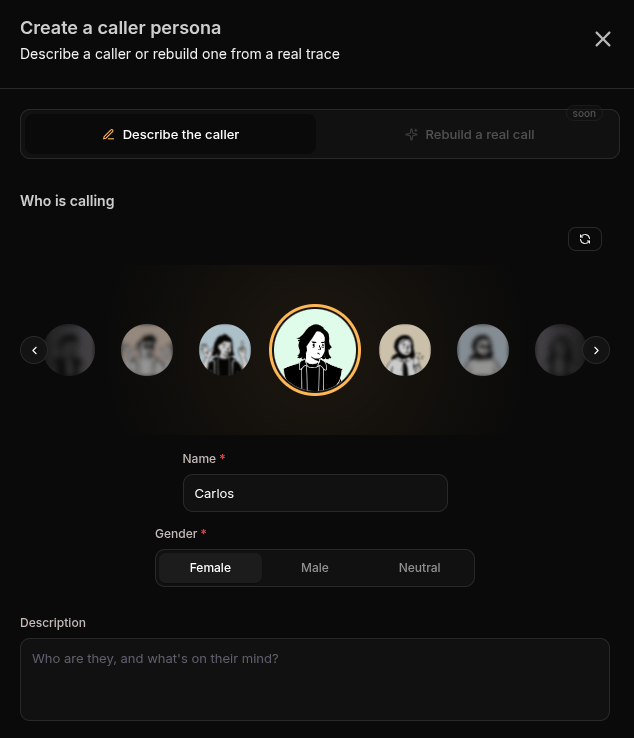 Choose an avatar to make the persona easy to recognize across the dashboard.
| Field | Description |
| --------------- | ------------------------------------------------------ |
| **Name** | A descriptive label (e.g., "Frustrated Refund Caller") |
| **Gender** | Female, male, or neutral—influences available voices |
| **Description** | Who this person is and why they might call |
Choose a behaviour preset—neutral, friendly, frustrated, confused, or custom—to shape how the persona reacts when the conversation gets difficult.
Tune how the persona actually talks:
| Trait | Options |
| --------------------- | ---------------------------------------------- |
| **Pace** | From very slow to very fast |
| **Clarity** | Clear, vague, or rambling |
| **Response Timing** | Quick, normal, or relaxed |
| **Disfluencies** | Add natural "um"s, "uh"s, and self-corrections |
| **Language & Accent** | The language spoken and its accent |
Vague, rambling callers with disfluencies are the best stress test for STT accuracy. Save them for later-stage testing once basic flows pass.
Choose an avatar to make the persona easy to recognize across the dashboard.
| Field | Description |
| --------------- | ------------------------------------------------------ |
| **Name** | A descriptive label (e.g., "Frustrated Refund Caller") |
| **Gender** | Female, male, or neutral—influences available voices |
| **Description** | Who this person is and why they might call |
Choose a behaviour preset—neutral, friendly, frustrated, confused, or custom—to shape how the persona reacts when the conversation gets difficult.
Tune how the persona actually talks:
| Trait | Options |
| --------------------- | ---------------------------------------------- |
| **Pace** | From very slow to very fast |
| **Clarity** | Clear, vague, or rambling |
| **Response Timing** | Quick, normal, or relaxed |
| **Disfluencies** | Add natural "um"s, "uh"s, and self-corrections |
| **Language & Accent** | The language spoken and its accent |
Vague, rambling callers with disfluencies are the best stress test for STT accuracy. Save them for later-stage testing once basic flows pass.
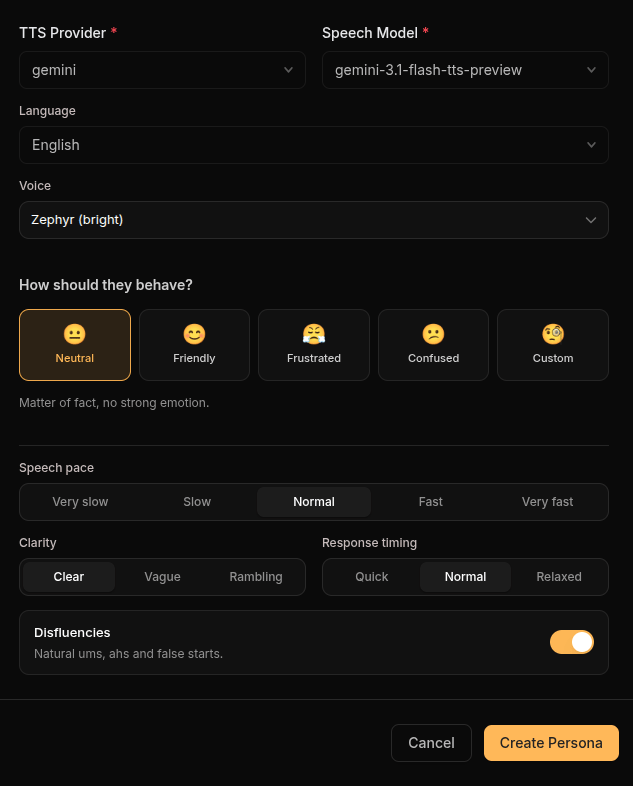 Choose the TTS provider, model, and voice that will speak this persona's lines. Available options depend on the provider you select—some models support accents and personality settings, others do not.
Provide the facts this persona knows (such as order numbers, dates, or account details) as key-value pairs. During a simulation, the persona can only reference this information—if your agent asks about something the persona does not know, it will say so.
Click **Create**. The persona becomes selectable in the [voice evaluation](/Simulations/voice-simulations/Simulations) creation flow.
## Using Personas
* **In evaluations**: Each voice scenario requires exactly one persona; mix personas across scenarios in the same evaluation to cover different caller types
* **Across runs**: Because a persona is fixed, changes in results between runs reflect your agent—not the caller
## Best Practices
### Building a Balanced Library
Cover the caller types your product actually serves:
| Persona Type | Tests |
| ---------------------- | ----------------------------------------- |
| Clear, neutral speaker | Baseline conversation quality |
| Fast talker | STT accuracy under pressure |
| Rambling, vague caller | Your agent's ability to guide and clarify |
| Frustrated caller | De-escalation and empathy |
| Non-native accent | Transcription robustness across accents |
### Managing Personas
* **Name by behavior**: "Fast rambling complainer" is more useful than "Test persona 3"
* **Keep knowledge minimal**: Only give personas the facts the scenario needs
* **Reuse before you create**: Check the library before adding a near-duplicate persona
## Related
* [Simulation Overview](/Simulations/Simulation-overview) - Understand the full simulation framework
* [Evaluations](/Simulations/voice-simulations/Simulations) - Create voice simulation scenarios
* [Evaluators](/Evaluators/voice-evaluators) - Score audio quality, transcription, and delivery
* [Test Runs](/Simulations/TestRuns) - Review transcripts with synced audio
Choose the TTS provider, model, and voice that will speak this persona's lines. Available options depend on the provider you select—some models support accents and personality settings, others do not.
Provide the facts this persona knows (such as order numbers, dates, or account details) as key-value pairs. During a simulation, the persona can only reference this information—if your agent asks about something the persona does not know, it will say so.
Click **Create**. The persona becomes selectable in the [voice evaluation](/Simulations/voice-simulations/Simulations) creation flow.
## Using Personas
* **In evaluations**: Each voice scenario requires exactly one persona; mix personas across scenarios in the same evaluation to cover different caller types
* **Across runs**: Because a persona is fixed, changes in results between runs reflect your agent—not the caller
## Best Practices
### Building a Balanced Library
Cover the caller types your product actually serves:
| Persona Type | Tests |
| ---------------------- | ----------------------------------------- |
| Clear, neutral speaker | Baseline conversation quality |
| Fast talker | STT accuracy under pressure |
| Rambling, vague caller | Your agent's ability to guide and clarify |
| Frustrated caller | De-escalation and empathy |
| Non-native accent | Transcription robustness across accents |
### Managing Personas
* **Name by behavior**: "Fast rambling complainer" is more useful than "Test persona 3"
* **Keep knowledge minimal**: Only give personas the facts the scenario needs
* **Reuse before you create**: Check the library before adding a near-duplicate persona
## Related
* [Simulation Overview](/Simulations/Simulation-overview) - Understand the full simulation framework
* [Evaluations](/Simulations/voice-simulations/Simulations) - Create voice simulation scenarios
* [Evaluators](/Evaluators/voice-evaluators) - Score audio quality, transcription, and delivery
* [Test Runs](/Simulations/TestRuns) - Review transcripts with synced audio