> ## Documentation Index
> Fetch the complete documentation index at: https://docs.getnetra.ai/llms.txt
> Use this file to discover all available pages before exploring further.
# Test Runs
> View Netra simulation test run results with full conversation transcripts. Analyze turn-by-turn scores, agent behavior, and goal completion rates.
Test Runs for simulation show the execution results of your [multi-turn datasets](/Simulation/Datasets). Each run provides a complete conversation transcript between the simulated user and your agent, along with evaluation results, scenario details, and performance metrics.
## Why Simulation Test Runs Matter
Simulation test runs provide deep insights into conversational agent performance:
| Capability | Benefit |
| ---------------------------- | ---------------------------------------------------------------------------------------------- |
| **Conversation Transcripts** | See the full multi-turn dialogue to understand how your agent performed |
| **Scenario Details** | View goal, persona, user data, and fact checker configuration |
| **Turn-by-Turn Tracing** | Jump directly to execution [traces](/Observability/Traces/overview) for each conversation turn |
| **Evaluation Results** | Review turn-level and session-level evaluator scores |
| **Exit Reason Tracking** | Understand why conversations ended (goal achieved, failed, abandoned, max turns) |
| **Aggregated Metrics** | Monitor cost, latency, and success rates across simulations |
## Test Runs Dashboard
Navigate to **Evaluation → Test Runs** from the left navigation panel to see simulation test runs.
{/* PLACEHOLDER: Screenshot of Test Runs dashboard filtered to Multi-turn */}
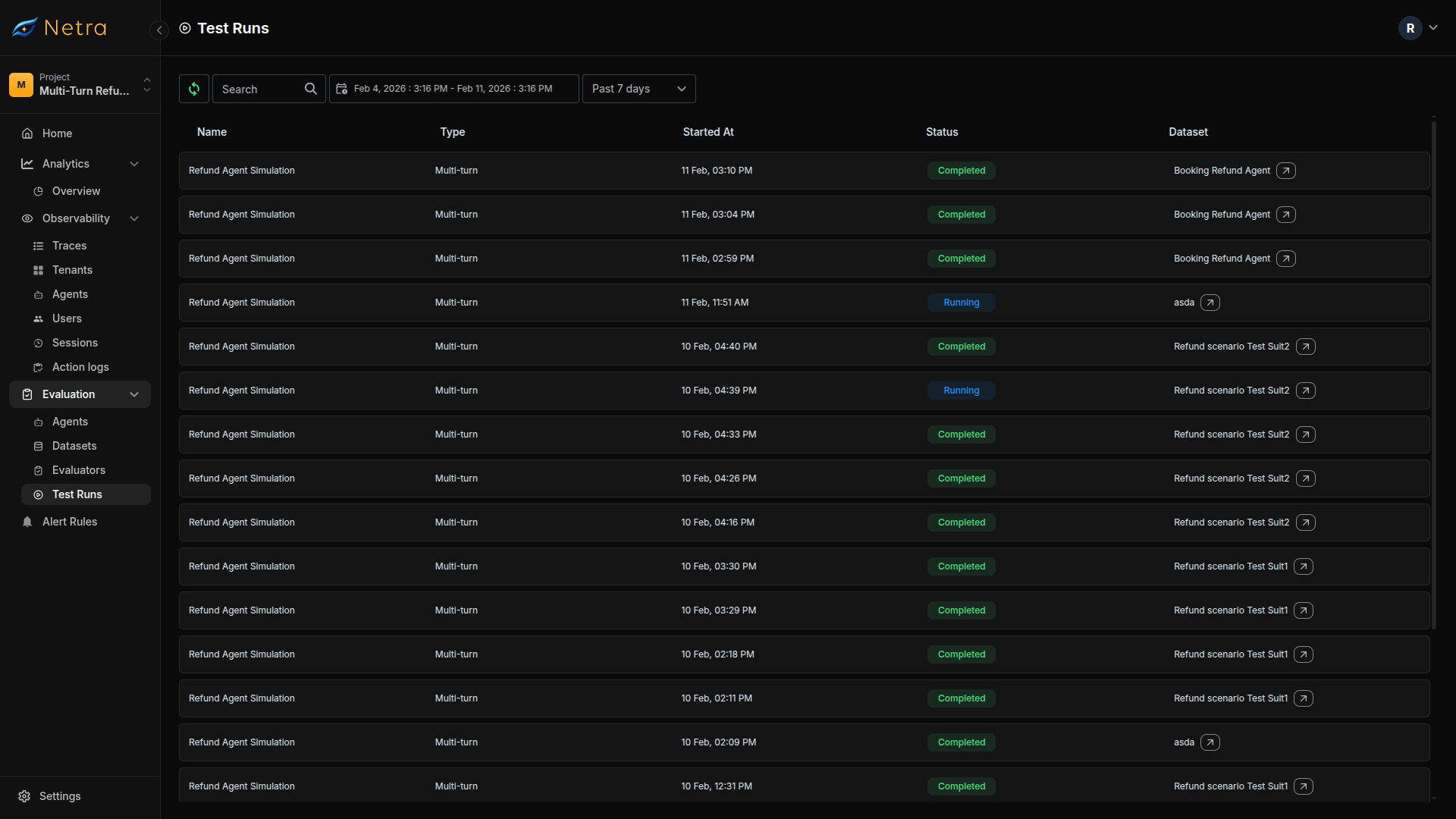 | Column | Description |
| -------------- | ------------------------------------------------------------ |
| **Name** | Name of the test run |
| **Type** | Multi-turn for simulation test runs |
| **Started At** | Timestamp when the simulation began |
| **Status** | Current state: Completed, In Progress, or Failed |
| **Dataset** | The [dataset](/Simulation/Datasets) used for this simulation |
### Filtering and Search
* **Date Range**: Filter runs by time period to compare performance over time
* **Search**: Find specific test runs by agent or dataset name
* **Sort**: Order by date, status, or dataset
## Viewing Test Run Details
Click on any simulation test run to access detailed results.
{/* PLACEHOLDER: Screenshot of Test Run Details page */}
| Column | Description |
| -------------- | ------------------------------------------------------------ |
| **Name** | Name of the test run |
| **Type** | Multi-turn for simulation test runs |
| **Started At** | Timestamp when the simulation began |
| **Status** | Current state: Completed, In Progress, or Failed |
| **Dataset** | The [dataset](/Simulation/Datasets) used for this simulation |
### Filtering and Search
* **Date Range**: Filter runs by time period to compare performance over time
* **Search**: Find specific test runs by agent or dataset name
* **Sort**: Order by date, status, or dataset
## Viewing Test Run Details
Click on any simulation test run to access detailed results.
{/* PLACEHOLDER: Screenshot of Test Run Details page */}
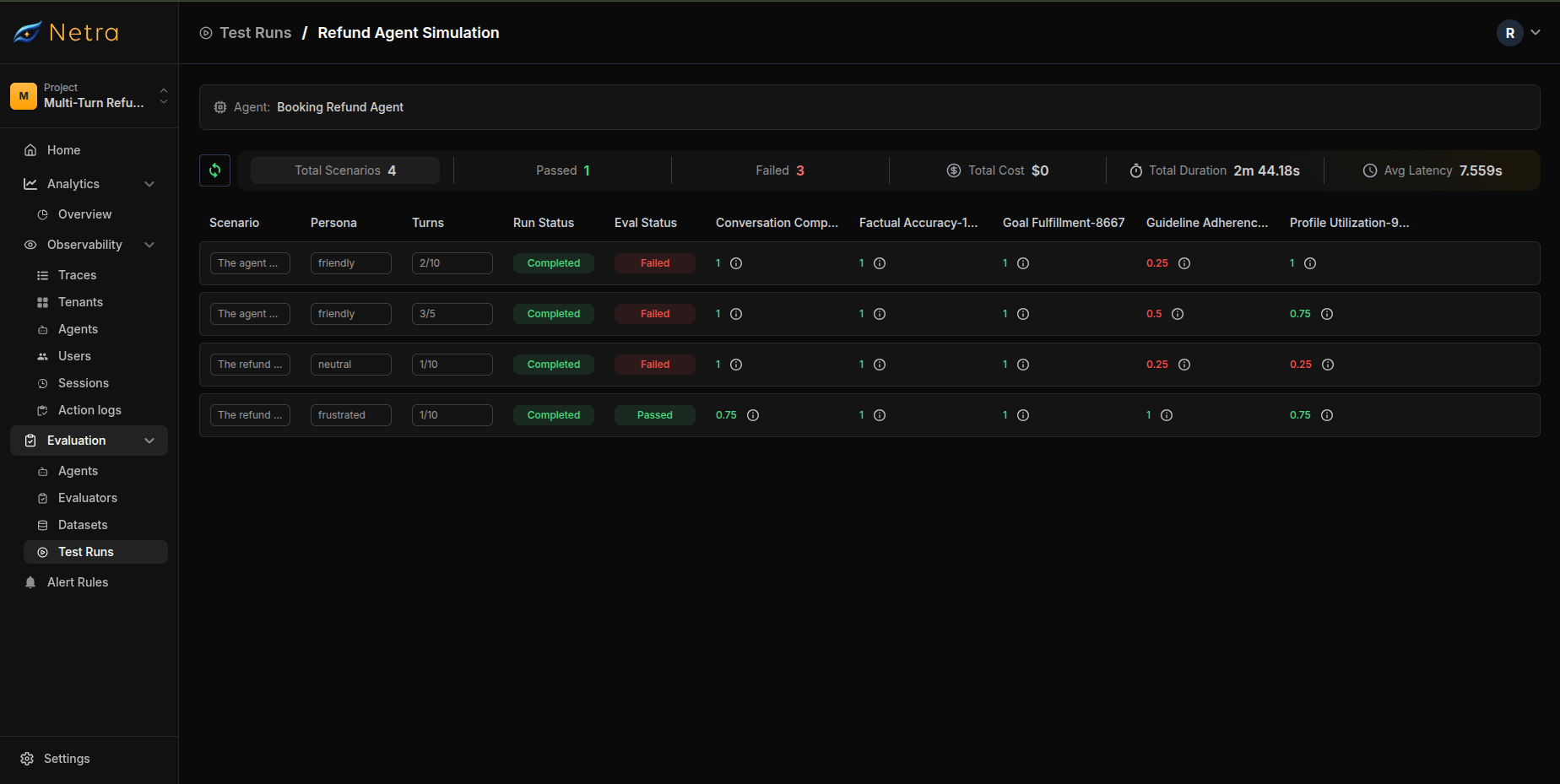 ### Summary Metrics
The top of the detail view shows aggregated performance data:
| Metric | Description |
| ------------------- | --------------------------------------------- |
| **Total Items** | Number of scenarios run in this test |
| **Passed Items** | Count of scenarios that achieved their goals |
| **Failed Items** | Count of scenarios that did not achieve goals |
| **Total Cost** | Aggregate token/API cost for all scenarios |
| **Total Duration** | End-to-end time for the simulation run |
| **Average Latency** | Mean response time across all turns |
## Viewing Scenario Details
Click on any test run item to view the detailed scenario results. This opens a modal with three tabs.
{/* Anupam */}
### Tab 1: Conversation
The Conversation tab shows the full multi-turn dialogue between the simulated user and your agent.
### Summary Metrics
The top of the detail view shows aggregated performance data:
| Metric | Description |
| ------------------- | --------------------------------------------- |
| **Total Items** | Number of scenarios run in this test |
| **Passed Items** | Count of scenarios that achieved their goals |
| **Failed Items** | Count of scenarios that did not achieve goals |
| **Total Cost** | Aggregate token/API cost for all scenarios |
| **Total Duration** | End-to-end time for the simulation run |
| **Average Latency** | Mean response time across all turns |
## Viewing Scenario Details
Click on any test run item to view the detailed scenario results. This opens a modal with three tabs.
{/* Anupam */}
### Tab 1: Conversation
The Conversation tab shows the full multi-turn dialogue between the simulated user and your agent.
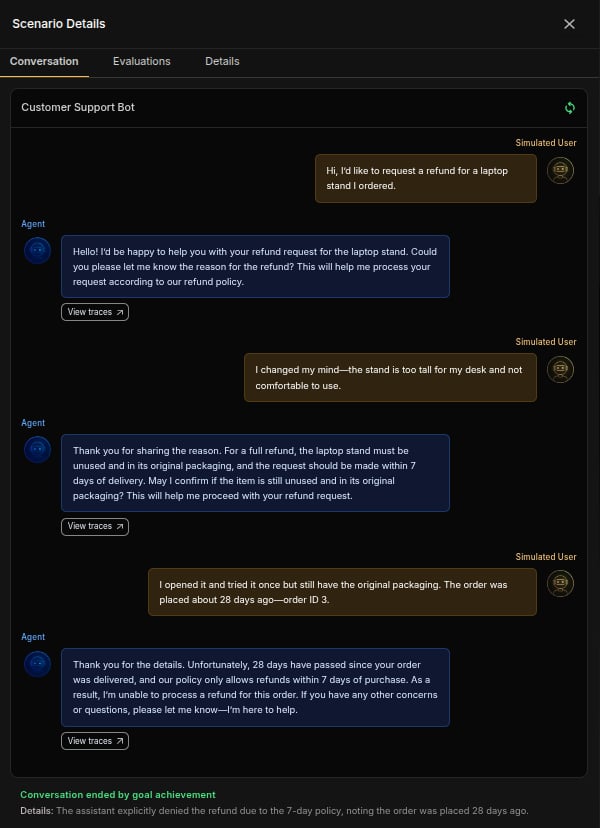 **Features**:
* **Turn-by-Turn Display**: Each conversation turn is clearly separated
* **User Messages**: Shows what the simulated user said
* **Agent Responses**: Shows what your agent replied
* **Trace Links**: Click **View Trace** on any turn to see detailed execution traces
* **Turn Index**: Track which turn number you're viewing (Turn 1, Turn 2, etc.)
* **Exit Reason**: Shows why the conversation ended
**Exit Reasons**:
| Exit Reason | Description |
| --------------------- | ------------------------------------------------- |
| **Goal Achieved** | The scenario objective was successfully completed |
| **Goal Failed** | The objective could not be achieved |
| **Abandoned** | The simulated user gave up or stopped engaging |
| **Max Turns Reached** | Hit the turn limit before goal completion |
Use the **View Trace** link to debug specific turns where the agent's response
was unexpected or incorrect. Traces show the full LLM call, tool usage, and
latency breakdown.
### Tab 2: Evaluation Results
The Evaluation Results tab shows scores from all configured [evaluators](/Simulation/Evaluators).
**Features**:
* **Turn-by-Turn Display**: Each conversation turn is clearly separated
* **User Messages**: Shows what the simulated user said
* **Agent Responses**: Shows what your agent replied
* **Trace Links**: Click **View Trace** on any turn to see detailed execution traces
* **Turn Index**: Track which turn number you're viewing (Turn 1, Turn 2, etc.)
* **Exit Reason**: Shows why the conversation ended
**Exit Reasons**:
| Exit Reason | Description |
| --------------------- | ------------------------------------------------- |
| **Goal Achieved** | The scenario objective was successfully completed |
| **Goal Failed** | The objective could not be achieved |
| **Abandoned** | The simulated user gave up or stopped engaging |
| **Max Turns Reached** | Hit the turn limit before goal completion |
Use the **View Trace** link to debug specific turns where the agent's response
was unexpected or incorrect. Traces show the full LLM call, tool usage, and
latency breakdown.
### Tab 2: Evaluation Results
The Evaluation Results tab shows scores from all configured [evaluators](/Simulation/Evaluators).
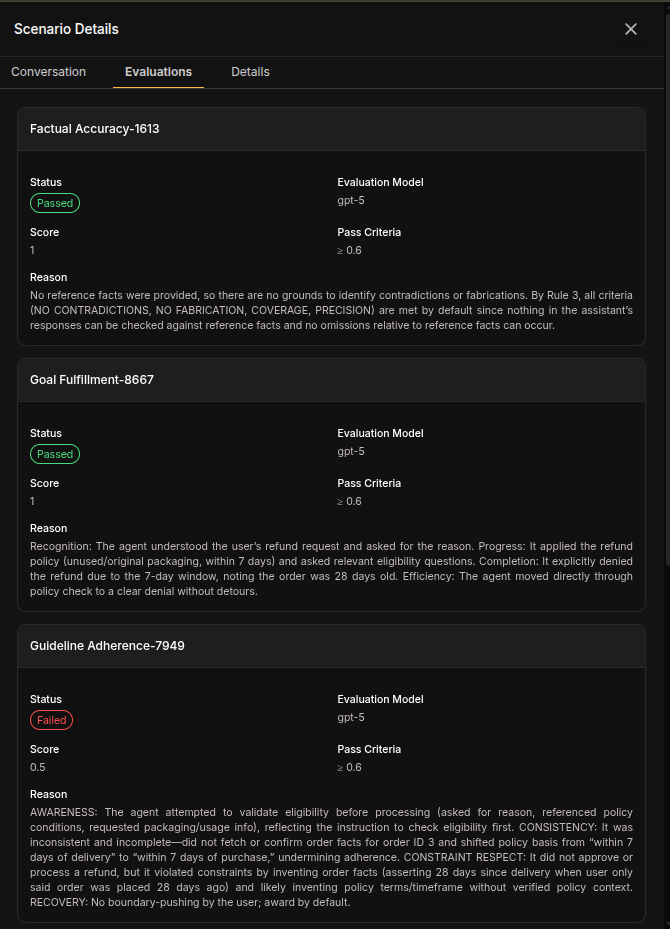 Each evaluator produces a normalized score between 0 and 1. Scores at or above **0.6** pass; scores below 0.6 fail.
**Example Results**:
| Evaluator | Score | Pass/Fail |
| ------------------------- | ----- | --------- |
| Goal Fulfillment | 1 | Pass |
| Factual Accuracy | 1 | Pass |
| Conversation Completeness | 1 | Pass |
| Profile Utilization | 0.75 | Pass |
| Guideline Adherence | 0.5 | Fail |
### Tab 3: Scenario Details
The Scenario Details tab shows the complete configuration used for this simulation.
Each evaluator produces a normalized score between 0 and 1. Scores at or above **0.6** pass; scores below 0.6 fail.
**Example Results**:
| Evaluator | Score | Pass/Fail |
| ------------------------- | ----- | --------- |
| Goal Fulfillment | 1 | Pass |
| Factual Accuracy | 1 | Pass |
| Conversation Completeness | 1 | Pass |
| Profile Utilization | 0.75 | Pass |
| Guideline Adherence | 0.5 | Fail |
### Tab 3: Scenario Details
The Scenario Details tab shows the complete configuration used for this simulation.
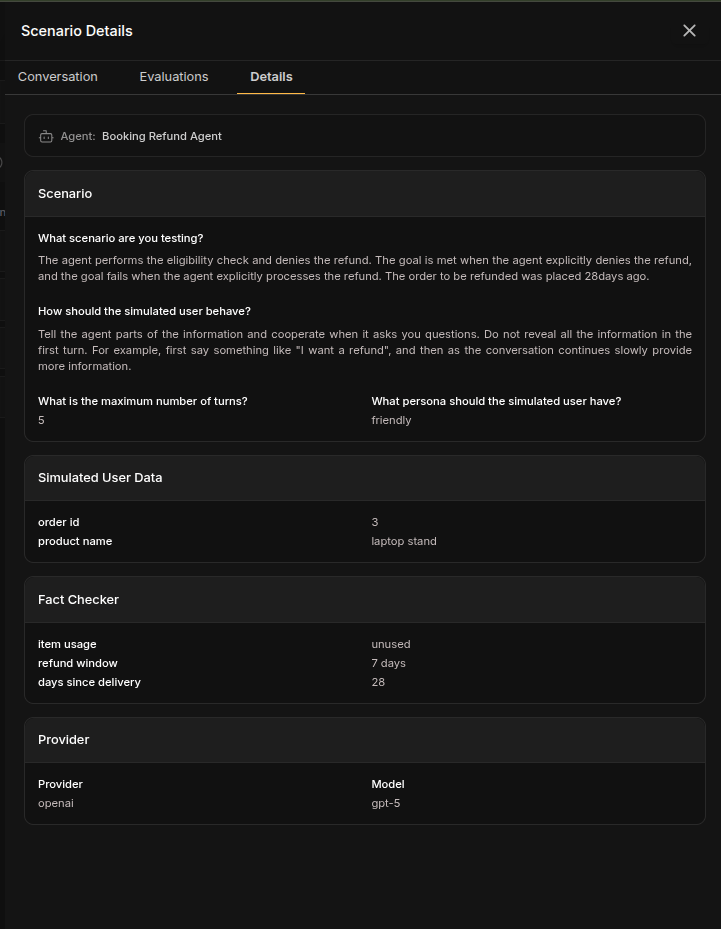 **Scenario Section**:
| Field | Value |
| ---------------- | ------------------------------------------------------------------- |
| **Goal** | The scenario objective (e.g., "Get a refund for a damaged product") |
| **Max Turns** | Maximum turns allowed (e.g., 5) |
| **User Persona** | The persona used (e.g., Frustrated 😤) |
**User Data Section**:
Shows all context data provided to the simulated user:
```json theme={null}
{
"order id": "3",
"product name": "laptop stand"
}
```
**Fact Checker Section**:
Shows facts the agent needed to communicate:
```json theme={null}
{
"item usage": "unused",
"refund window": "7 days",
"days since delivery": "28"
}
```
**Provider Configuration Section**:
| Field | Value |
| ------------ | --------------------------------------------- |
| **Provider** | The LLM provider used (e.g., openai) |
| **Model** | The model used for simulation (e.g., gpt-4.1) |
The Scenario Details tab is crucial for understanding the context of each
simulation. It shows exactly what data the simulated user had access to and
what facts the agent was expected to communicate.
## Analyzing Simulation Results
### Identifying Patterns
When reviewing simulation test runs, look for:
* **Goal achievement rates**: What percentage of simulations achieved their goals?
* **Persona differences**: Does your agent perform better with certain personas? Run the same scenarios with all persona types and compare results.
* **Turn efficiency**: Are conversations longer than necessary? Compare turn counts for successful vs failed scenarios.
* **Common failure points**: Which turns typically cause issues?
* **Fact accuracy**: Are specific facts consistently missed?
* **Cost trends**: Monitor total cost across test runs and identify scenarios that consume excessive turns.
### Debugging Failed Simulations
For each failed scenario:
1. **Review the Conversation tab**: Identify where the conversation went wrong
2. **Check the Evaluation Results tab**: See which evaluators failed and why
3. **Examine the Scenario Details tab**: Verify the user data and facts were correct
4. **Click View Trace**: Inspect the full execution flow for problematic turns — check LLM inputs, tool calls, and latency breakdowns
### Comparing Across Runs
To track improvement or regression:
1. Run simulations after each agent update
2. Compare goal achievement rates and evaluator scores across runs
3. Investigate scenarios that changed from pass to fail
4. Track turn efficiency and cost trends over time
## Best Practices
* **Test after every agent change**: Run simulations when updating your agent to catch regressions early
* **Create baseline runs**: Establish performance benchmarks before making changes
* **Always check traces for failures**: Don't just read the conversation — inspect the execution flow, LLM context, and tool calls
* **Review latency**: Identify slow turns that might frustrate real users
## Related
* [Simulation Overview](/Simulation/Simulation-overview) - Understand the full simulation framework
* [Datasets](/Simulation/Datasets) - Create scenarios that generate test runs
* [Evaluators](/Simulation/Evaluators) - Configure scoring logic for simulations
* [Traces](/Observability/Traces/overview) - Debug simulation turns with execution traces
**Scenario Section**:
| Field | Value |
| ---------------- | ------------------------------------------------------------------- |
| **Goal** | The scenario objective (e.g., "Get a refund for a damaged product") |
| **Max Turns** | Maximum turns allowed (e.g., 5) |
| **User Persona** | The persona used (e.g., Frustrated 😤) |
**User Data Section**:
Shows all context data provided to the simulated user:
```json theme={null}
{
"order id": "3",
"product name": "laptop stand"
}
```
**Fact Checker Section**:
Shows facts the agent needed to communicate:
```json theme={null}
{
"item usage": "unused",
"refund window": "7 days",
"days since delivery": "28"
}
```
**Provider Configuration Section**:
| Field | Value |
| ------------ | --------------------------------------------- |
| **Provider** | The LLM provider used (e.g., openai) |
| **Model** | The model used for simulation (e.g., gpt-4.1) |
The Scenario Details tab is crucial for understanding the context of each
simulation. It shows exactly what data the simulated user had access to and
what facts the agent was expected to communicate.
## Analyzing Simulation Results
### Identifying Patterns
When reviewing simulation test runs, look for:
* **Goal achievement rates**: What percentage of simulations achieved their goals?
* **Persona differences**: Does your agent perform better with certain personas? Run the same scenarios with all persona types and compare results.
* **Turn efficiency**: Are conversations longer than necessary? Compare turn counts for successful vs failed scenarios.
* **Common failure points**: Which turns typically cause issues?
* **Fact accuracy**: Are specific facts consistently missed?
* **Cost trends**: Monitor total cost across test runs and identify scenarios that consume excessive turns.
### Debugging Failed Simulations
For each failed scenario:
1. **Review the Conversation tab**: Identify where the conversation went wrong
2. **Check the Evaluation Results tab**: See which evaluators failed and why
3. **Examine the Scenario Details tab**: Verify the user data and facts were correct
4. **Click View Trace**: Inspect the full execution flow for problematic turns — check LLM inputs, tool calls, and latency breakdowns
### Comparing Across Runs
To track improvement or regression:
1. Run simulations after each agent update
2. Compare goal achievement rates and evaluator scores across runs
3. Investigate scenarios that changed from pass to fail
4. Track turn efficiency and cost trends over time
## Best Practices
* **Test after every agent change**: Run simulations when updating your agent to catch regressions early
* **Create baseline runs**: Establish performance benchmarks before making changes
* **Always check traces for failures**: Don't just read the conversation — inspect the execution flow, LLM context, and tool calls
* **Review latency**: Identify slow turns that might frustrate real users
## Related
* [Simulation Overview](/Simulation/Simulation-overview) - Understand the full simulation framework
* [Datasets](/Simulation/Datasets) - Create scenarios that generate test runs
* [Evaluators](/Simulation/Evaluators) - Configure scoring logic for simulations
* [Traces](/Observability/Traces/overview) - Debug simulation turns with execution traces