> ## Documentation Index
> Fetch the complete documentation index at: https://docs.getnetra.ai/llms.txt
> Use this file to discover all available pages before exploring further.
# Datasets
> Create multi-turn simulation datasets in Netra to test AI agent behavior. Define conversation goals and expected dialogue paths for simulation runs.
Datasets for simulation define the scenarios you want to test—multi-turn conversations with specific goals, user personas, and success criteria. Unlike single-turn evaluation datasets, simulation datasets create dynamic, goal-oriented conversations that reflect real-world user interactions.
## Why Simulation Datasets Matter
Simulation datasets transform simple Q\&A testing into realistic conversation testing:
| Benefit | Description |
| ---------------------------- | ----------------------------------------------------------------------------------- |
| **Goal-Oriented Testing** | Test whether your agent achieves specific objectives, not just individual responses |
| **Persona-Based Scenarios** | Simulate different user types—frustrated, confused, friendly, or neutral |
| **Multi-Turn Conversations** | Test how your agent handles back-and-forth dialogue (1-10 turns) |
| **Fact Verification** | Ensure your agent communicates critical information correctly |
| **Context Simulation** | Provide user data and context for realistic scenario execution |
## Dataset Dashboard
Navigate to **Evaluation → Datasets** from the left navigation panel. Filter by **Multi** turn type to see simulation datasets.
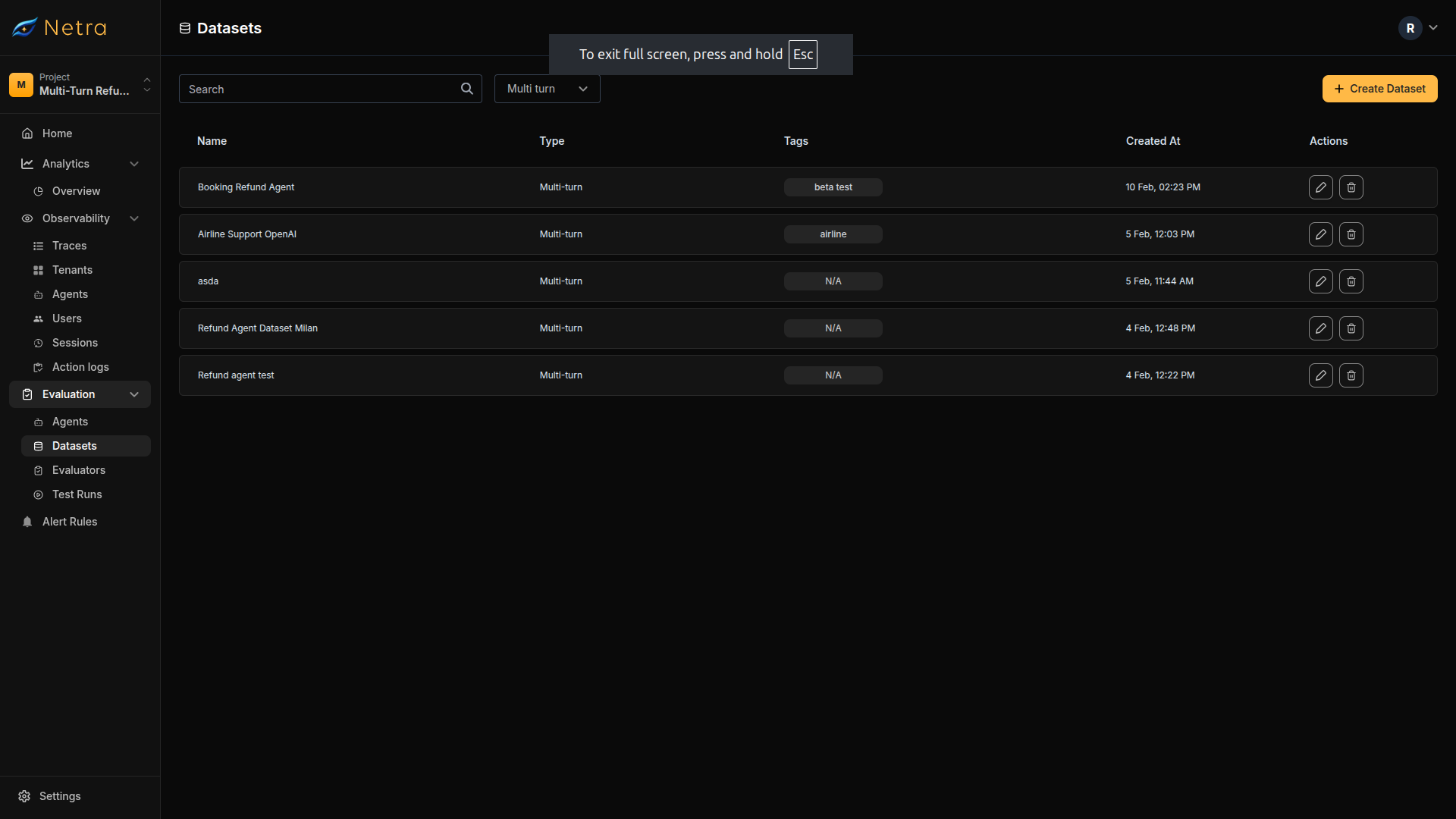 Each card displays the following fields:
| Column | Description |
| ---------------- | ---------------------------------------------- |
| **Dataset Name** | Unique identifier for the simulation suite |
| **Turn Type** | MULTI for simulation datasets |
| **Tags** | Metadata labels for filtering and organization |
| **Created At** | Timestamp for version tracking |
| **Actions** | Quick access to edit or delete datasets |
## Creating a Multi-Turn Dataset
Click the **Create Dataset** button in the top right corner of the Datasets page.
Each card displays the following fields:
| Column | Description |
| ---------------- | ---------------------------------------------- |
| **Dataset Name** | Unique identifier for the simulation suite |
| **Turn Type** | MULTI for simulation datasets |
| **Tags** | Metadata labels for filtering and organization |
| **Created At** | Timestamp for version tracking |
| **Actions** | Quick access to edit or delete datasets |
## Creating a Multi-Turn Dataset
Click the **Create Dataset** button in the top right corner of the Datasets page.
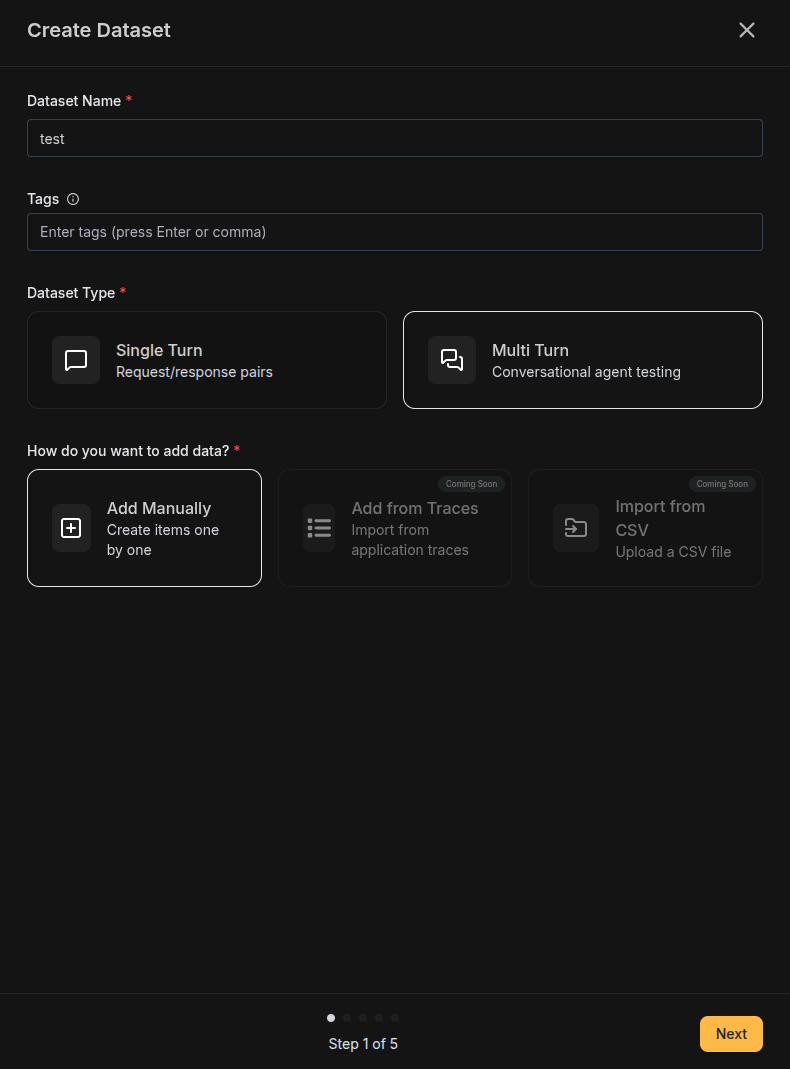 | Field | Description |
| --------------- | -------------------------------------------------------------------------------------- |
| **Name** | A descriptive identifier for your simulation suite (e.g., "Customer Refund Scenarios") |
| **Tags** | Labels for filtering (e.g., "customer-support", "refunds", "production") |
| **Type** | Select **Multi-turn** for simulation scenarios |
| **Data Source** | Select **Add manually** to create scenarios one by one |
Import from traces and CSV import for multi-turn datasets are coming soon.
| Field | Description |
| --------------- | -------------------------------------------------------------------------------------- |
| **Name** | A descriptive identifier for your simulation suite (e.g., "Customer Refund Scenarios") |
| **Tags** | Labels for filtering (e.g., "customer-support", "refunds", "production") |
| **Type** | Select **Multi-turn** for simulation scenarios |
| **Data Source** | Select **Add manually** to create scenarios one by one |
Import from traces and CSV import for multi-turn datasets are coming soon.
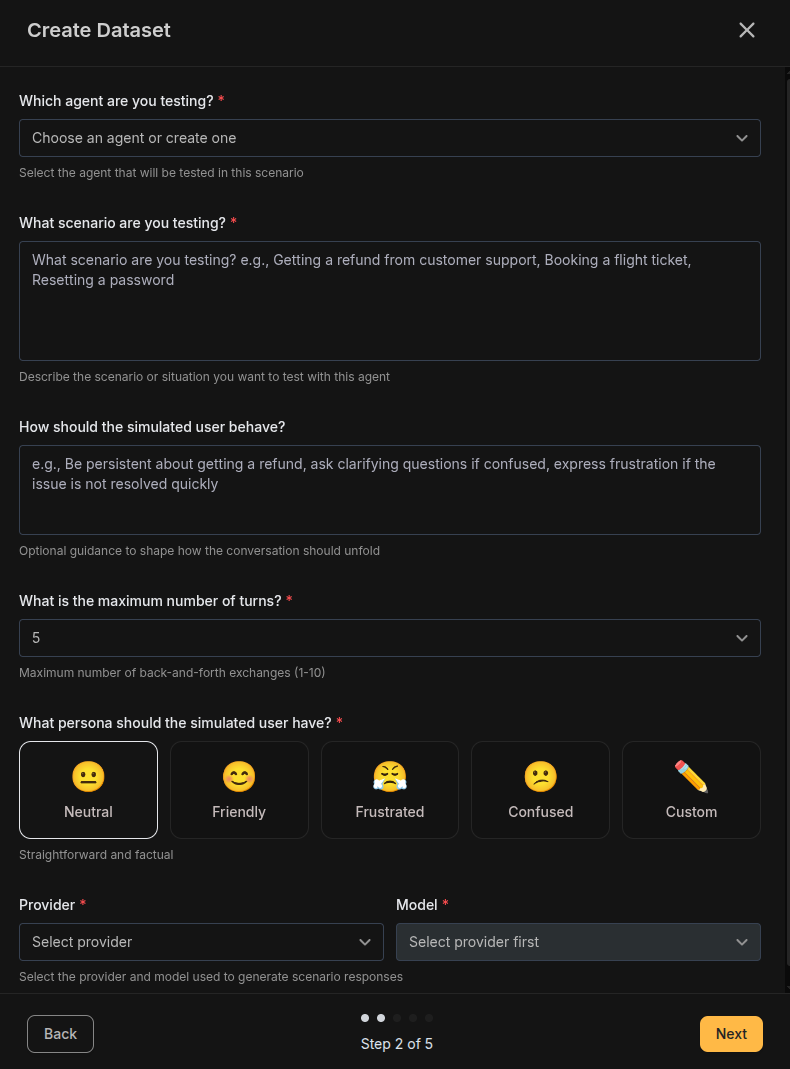 Define the simulation scenario with the following fields:
**Scenario Goal** — Describe what the simulated user is trying to achieve. This becomes the goal that drives the conversation.
```
The customer wants to get a refund for a product they purchased
15 days ago because it arrived damaged.
```
**Behavior Instructions (Optional)** — Provide guidance on how the simulated user should behave.
```
Start politely, but become slightly impatient if the agent
asks for information already provided.
```
**Max Turns** — Choose the maximum number of conversation turns (1-10):
* **Lower (1-3)**: Quick interactions like single-question support
* **Medium (4-6)**: Standard support conversations
* **Higher (7-10)**: Complex, multi-step problem resolution
The simulation stops when the goal is achieved, the max turns limit is reached, or the scenario is abandoned.
**User Persona** — Choose how the simulated user behaves emotionally:
| Persona | Icon | Description |
| -------------- | ---- | --------------------------------------------------- |
| **Neutral** | 😐 | Straightforward and factual, sticks to the point |
| **Friendly** | 😊 | Polite and cooperative, patient with the agent |
| **Frustrated** | 😤 | Impatient, wants quick resolution, may be curt |
| **Confused** | 😕 | Needs extra clarification, asks follow-up questions |
| **Custom** | ✏️ | Define your own persona behavior |
**Provider and Model** — Choose the LLM provider and model that will generate simulated user responses (e.g., OpenAI / GPT-4.1).
Use consistent, capable models (GPT-4, Claude Sonnet) for realistic user simulation.
Define the simulation scenario with the following fields:
**Scenario Goal** — Describe what the simulated user is trying to achieve. This becomes the goal that drives the conversation.
```
The customer wants to get a refund for a product they purchased
15 days ago because it arrived damaged.
```
**Behavior Instructions (Optional)** — Provide guidance on how the simulated user should behave.
```
Start politely, but become slightly impatient if the agent
asks for information already provided.
```
**Max Turns** — Choose the maximum number of conversation turns (1-10):
* **Lower (1-3)**: Quick interactions like single-question support
* **Medium (4-6)**: Standard support conversations
* **Higher (7-10)**: Complex, multi-step problem resolution
The simulation stops when the goal is achieved, the max turns limit is reached, or the scenario is abandoned.
**User Persona** — Choose how the simulated user behaves emotionally:
| Persona | Icon | Description |
| -------------- | ---- | --------------------------------------------------- |
| **Neutral** | 😐 | Straightforward and factual, sticks to the point |
| **Friendly** | 😊 | Polite and cooperative, patient with the agent |
| **Frustrated** | 😤 | Impatient, wants quick resolution, may be curt |
| **Confused** | 😕 | Needs extra clarification, asks follow-up questions |
| **Custom** | ✏️ | Define your own persona behavior |
**Provider and Model** — Choose the LLM provider and model that will generate simulated user responses (e.g., OpenAI / GPT-4.1).
Use consistent, capable models (GPT-4, Claude Sonnet) for realistic user simulation.
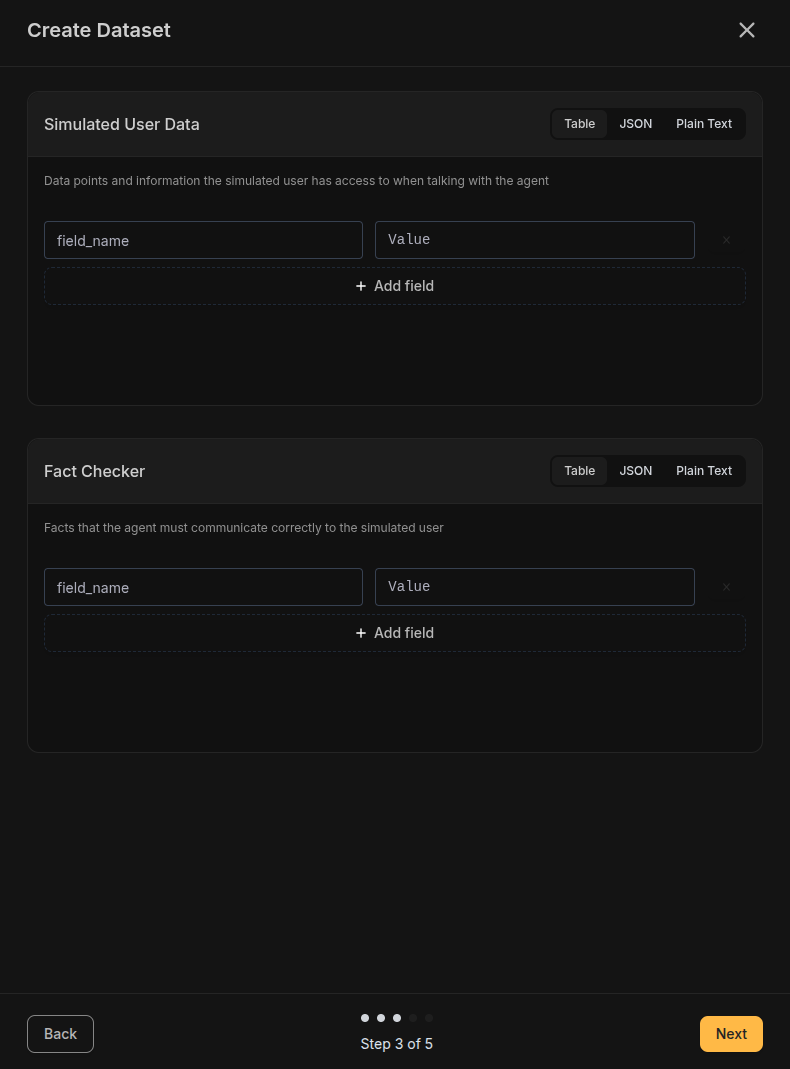 **Simulated User Data** — Provide context data that the simulated user can reference during the conversation. Available in Table, JSON, or Plain Text format.
**Example (Table)**:
| Key | Value |
| ----------------- | ------------------------- |
| order\_number | ORD-123456 |
| purchase\_date | 2024-01-15 |
| product\_name | Wireless Headphones |
| order\_total | \$129.99 |
| shipping\_address | 123 Main St, New York, NY |
**Example (JSON)**:
```json theme={null}
{
"order_number": "ORD-123456",
"purchase_date": "2024-01-15",
"product_name": "Wireless Headphones",
"order_total": "$129.99",
"shipping_address": "123 Main St, New York, NY"
}
```
**Fact Checker** — Specify facts that the agent MUST communicate correctly. These are used by evaluators to verify accuracy.
**Example (Table)**:
| Fact | Expected Value |
| ------------------------ | ------------------------- |
| refund\_processing\_time | 5-7 business days |
| refund\_method | Original payment method |
| return\_label\_delivery | Within 24 hours via email |
**Example (JSON)**:
```json theme={null}
{
"refund_processing_time": "5-7 business days",
"refund_method": "Original payment method",
"return_label_delivery": "Within 24 hours via email"
}
```
**JSON Validation**: When using JSON format, ensure there are no duplicate
keys. The system validates JSON structure before allowing you to proceed.
**Simulated User Data** — Provide context data that the simulated user can reference during the conversation. Available in Table, JSON, or Plain Text format.
**Example (Table)**:
| Key | Value |
| ----------------- | ------------------------- |
| order\_number | ORD-123456 |
| purchase\_date | 2024-01-15 |
| product\_name | Wireless Headphones |
| order\_total | \$129.99 |
| shipping\_address | 123 Main St, New York, NY |
**Example (JSON)**:
```json theme={null}
{
"order_number": "ORD-123456",
"purchase_date": "2024-01-15",
"product_name": "Wireless Headphones",
"order_total": "$129.99",
"shipping_address": "123 Main St, New York, NY"
}
```
**Fact Checker** — Specify facts that the agent MUST communicate correctly. These are used by evaluators to verify accuracy.
**Example (Table)**:
| Fact | Expected Value |
| ------------------------ | ------------------------- |
| refund\_processing\_time | 5-7 business days |
| refund\_method | Original payment method |
| return\_label\_delivery | Within 24 hours via email |
**Example (JSON)**:
```json theme={null}
{
"refund_processing_time": "5-7 business days",
"refund_method": "Original payment method",
"return_label_delivery": "Within 24 hours via email"
}
```
**JSON Validation**: When using JSON format, ensure there are no duplicate
keys. The system validates JSON structure before allowing you to proceed.
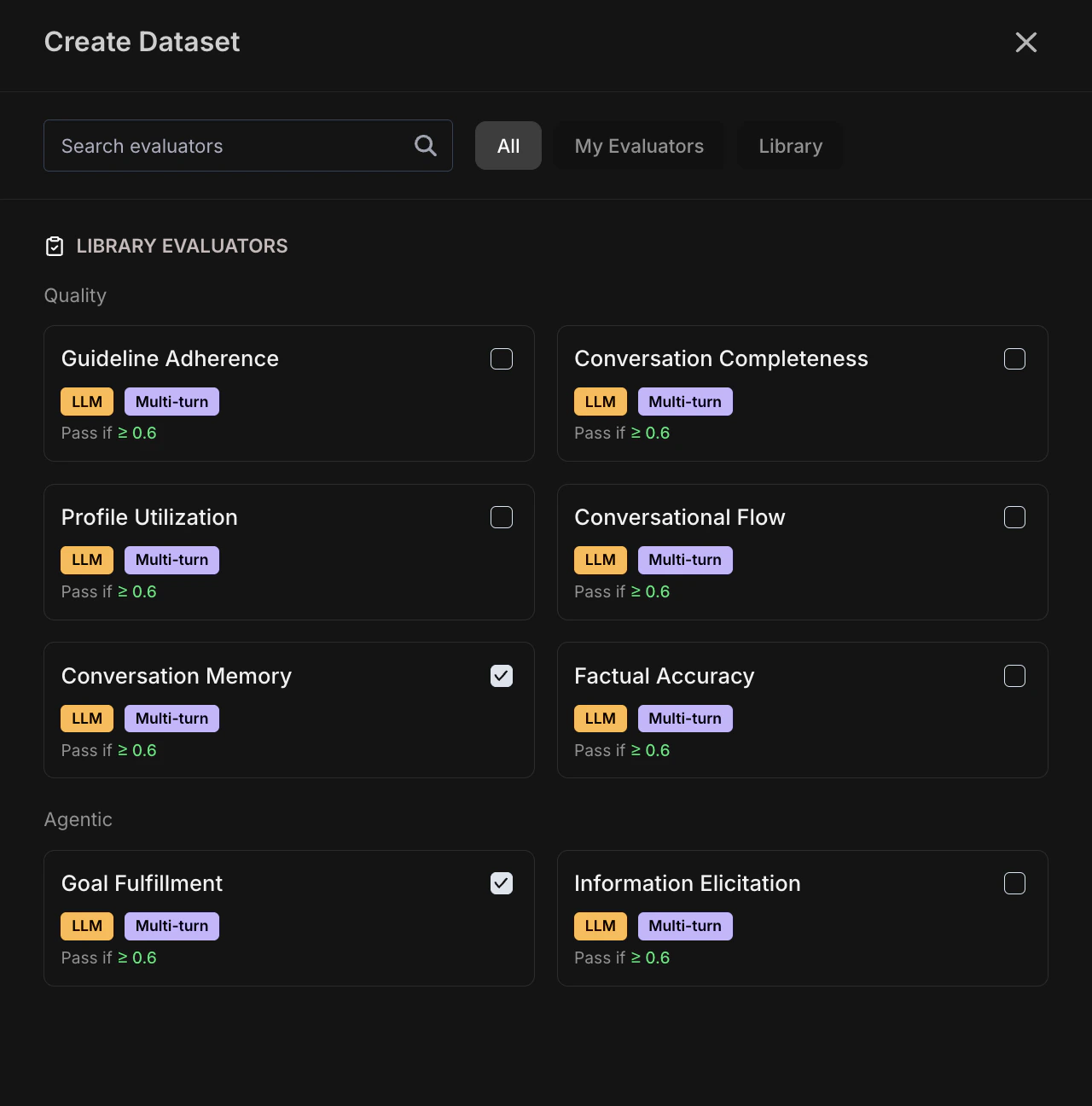 Select [evaluators](/Simulation/Evaluators) from Netra's library of session-level evaluators across two categories:
**Recommended Evaluators**:
* **Agentic**: Goal Fulfillment, Information Elicitation
* **Quality**: Factual Accuracy, Conversation Completeness, Guideline Adherence
Configure variable mappings to connect evaluator inputs to your data:
* **Scenario fields**: Goal, persona, user data
* **Agent response**: What the agent said in each turn
* **Conversation metadata**: Turn index, conversation history
* **Execution data**: Latency, tokens, model
Select [evaluators](/Simulation/Evaluators) from Netra's library of session-level evaluators across two categories:
**Recommended Evaluators**:
* **Agentic**: Goal Fulfillment, Information Elicitation
* **Quality**: Factual Accuracy, Conversation Completeness, Guideline Adherence
Configure variable mappings to connect evaluator inputs to your data:
* **Scenario fields**: Goal, persona, user data
* **Agent response**: What the agent said in each turn
* **Conversation metadata**: Turn index, conversation history
* **Execution data**: Latency, tokens, model
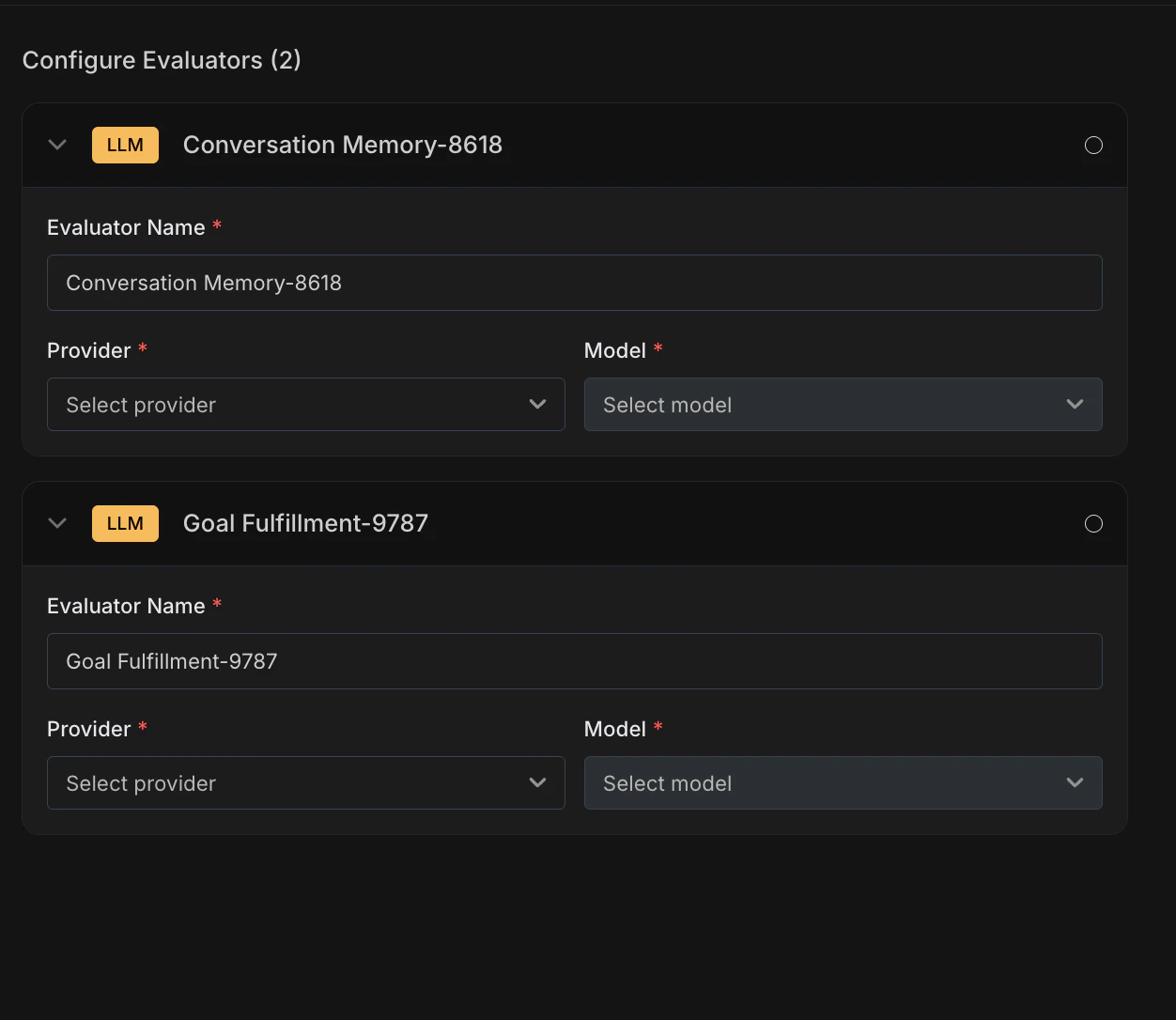 When you select evaluators from the library, Netra clones them and adds them to **My Evaluators**. Configure each cloned evaluator:
* **Rename** (optional) — Rename any evaluator to match your use case (e.g., "Refund Goal Fulfillment" instead of "Goal Fulfillment")
* **Select Provider and Model** — For each evaluator, choose the **provider** and **model** that will run the LLM-as-Judge evaluation (e.g., OpenAI / GPT-4.1)
Review all configurations, then click **Create Dataset** to finalize. Your simulation dataset is now ready to run.
## Running a Simulation
Once your dataset is configured, you can run simulations:
Open your dataset and copy the **Dataset ID** displayed at the top of the page.
When you select evaluators from the library, Netra clones them and adds them to **My Evaluators**. Configure each cloned evaluator:
* **Rename** (optional) — Rename any evaluator to match your use case (e.g., "Refund Goal Fulfillment" instead of "Goal Fulfillment")
* **Select Provider and Model** — For each evaluator, choose the **provider** and **model** that will run the LLM-as-Judge evaluation (e.g., OpenAI / GPT-4.1)
Review all configurations, then click **Create Dataset** to finalize. Your simulation dataset is now ready to run.
## Running a Simulation
Once your dataset is configured, you can run simulations:
Open your dataset and copy the **Dataset ID** displayed at the top of the page.
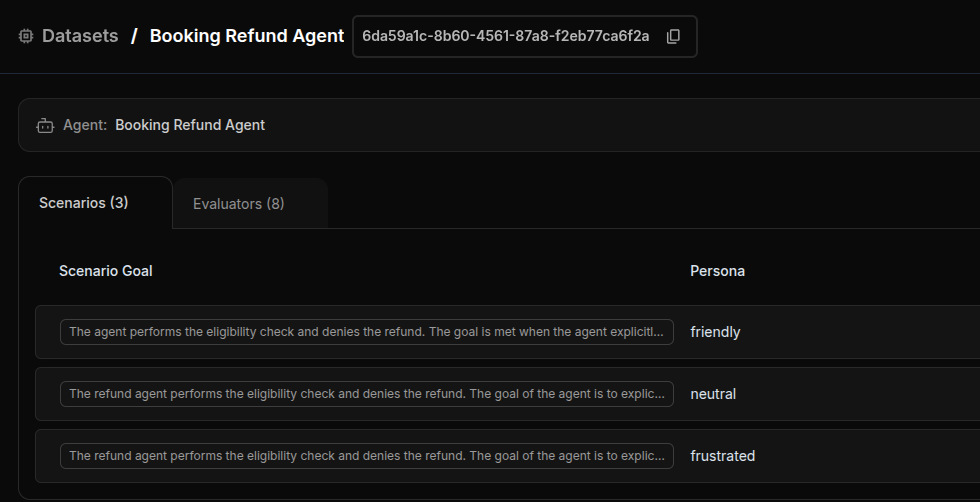 Use the Dataset ID in your simulation code. The simulation runs automatically
through the Netra SDK.
Monitor progress and results in [Test Runs](/Simulation/TestRuns).
Simulations execute automatically when the associated code is triggered. You
don't need to manually start each run—just ensure your agent code is
integrated with Netra.
## Best Practices
### Crafting Effective Scenarios
* **Be specific**: "Get a refund for a damaged product" is better than "Ask about returns"
* **Include context**: Provide enough detail for realistic simulation (order details, timeline, issue description)
* **Include edge cases**: Create scenarios that challenge your agent's boundaries
### Choosing User Personas
* **Neutral**: Best for baseline performance testing
* **Friendly**: Tests whether your agent maintains professionalism even when not challenged
* **Frustrated**: Critical for customer support agents—tests patience and de-escalation
* **Confused**: Tests clarity and explanation quality
* **Custom**: Use for industry-specific personas (technical users, non-native speakers, etc.)
### Defining User Data
* **Provide realistic data**: Use representative order numbers, dates, and values
* **Include edge cases**: Test with missing fields, unusual values, or conflicting data
* **Keep it relevant**: Only include data that matters for the scenario
* **Use consistent formats**: Standardize date formats, currency, and naming
### Setting Fact Checkers
* **Focus on critical facts**: What MUST the agent communicate correctly?
* **Be precise**: "5-7 business days" is better than "about a week"
* **Test compliance**: Include regulatory or policy-critical information
* **Verify, don't duplicate**: Don't repeat information already in user data
## Related
* [Simulation Overview](/Simulation/Simulation-overview) - Understand the full simulation framework
* [Evaluators](/Simulation/Evaluators) - Configure scoring logic for simulations
* [Test Runs](/Simulation/TestRuns) - View simulation results and conversation transcripts
* [Traces](/Observability/Traces/overview) - Debug simulation turns with execution traces
Use the Dataset ID in your simulation code. The simulation runs automatically
through the Netra SDK.
Monitor progress and results in [Test Runs](/Simulation/TestRuns).
Simulations execute automatically when the associated code is triggered. You
don't need to manually start each run—just ensure your agent code is
integrated with Netra.
## Best Practices
### Crafting Effective Scenarios
* **Be specific**: "Get a refund for a damaged product" is better than "Ask about returns"
* **Include context**: Provide enough detail for realistic simulation (order details, timeline, issue description)
* **Include edge cases**: Create scenarios that challenge your agent's boundaries
### Choosing User Personas
* **Neutral**: Best for baseline performance testing
* **Friendly**: Tests whether your agent maintains professionalism even when not challenged
* **Frustrated**: Critical for customer support agents—tests patience and de-escalation
* **Confused**: Tests clarity and explanation quality
* **Custom**: Use for industry-specific personas (technical users, non-native speakers, etc.)
### Defining User Data
* **Provide realistic data**: Use representative order numbers, dates, and values
* **Include edge cases**: Test with missing fields, unusual values, or conflicting data
* **Keep it relevant**: Only include data that matters for the scenario
* **Use consistent formats**: Standardize date formats, currency, and naming
### Setting Fact Checkers
* **Focus on critical facts**: What MUST the agent communicate correctly?
* **Be precise**: "5-7 business days" is better than "about a week"
* **Test compliance**: Include regulatory or policy-critical information
* **Verify, don't duplicate**: Don't repeat information already in user data
## Related
* [Simulation Overview](/Simulation/Simulation-overview) - Understand the full simulation framework
* [Evaluators](/Simulation/Evaluators) - Configure scoring logic for simulations
* [Test Runs](/Simulation/TestRuns) - View simulation results and conversation transcripts
* [Traces](/Observability/Traces/overview) - Debug simulation turns with execution traces