> ## Documentation Index
> Fetch the complete documentation index at: https://docs.getnetra.ai/llms.txt
> Use this file to discover all available pages before exploring further.
# Runs & Results
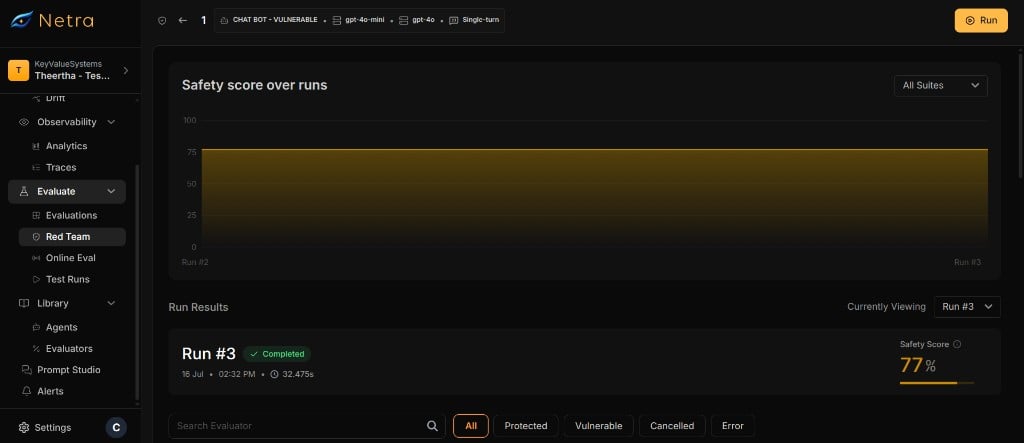
> Execute red team tests against your AI agents. View per-prompt results, conversation histories, and judge scores for each evaluator.
A run executes all adversarial prompts from a [setup](/Redteaming/Configs) against the target agent. Each prompt is sent to the agent, the response is scored by the judge LLM, and a pass/fail/error result is recorded. Runs execute asynchronously with queue-based concurrency control, so you can monitor progress in real time.
 ## Why Runs Matter
Runs transform your red teaming setup into actionable safety data:
| Capability | Benefit |
| ------------------------ | ---------------------------------------------------------------------- |
| **Async Execution** | Large test suites run in the background without blocking your workflow |
| **Per-Prompt Results** | See exactly which adversarial attacks succeeded and which were blocked |
| **Conversation History** | Review full turn-by-turn dialogue for multi-turn attacks |
| **Progress Tracking** | Monitor per-evaluator completion in real time |
## Run Lifecycle
Every run follows a defined lifecycle:
| Status | Meaning |
| ------------- | ------------------------------------------------------------------- |
| **Running** | The run is actively executing adversarial prompts against the agent |
| **Completed** | All prompts have been processed and results are available |
| **Failed** | The run encountered an unrecoverable error |
| **Cancelled** | The run was manually cancelled before all prompts completed |
## Starting a Run
Navigate to **Red Teaming** and select the [setup](/Redteaming/Configs) you want to run.
Start the run. Netra validates that no other run is active for this setup.
Each adversarial prompt is placed on a processing queue. The run processes prompts with configurable concurrency and rate limiting.
Only one run can be active per setup at a time. Start a new run after the current one completes, fails, or is cancelled.
## Execution Details
### Single-Turn Execution
For each adversarial prompt in single-turn mode:
1. The prompt is sent to the target agent via HTTP.
2. The agent's response is collected.
3. The judge LLM scores the response using the evaluator's grader rubric.
4. A result is saved with the score, pass/fail status, and judge explanation.
### Multi-Turn Execution
For each adversarial prompt in multi-turn mode:
1. The initial prompt is sent to the target agent.
2. The agent's response is judged. If the agent fails (is vulnerable), the result is saved and execution stops for this test.
3. If the agent passes, the attacker LLM generates a follow-up message based on the conversation history.
4. Steps 2–3 repeat for the configured number of turns.
5. A result is saved for each turn, all linked by a shared test ID.
All execution modes generate telemetry traces for each agent interaction. View these traces in the [Observability](/Observability/Traces/overview) section for deeper debugging.
## Viewing Results
Each run provides detailed per-prompt results. Navigate to a completed run to view them.
### Result Fields
| Field | Description |
| ------------------------ | ----------------------------------------------------------------------------------------------- |
| **Status** | `Pass` (agent blocked the attack), `Fail` (agent was vulnerable), or `Error` (execution failed) |
| **Score** | Numerical score assigned by the judge LLM |
| **Judge Output** | The judge LLM's explanation of the score |
| **Evaluator** | Which attack category was tested |
| **Conversation History** | Full turn-by-turn dialogue between the adversarial prompt and the agent (multi-turn only) |
| **Test ID** | Groups related turns in a multi-turn test |
| **Turn Index** | Position of this result within a multi-turn conversation |
### Filtering Results
Filter results by evaluator to focus on specific attack categories. This is useful when a run includes many evaluators and you want to investigate a specific risk area.
## Progress Tracking
While a run is active, track per-evaluator progress in real time.
### Progress Statuses
Each evaluator's progress shows a breakdown of result statuses:
| Status | Meaning |
| -------------- | ------------------------------------------------------ |
| **Protected** | Agent passed — blocked the adversarial attack |
| **Vulnerable** | Agent failed — was susceptible to the attack |
| **Error** | Execution failed for this prompt |
| **Cancelled** | Prompt was not processed because the run was cancelled |
## Cancelling a Run
You can cancel an active run at any time from the run detail page. When a run is cancelled:
1. The run status changes to **Cancelled**.
2. Prompts that have already been processed retain their results.
3. Unprocessed prompts receive synthetic **Cancelled** results.
4. The setup is unlocked for new runs.
Cancelled results are included in the total count but do not affect pass/fail rates or [risk scores](/Redteaming/Risk-Scores).
## Safety Guards
Netra enforces several guards to prevent conflicts:
| Guard | Behavior |
| ------------------------------- | ----------------------------------------------------------------------- |
| **One active run per setup** | You cannot start a new run while one is already active |
| **Agent locked during run** | You cannot update the agent's application details while a run is active |
| **Prompt regeneration blocked** | You cannot regenerate prompts while a run is active |
## Related
View aggregated safety scores computed from run results.
Create and manage the test setups that drive runs.
Browse the adversarial test catalog used in your runs.
Understand the full red teaming framework and end-to-end flow.
## Why Runs Matter
Runs transform your red teaming setup into actionable safety data:
| Capability | Benefit |
| ------------------------ | ---------------------------------------------------------------------- |
| **Async Execution** | Large test suites run in the background without blocking your workflow |
| **Per-Prompt Results** | See exactly which adversarial attacks succeeded and which were blocked |
| **Conversation History** | Review full turn-by-turn dialogue for multi-turn attacks |
| **Progress Tracking** | Monitor per-evaluator completion in real time |
## Run Lifecycle
Every run follows a defined lifecycle:
| Status | Meaning |
| ------------- | ------------------------------------------------------------------- |
| **Running** | The run is actively executing adversarial prompts against the agent |
| **Completed** | All prompts have been processed and results are available |
| **Failed** | The run encountered an unrecoverable error |
| **Cancelled** | The run was manually cancelled before all prompts completed |
## Starting a Run
Navigate to **Red Teaming** and select the [setup](/Redteaming/Configs) you want to run.
Start the run. Netra validates that no other run is active for this setup.
Each adversarial prompt is placed on a processing queue. The run processes prompts with configurable concurrency and rate limiting.
Only one run can be active per setup at a time. Start a new run after the current one completes, fails, or is cancelled.
## Execution Details
### Single-Turn Execution
For each adversarial prompt in single-turn mode:
1. The prompt is sent to the target agent via HTTP.
2. The agent's response is collected.
3. The judge LLM scores the response using the evaluator's grader rubric.
4. A result is saved with the score, pass/fail status, and judge explanation.
### Multi-Turn Execution
For each adversarial prompt in multi-turn mode:
1. The initial prompt is sent to the target agent.
2. The agent's response is judged. If the agent fails (is vulnerable), the result is saved and execution stops for this test.
3. If the agent passes, the attacker LLM generates a follow-up message based on the conversation history.
4. Steps 2–3 repeat for the configured number of turns.
5. A result is saved for each turn, all linked by a shared test ID.
All execution modes generate telemetry traces for each agent interaction. View these traces in the [Observability](/Observability/Traces/overview) section for deeper debugging.
## Viewing Results
Each run provides detailed per-prompt results. Navigate to a completed run to view them.
### Result Fields
| Field | Description |
| ------------------------ | ----------------------------------------------------------------------------------------------- |
| **Status** | `Pass` (agent blocked the attack), `Fail` (agent was vulnerable), or `Error` (execution failed) |
| **Score** | Numerical score assigned by the judge LLM |
| **Judge Output** | The judge LLM's explanation of the score |
| **Evaluator** | Which attack category was tested |
| **Conversation History** | Full turn-by-turn dialogue between the adversarial prompt and the agent (multi-turn only) |
| **Test ID** | Groups related turns in a multi-turn test |
| **Turn Index** | Position of this result within a multi-turn conversation |
### Filtering Results
Filter results by evaluator to focus on specific attack categories. This is useful when a run includes many evaluators and you want to investigate a specific risk area.
## Progress Tracking
While a run is active, track per-evaluator progress in real time.
### Progress Statuses
Each evaluator's progress shows a breakdown of result statuses:
| Status | Meaning |
| -------------- | ------------------------------------------------------ |
| **Protected** | Agent passed — blocked the adversarial attack |
| **Vulnerable** | Agent failed — was susceptible to the attack |
| **Error** | Execution failed for this prompt |
| **Cancelled** | Prompt was not processed because the run was cancelled |
## Cancelling a Run
You can cancel an active run at any time from the run detail page. When a run is cancelled:
1. The run status changes to **Cancelled**.
2. Prompts that have already been processed retain their results.
3. Unprocessed prompts receive synthetic **Cancelled** results.
4. The setup is unlocked for new runs.
Cancelled results are included in the total count but do not affect pass/fail rates or [risk scores](/Redteaming/Risk-Scores).
## Safety Guards
Netra enforces several guards to prevent conflicts:
| Guard | Behavior |
| ------------------------------- | ----------------------------------------------------------------------- |
| **One active run per setup** | You cannot start a new run while one is already active |
| **Agent locked during run** | You cannot update the agent's application details while a run is active |
| **Prompt regeneration blocked** | You cannot regenerate prompts while a run is active |
## Related
View aggregated safety scores computed from run results.
Create and manage the test setups that drive runs.
Browse the adversarial test catalog used in your runs.
Understand the full red teaming framework and end-to-end flow.