> ## Documentation Index
> Fetch the complete documentation index at: https://docs.getnetra.ai/llms.txt
> Use this file to discover all available pages before exploring further.
# Users
> Track individual end users interacting with your AI app in Netra. Associate traces with user IDs to analyze behavior, costs, and quality per user.
The Users view in Netra provides a list of all end users who have interacted with your AI applications. It helps you understand user activity, correlate behavior with system usage, and debug user-specific issues.
## Viewing Users
Access the Users view from **Observability → Users** in the Netra dashboard.
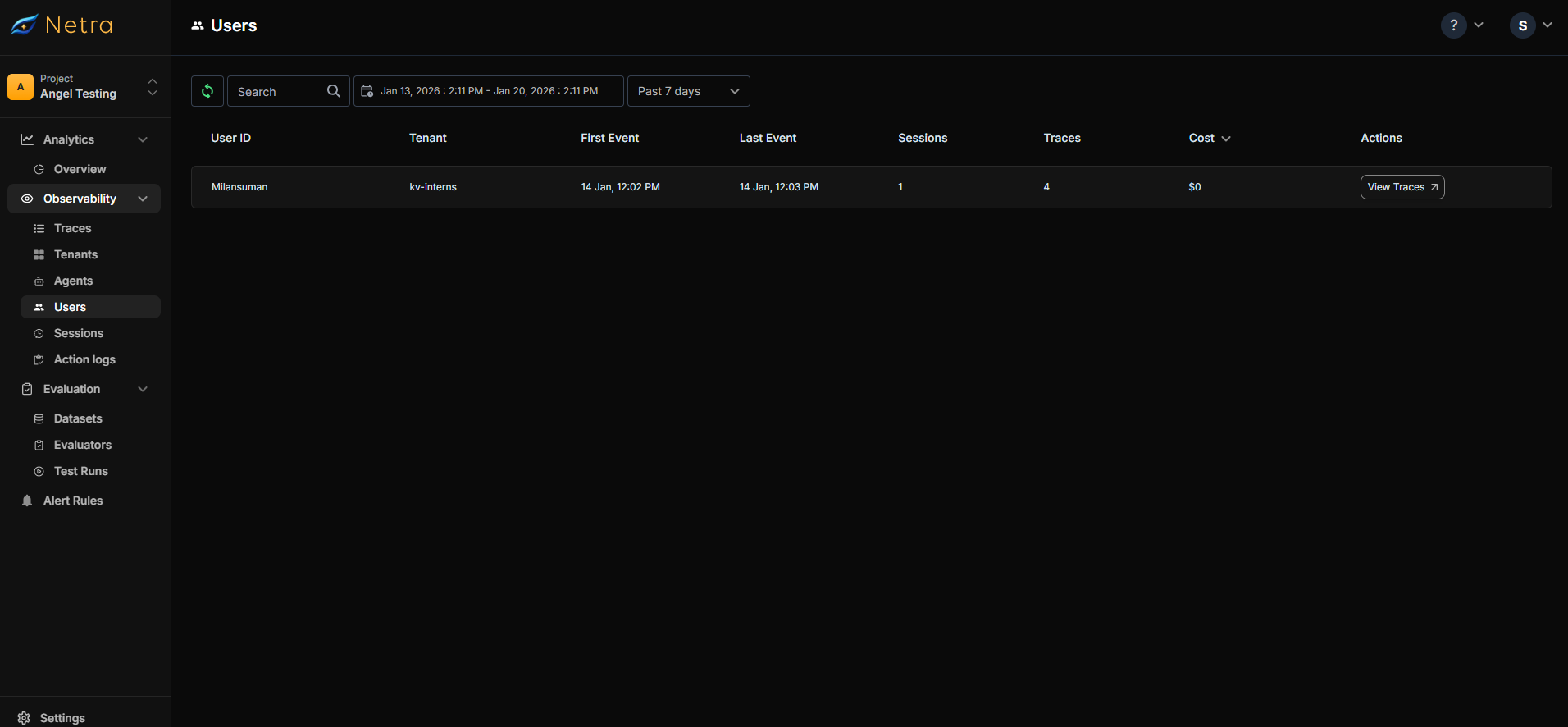 For each user, Netra displays:
| Field | Description |
| --------------------- | ----------------------------------------------- |
| **User ID** | The identifier you assigned via `setUserId()` |
| **Tenant** | The tenant this user belongs to (if configured) |
| **First Interaction** | When the user first interacted with the system |
| **Last Interaction** | When the user was most recently active |
| **Sessions** | Number of sessions generated by this user |
| **Traces** | Total number of traces from this user |
| **Total Cost** | Estimated cost incurred by this user's activity |
### User Actions
Each user entry provides:
* **View Traces** - Opens the Traces view filtered to this user, showing all their requests and executions
## Configuring User Tracking
User tracking is configured by calling `setUserId()` in your application code. Once set, all subsequent traces will be associated with that user.
### Setting the User ID
Call `setUserId()` after initializing Netra and when you know the user's identity (e.g., after authentication):
```python Python theme={null}
from netra import Netra
# Initialize Netra
Netra.init(
app_name="my-ai-app",
environment="production",
)
# After user authentication
def on_user_login(user):
Netra.set_user_id(user.id)
# All subsequent traces will be associated with this user
response = openai.chat.completions.create(
model="gpt-4",
messages=[{"role": "user", "content": query}],
)
```
```typescript TypeScript theme={null}
import { Netra } from "netra-sdk";
// Initialize Netra
await Netra.init({
appName: "my-ai-app",
environment: "production",
});
// After user authentication
function onUserLogin(user: User) {
Netra.setUserId(user.id);
}
// All subsequent traces will be associated with this user
const response = await openai.chat.completions.create({
model: "gpt-4",
messages: [{ role: "user", content: query }],
});
```
### User ID in Web Frameworks
For web applications, set the user ID in your request middleware:
```python Python (FastAPI) theme={null}
from netra import Netra
from fastapi import FastAPI, Depends, Request
app = FastAPI()
async def set_user_context(request: Request):
if hasattr(request.state, "user") and request.state.user:
Netra.set_user_id(request.state.user.id)
@app.post("/api/chat")
async def chat(message: str, _=Depends(set_user_context)):
# This trace will be associated with the authenticated user
response = await process_chat(message)
return response
```
```typescript TypeScript (Express) theme={null}
import { Netra } from "netra-sdk";
import express from "express";
const app = express();
// Middleware to set user context
app.use((req, res, next) => {
if (req.user?.id) {
Netra.setUserId(req.user.id);
}
next();
});
app.post("/api/chat", async (req, res) => {
// This trace will be associated with the authenticated user
const response = await processChat(req.body.message);
res.json(response);
});
```
### Combining with Tenant and Session
For multi-tenant applications, combine user tracking with tenant and session IDs:
```python Python theme={null}
from netra import Netra
def initialize_user_context(user, tenant, session_id: str):
# Set all context attributes
Netra.set_user_id(user.id)
Netra.set_tenant_id(tenant.id)
Netra.set_session_id(session_id)
# Optionally add custom attributes
Netra.set_custom_attributes("user.plan", user.plan)
Netra.set_custom_attributes("user.region", user.region)
# All traces will now include user, tenant, and session context
```
```typescript TypeScript theme={null}
import { Netra } from "netra-sdk";
function initializeUserContext(user: User, tenant: Tenant, sessionId: string) {
// Set all context attributes
Netra.setUserId(user.id);
Netra.setTenantId(tenant.id);
Netra.setSessionId(sessionId);
// Optionally add custom attributes
Netra.setCustomAttributes("user.plan", user.plan);
Netra.setCustomAttributes("user.region", user.region);
}
// All traces will now include user, tenant, and session context
```
## User Context Methods
| Method | Description |
| --------------------------------- | ------------------------------------------------------ |
| `setUserId(userId)` | Associate traces with a user identifier |
| `setTenantId(tenantId)` | Associate traces with a tenant (for multi-tenant apps) |
| `setSessionId(sessionId)` | Group traces into a session |
| `setCustomAttributes(key, value)` | Add custom metadata to traces |
## Use Cases
### Per-User Cost Analysis
Track costs incurred by each user to understand usage patterns and implement usage-based billing:
1. Navigate to **Observability → Users**
2. Sort by **Total Cost** to find highest-cost users
3. Click **View Traces** to understand their usage patterns
### Debugging User-Specific Issues
When a user reports an issue:
1. Search for the user by their ID
2. Click **View Traces** to see their recent activity
3. Identify failed or slow traces
4. Drill into specific traces to debug
### User Activity Monitoring
Track user engagement with your AI features:
* **Sessions count** - How often users return
* **Traces count** - How much they use AI features
* **Last interaction** - When they were last active
## Best Practices
1. **Use stable user IDs** - Use your application's user ID, not ephemeral session tokens
2. **Set user ID early** - Call `setUserId()` as soon as authentication completes
3. **Handle anonymous users** - For unauthenticated users, consider using a consistent anonymous ID or skip user tracking
4. **Combine with sessions** - Use session IDs to group related traces within a user's activity
5. **Add relevant attributes** - Include user plan, region, or other attributes useful for analysis
## Privacy Considerations
* User IDs are stored in Netra and appear in the dashboard
* Avoid using PII (email, name) as user IDs—use opaque identifiers instead
* Consider your data retention requirements when storing user activity
## Next Steps
* [Sessions](/Observability/Session) - Group user interactions into sessions
* [Tenants](/Observability/Tenants) - Multi-tenant user organization
* [Traces Overview](/Observability/Traces/overview) - Understanding trace data
For each user, Netra displays:
| Field | Description |
| --------------------- | ----------------------------------------------- |
| **User ID** | The identifier you assigned via `setUserId()` |
| **Tenant** | The tenant this user belongs to (if configured) |
| **First Interaction** | When the user first interacted with the system |
| **Last Interaction** | When the user was most recently active |
| **Sessions** | Number of sessions generated by this user |
| **Traces** | Total number of traces from this user |
| **Total Cost** | Estimated cost incurred by this user's activity |
### User Actions
Each user entry provides:
* **View Traces** - Opens the Traces view filtered to this user, showing all their requests and executions
## Configuring User Tracking
User tracking is configured by calling `setUserId()` in your application code. Once set, all subsequent traces will be associated with that user.
### Setting the User ID
Call `setUserId()` after initializing Netra and when you know the user's identity (e.g., after authentication):
```python Python theme={null}
from netra import Netra
# Initialize Netra
Netra.init(
app_name="my-ai-app",
environment="production",
)
# After user authentication
def on_user_login(user):
Netra.set_user_id(user.id)
# All subsequent traces will be associated with this user
response = openai.chat.completions.create(
model="gpt-4",
messages=[{"role": "user", "content": query}],
)
```
```typescript TypeScript theme={null}
import { Netra } from "netra-sdk";
// Initialize Netra
await Netra.init({
appName: "my-ai-app",
environment: "production",
});
// After user authentication
function onUserLogin(user: User) {
Netra.setUserId(user.id);
}
// All subsequent traces will be associated with this user
const response = await openai.chat.completions.create({
model: "gpt-4",
messages: [{ role: "user", content: query }],
});
```
### User ID in Web Frameworks
For web applications, set the user ID in your request middleware:
```python Python (FastAPI) theme={null}
from netra import Netra
from fastapi import FastAPI, Depends, Request
app = FastAPI()
async def set_user_context(request: Request):
if hasattr(request.state, "user") and request.state.user:
Netra.set_user_id(request.state.user.id)
@app.post("/api/chat")
async def chat(message: str, _=Depends(set_user_context)):
# This trace will be associated with the authenticated user
response = await process_chat(message)
return response
```
```typescript TypeScript (Express) theme={null}
import { Netra } from "netra-sdk";
import express from "express";
const app = express();
// Middleware to set user context
app.use((req, res, next) => {
if (req.user?.id) {
Netra.setUserId(req.user.id);
}
next();
});
app.post("/api/chat", async (req, res) => {
// This trace will be associated with the authenticated user
const response = await processChat(req.body.message);
res.json(response);
});
```
### Combining with Tenant and Session
For multi-tenant applications, combine user tracking with tenant and session IDs:
```python Python theme={null}
from netra import Netra
def initialize_user_context(user, tenant, session_id: str):
# Set all context attributes
Netra.set_user_id(user.id)
Netra.set_tenant_id(tenant.id)
Netra.set_session_id(session_id)
# Optionally add custom attributes
Netra.set_custom_attributes("user.plan", user.plan)
Netra.set_custom_attributes("user.region", user.region)
# All traces will now include user, tenant, and session context
```
```typescript TypeScript theme={null}
import { Netra } from "netra-sdk";
function initializeUserContext(user: User, tenant: Tenant, sessionId: string) {
// Set all context attributes
Netra.setUserId(user.id);
Netra.setTenantId(tenant.id);
Netra.setSessionId(sessionId);
// Optionally add custom attributes
Netra.setCustomAttributes("user.plan", user.plan);
Netra.setCustomAttributes("user.region", user.region);
}
// All traces will now include user, tenant, and session context
```
## User Context Methods
| Method | Description |
| --------------------------------- | ------------------------------------------------------ |
| `setUserId(userId)` | Associate traces with a user identifier |
| `setTenantId(tenantId)` | Associate traces with a tenant (for multi-tenant apps) |
| `setSessionId(sessionId)` | Group traces into a session |
| `setCustomAttributes(key, value)` | Add custom metadata to traces |
## Use Cases
### Per-User Cost Analysis
Track costs incurred by each user to understand usage patterns and implement usage-based billing:
1. Navigate to **Observability → Users**
2. Sort by **Total Cost** to find highest-cost users
3. Click **View Traces** to understand their usage patterns
### Debugging User-Specific Issues
When a user reports an issue:
1. Search for the user by their ID
2. Click **View Traces** to see their recent activity
3. Identify failed or slow traces
4. Drill into specific traces to debug
### User Activity Monitoring
Track user engagement with your AI features:
* **Sessions count** - How often users return
* **Traces count** - How much they use AI features
* **Last interaction** - When they were last active
## Best Practices
1. **Use stable user IDs** - Use your application's user ID, not ephemeral session tokens
2. **Set user ID early** - Call `setUserId()` as soon as authentication completes
3. **Handle anonymous users** - For unauthenticated users, consider using a consistent anonymous ID or skip user tracking
4. **Combine with sessions** - Use session IDs to group related traces within a user's activity
5. **Add relevant attributes** - Include user plan, region, or other attributes useful for analysis
## Privacy Considerations
* User IDs are stored in Netra and appear in the dashboard
* Avoid using PII (email, name) as user IDs—use opaque identifiers instead
* Consider your data retention requirements when storing user activity
## Next Steps
* [Sessions](/Observability/Session) - Group user interactions into sessions
* [Tenants](/Observability/Tenants) - Multi-tenant user organization
* [Traces Overview](/Observability/Traces/overview) - Understanding trace data