> ## Documentation Index
> Fetch the complete documentation index at: https://docs.getnetra.ai/llms.txt
> Use this file to discover all available pages before exploring further.
# Spans
> Learn about span types, attributes, and hierarchy in Netra traces. Understand GENERATION, TOOL, AGENT, and EMBEDDING spans for AI observability.
A span represents a single unit of execution within a trace. Each span captures a discrete operation performed during a request lifecycle, such as an API call, model invocation, or tool execution, along with its timing, cost, and execution context.
Spans are organized hierarchically within a trace, allowing you to understand how individual operations contribute to overall latency, cost, and system behavior.
## Span Types
Netra supports five span types, each designed to categorize specific kinds of operations:
| Span Type | Enum Value | Description | Use Case |
| -------------- | --------------------- | ----------------------------------- | ----------------------------------------------------------- |
| **Span** | `SpanType.SPAN` | Default type for general operations | Function calls, business logic, generic operations |
| **Generation** | `SpanType.GENERATION` | LLM text or image generation | Chat completions, text generation, image generation |
| **Embedding** | `SpanType.EMBEDDING` | Vector embedding operations | Text-to-vector conversions, embedding API calls |
| **Tool** | `SpanType.TOOL` | Tool or function execution | Function calls, API requests, database queries |
| **Agent** | `SpanType.AGENT` | AI agent reasoning or decisions | Agent orchestration, multi-step reasoning, autonomous tasks |
### When to Use Each Type
**Span (Default)**
* General-purpose operations that don't fit other categories
* Business logic and data processing
* Workflow orchestration steps
**Generation**
* OpenAI, Anthropic, or other LLM completions
* Image generation (DALL-E, Stable Diffusion)
* Text-to-speech or speech-to-text operations
**Embedding**
* Converting text to vectors for similarity search
* Embedding API calls (OpenAI embeddings, Cohere embed)
* Document embedding pipelines
**Tool**
* External API calls
* Database operations
* File system operations
* Any function that performs a specific action
**Agent**
* AI agents making autonomous decisions
* ReAct-style reasoning loops
* Multi-step task execution
* Agent frameworks (LangGraph, CrewAI, AutoGen)
### Specifying Span Types
When creating manual spans, specify the type using the `as_type` parameter:
```python Python theme={null}
from netra import Netra, SpanType
# Generation span for LLM calls
with Netra.start_span("chat-completion", as_type=SpanType.GENERATION) as span:
pass
# Embedding span for vector operations
with Netra.start_span("generate-embedding", as_type=SpanType.EMBEDDING) as span:
pass
# Tool span for function calls
with Netra.start_span("search-database", as_type=SpanType.TOOL) as span:
pass
# Agent span for AI agents
with Netra.start_span("research-agent", as_type=SpanType.AGENT) as span:
pass
```
```typescript TypeScript theme={null}
import { Netra, SpanType } from "netra-sdk";
// Generation span for LLM calls
const genSpan = Netra.startSpan("chat-completion", {}, undefined, SpanType.GENERATION);
// Embedding span for vector operations
const embedSpan = Netra.startSpan("generate-embedding", {}, undefined, SpanType.EMBEDDING);
// Tool span for function calls
const toolSpan = Netra.startSpan("search-database", {}, undefined, SpanType.TOOL);
// Agent span for AI agents
const agentSpan = Netra.startSpan("research-agent", {}, undefined, SpanType.AGENT);
```
Auto-instrumentation automatically assigns the correct span type based on the operation. For example, OpenAI chat completions are automatically marked as `GENERATION` spans.
## Viewing Spans in Netra
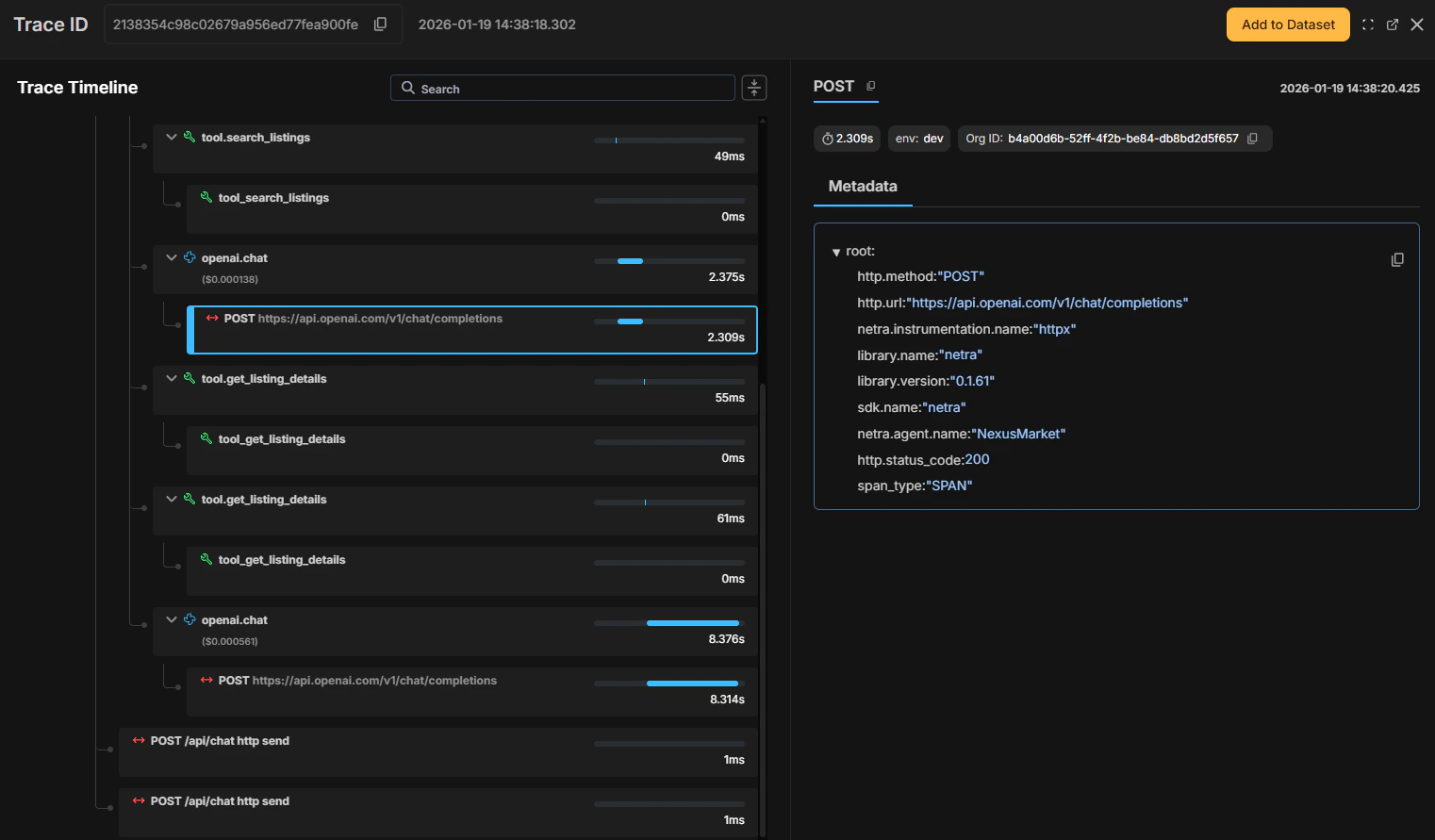
Netra displays spans within the Trace Timeline as a hierarchical view of all operations executed during a request. Selecting a span highlights it in the timeline and surfaces its details in the **Metadata** panel, allowing you to inspect execution context without leaving the trace.
Different span types are visually distinguished to help you quickly identify agent execution, model generations, and tool calls.
 ## Span Attributes
Each span in Netra captures attributes in the **Metadata** panel. Some attributes are common across all span types, while others are specific to certain types.
| Attribute | Description | Applies To |
| ---------------------------------------- | ------------------------------------------ | ---------- |
| `library.name` | Name of the tracing library | All |
| `library.version` | Version of the tracing library | All |
| `sdk.name` | Name of the SDK | All |
| `netra.session_id` | Session identifier (if specified) | All |
| `netra.user_id` | User identifier (if specified) | All |
| `netra.duration_ms` | Duration of the operation in milliseconds | All |
| `netra.status` | Success or error status | All |
| `span_type` | Type of the span | All |
| `netra.instrumentation.name` | LLM provider (e.g., "openai", "anthropic") | Generation |
| `gen_ai.request.model` | Model used for the request | Generation |
| `gen_ai.response.model` | Model returned in the response | Generation |
| `gen_ai.usage.prompt_tokens` | Number of input tokens | Generation |
| `gen_ai.usage.completion_tokens` | Number of output tokens | Generation |
| `llm.usage.total_tokens` | Total tokens used | Generation |
| `llm.response.duration` | Response time from the LLM | Generation |
| `gen_ai.performance.time_to_first_token` | Time to receive the first token | Generation |
| `netra.model` | The embedding model used | Embedding |
| `cost.total_usd` | Total cost in USD | Agent |
Generation spans also show additional data in **Chat Preview** including system prompt, user input, and assistant response.
### Custom Attributes
You can add custom attributes to any span for additional context using `set_attribute()` / `setAttribute()`. See [Manual Tracing](/Observability/Traces/manual-tracing#setting-span-attributes) for detailed examples of working with span attributes.
## Adding Spans to Datasets
Spans can be added to a dataset using **Add to Dataset** for reuse in evaluations and testing workflows. This is useful for:
* Building evaluation datasets from production data
* Creating test cases for regression testing
* Analyzing specific types of operations
See [Evaluations](/Evaluation/Evaluation-overview) for more details.
## Learn More
* [Manual Tracing](/Observability/Traces/manual-tracing) - Create custom spans with full control
* [Decorators](/Observability/Traces/decorators) - Use decorators for cleaner instrumentation
* [Auto Instrumentation](/Observability/Traces/auto-instrumentation) - Zero-code tracing for supported libraries
## Span Attributes
Each span in Netra captures attributes in the **Metadata** panel. Some attributes are common across all span types, while others are specific to certain types.
| Attribute | Description | Applies To |
| ---------------------------------------- | ------------------------------------------ | ---------- |
| `library.name` | Name of the tracing library | All |
| `library.version` | Version of the tracing library | All |
| `sdk.name` | Name of the SDK | All |
| `netra.session_id` | Session identifier (if specified) | All |
| `netra.user_id` | User identifier (if specified) | All |
| `netra.duration_ms` | Duration of the operation in milliseconds | All |
| `netra.status` | Success or error status | All |
| `span_type` | Type of the span | All |
| `netra.instrumentation.name` | LLM provider (e.g., "openai", "anthropic") | Generation |
| `gen_ai.request.model` | Model used for the request | Generation |
| `gen_ai.response.model` | Model returned in the response | Generation |
| `gen_ai.usage.prompt_tokens` | Number of input tokens | Generation |
| `gen_ai.usage.completion_tokens` | Number of output tokens | Generation |
| `llm.usage.total_tokens` | Total tokens used | Generation |
| `llm.response.duration` | Response time from the LLM | Generation |
| `gen_ai.performance.time_to_first_token` | Time to receive the first token | Generation |
| `netra.model` | The embedding model used | Embedding |
| `cost.total_usd` | Total cost in USD | Agent |
Generation spans also show additional data in **Chat Preview** including system prompt, user input, and assistant response.
### Custom Attributes
You can add custom attributes to any span for additional context using `set_attribute()` / `setAttribute()`. See [Manual Tracing](/Observability/Traces/manual-tracing#setting-span-attributes) for detailed examples of working with span attributes.
## Adding Spans to Datasets
Spans can be added to a dataset using **Add to Dataset** for reuse in evaluations and testing workflows. This is useful for:
* Building evaluation datasets from production data
* Creating test cases for regression testing
* Analyzing specific types of operations
See [Evaluations](/Evaluation/Evaluation-overview) for more details.
## Learn More
* [Manual Tracing](/Observability/Traces/manual-tracing) - Create custom spans with full control
* [Decorators](/Observability/Traces/decorators) - Use decorators for cleaner instrumentation
* [Auto Instrumentation](/Observability/Traces/auto-instrumentation) - Zero-code tracing for supported libraries