> ## Documentation Index
> Fetch the complete documentation index at: https://docs.getnetra.ai/llms.txt
> Use this file to discover all available pages before exploring further.
# Sessions
> Group and analyze related AI interactions with Netra session tracking. Monitor multi-turn conversations, costs, and user behavior in one session view.
The Sessions view in the Netra dashboard provides a centralized place to monitor user interactions, track custom events, and analyze session-level performance metrics. This section explains how to set up session tracking in your code and how to view and analyze sessions in the dashboard.
## Setting Up Session Tracking
Before viewing sessions in the dashboard, you need to set up session tracking in your application code.
### Initialize the Netra SDK
```python Python theme={null}
from netra import Netra
from netra.instrumentation.instruments import InstrumentSet
# Initialize with default settings
Netra.init(app_name="Your application name")
# Or with custom configuration
api_key = "Your API key"
headers = f"x-api-key={api_key}"
Netra.init(
app_name="Your application name",
headers=headers,
trace_content=True,
environment="Your Application environment",
instruments={InstrumentSet.OPENAI}
)
```
```typescript TypeScript theme={null}
import { Netra, NetraInstruments } from "netra-sdk";
// Initialize with default settings
await Netra.init({ appName: "Your application name" });
// Or with custom configuration
const apiKey = process.env.NETRA_API_KEY;
const headers = `x-api-key=${apiKey}`;
await Netra.init({
appName: "Your application name",
headers: headers,
traceContent: true,
environment: "Your Application environment",
instruments: new Set([NetraInstruments.OPENAI]),
});
```
### Set Session Identifiers
Track specific users, sessions, and tenants with unique identifiers:
```python Python theme={null}
# Set session identification
Netra.set_session_id("unique-session-id")
Netra.set_user_id("user-123")
Netra.set_tenant_id("tenant-456")
```
```typescript TypeScript theme={null}
// Set session identification
Netra.setSessionId("unique-session-id");
Netra.setUserId("user-123");
Netra.setTenantId("tenant-456");
```
### Add Custom Context Attributes
Enrich your session data with custom attributes for better analysis:
```python Python theme={null}
# Add custom context attributes
Netra.set_custom_attributes(key="customer_tier", value="premium")
Netra.set_custom_attributes(key="region", value="us-east")
Netra.set_custom_attributes(key="plan_type", value="enterprise")
```
```typescript TypeScript theme={null}
// Add custom context attributes
Netra.setCustomAttributes({ key: "customer_tier", value: "premium" });
Netra.setCustomAttributes({ key: "region", value: "us-east" });
Netra.setCustomAttributes({ key: "plan_type", value: "enterprise" });
```
### Record Custom Events
Track important business and technical events:
```python Python theme={null}
# Record user feedback event
Netra.set_custom_event(event_name="user_feedback", attributes={
"rating": 5,
"comment": "Great response!",
"timestamp": "2024-01-15T10:30:00Z",
"category": "positive"
})
# Record conversion event
Netra.set_custom_event(event_name="conversion", attributes={
"type": "subscription",
"plan": "premium",
"value": 99.99,
"currency": "USD",
"source": "website",
"campaign": "spring_sale"
})
# Record error event
Netra.set_custom_event(event_name="error_occurred", attributes={
"error_type": "authentication",
"error_message": "Invalid credentials",
"severity": "high",
"user_action": "login"
})
```
```typescript TypeScript theme={null}
// Record user feedback event
Netra.setCustomEvent({
event_name: "user_feedback",
attributes: {
rating: 5,
comment: "Great response!",
timestamp: "2024-01-15T10:30:00Z",
category: "positive",
},
});
// Record conversion event
Netra.setCustomEvent({
event_name: "conversion",
attributes: {
type: "subscription",
plan: "premium",
value: 99.99,
currency: "USD",
source: "website",
campaign: "spring_sale",
},
});
// Record error event
Netra.setCustomEvent({
event_name: "error_occurred",
attributes: {
error_type: "authentication",
error_message: "Invalid credentials",
severity: "high",
user_action: "login",
},
});
```
## Viewing Sessions in the Dashboard
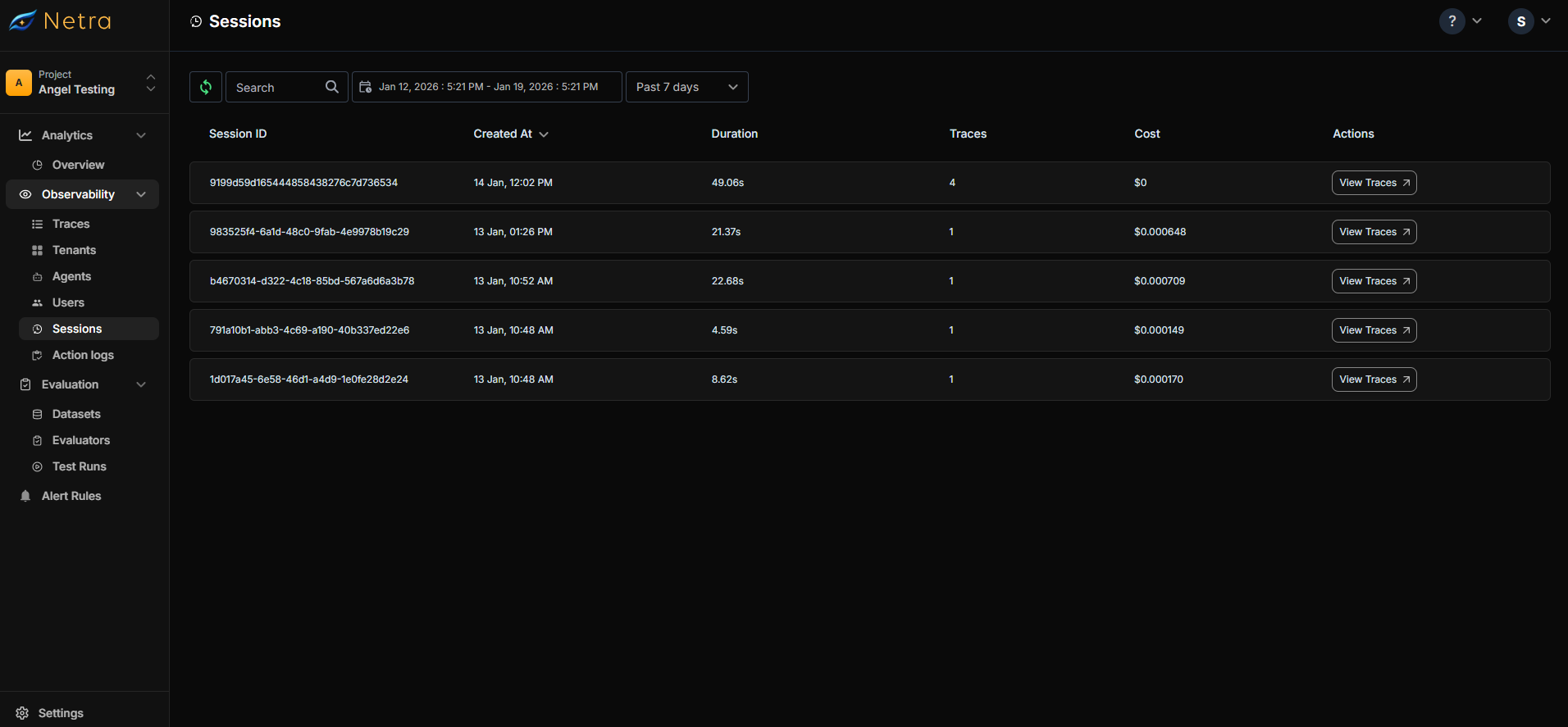
The Sessions dashboard displays all your application sessions with their associated traces. Each session shows key information including session ID, creation time, duration, number of traces, and total cost.
 ### Features
* **Filter & Search:** Filter sessions by date, time range, or search by session/user ID
* **Refresh Data:** Manually refresh to see the latest sessions
* **View Columns:** SessionId, CreatedAt, Duration, Traces, Cost, and Actions button
Click the **Actions** button to navigate to the trace view and inspect all traces associated with that session.
## Use Cases
* **Debugging User Issues:** Retrieve a specific user's session to review all their interactions and traces
* **Cost Analysis:** Identify expensive sessions by viewing total cost per session
* **Performance Monitoring:** Track session duration and number of traces to monitor application behavior
* **Error Investigation:** Find sessions with failed traces to diagnose issues quickly
* **User Analytics:** Analyze session patterns to understand user behavior and engagement
## Next Steps
* [Users](/Observability/Users) - Track individual users across sessions
* [Tenants](/Observability/Tenants) - Organize sessions by tenant for multi-tenant applications
* [Traces Overview](/Observability/Traces/overview) - Deep dive into trace data within sessions
### Features
* **Filter & Search:** Filter sessions by date, time range, or search by session/user ID
* **Refresh Data:** Manually refresh to see the latest sessions
* **View Columns:** SessionId, CreatedAt, Duration, Traces, Cost, and Actions button
Click the **Actions** button to navigate to the trace view and inspect all traces associated with that session.
## Use Cases
* **Debugging User Issues:** Retrieve a specific user's session to review all their interactions and traces
* **Cost Analysis:** Identify expensive sessions by viewing total cost per session
* **Performance Monitoring:** Track session duration and number of traces to monitor application behavior
* **Error Investigation:** Find sessions with failed traces to diagnose issues quickly
* **User Analytics:** Analyze session patterns to understand user behavior and engagement
## Next Steps
* [Users](/Observability/Users) - Track individual users across sessions
* [Tenants](/Observability/Tenants) - Organize sessions by tenant for multi-tenant applications
* [Traces Overview](/Observability/Traces/overview) - Deep dive into trace data within sessions