> ## Documentation Index
> Fetch the complete documentation index at: https://docs.getnetra.ai/llms.txt
> Use this file to discover all available pages before exploring further.
# Evaluators
> Create LLM-as-Judge and code evaluators in Netra to assess AI output quality. Use library evaluators or define custom scoring criteria for your use case.
Evaluators are the scoring logic that determines whether your AI system meets quality standards. They transform subjective assessments into measurable metrics—from semantic correctness and tool execution accuracy to safety guardrails and custom business logic. Use them with [Datasets](/Evaluation/Datasets) to build automated quality pipelines.
## Why Evaluators Matter
Without systematic scoring, you can't measure improvement or catch regressions:
| Challenge | How Evaluators Help |
| ------------------ | ------------------------------------------------------------------------ |
| Subjective quality | LLM as Judge provides consistent, scalable assessment |
| Format validation | Code Evaluators enforce JSON schemas, regex patterns, and business rules |
| Safety compliance | Guardrail evaluators detect toxic, harmful, or off-topic content |
| Tool execution | Agentic evaluators verify correct function calling sequences |
## Evaluator Types
Netra offers two approaches to scoring, each suited for different use cases:
Best for subjective quality, semantic correctness, and nuanced criteria. Uses AI models to evaluate AI outputs.
Best for deterministic checks—JSON validation, regex matching, calculations, and custom business logic in JavaScript or Python.
## Auto Evaluation
When a trace contains an LLM call, Netra automatically scores the response using three built-in evaluators — no datasets, test runs, or configuration required.
| Evaluator | What It Measures |
| -------------------- | --------------------------------------------------------------------------------- |
| **Coherence** | Is the response well-structured, logically organized, and free of contradictions? |
| **Factual Accuracy** | Is the response factually correct based on the provided context? |
| **Toxicity** | Does the response contain harmful, offensive, or inappropriate content? |
Scores appear directly on the trace in your dashboard. Traces that do not contain an LLM call — such as pure retrieval or database operations — will not have auto evaluation scores.
The LLM call must go through a provider supported in the [Integrations](/Integrations/overview). If the call is proxied through an unsupported provider, auto evaluation scores will not appear.
## Evaluators Dashboard
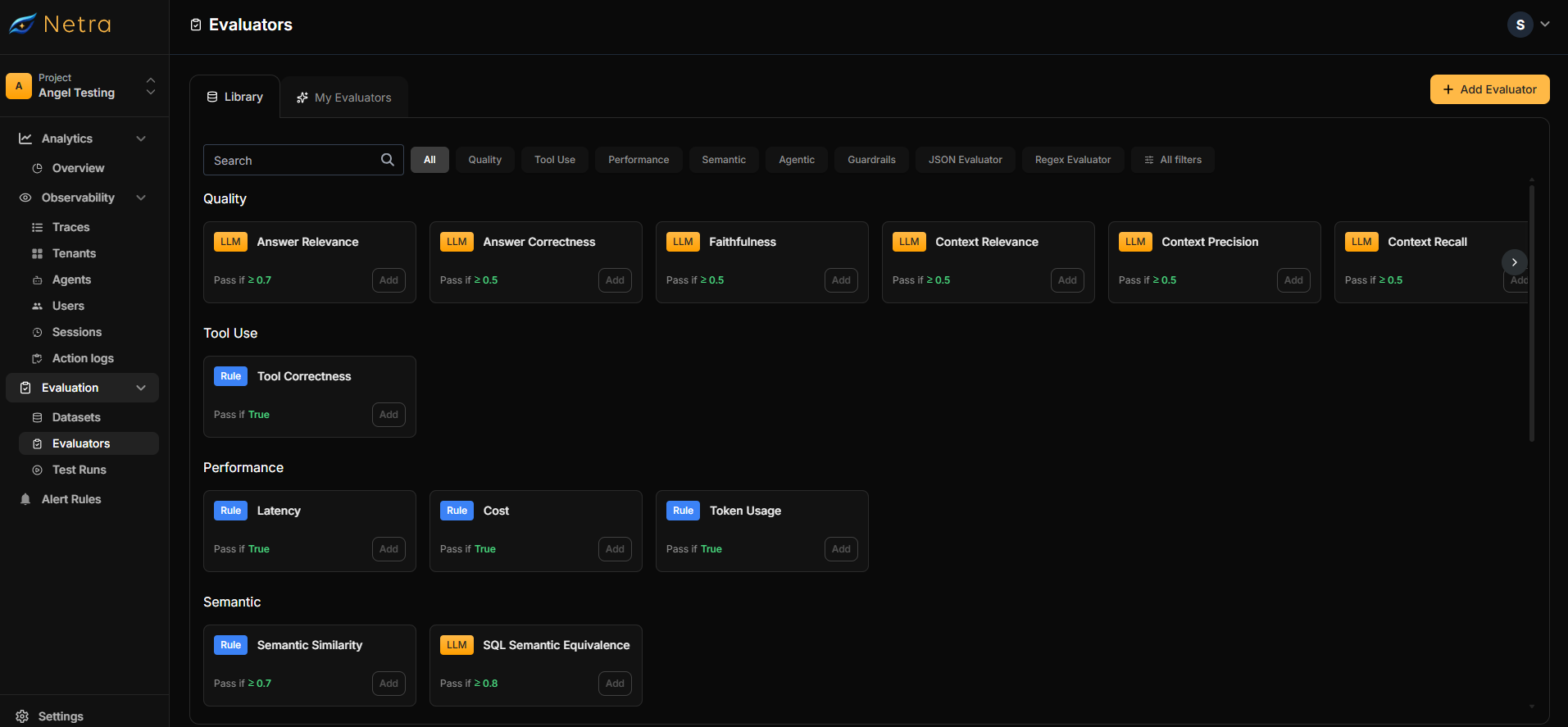
Navigate to **Evaluation → Evaluators** from the left navigation panel. The interface has two tabs:
| Tab | Description |
| ----------------- | ---------------------------------------------------------------------------------- |
| **Library** | Netra's preconfigured evaluators organized by category |
| **My Evaluators** | Your saved custom configurations for reuse across [datasets](/Evaluation/Datasets) |
 ## Creating Custom Evaluators
Click the **Add Evaluator** button in the top right corner to create a new evaluator.
You can also customize any pre-built evaluator from the [Library](#library) by clicking the **Add** button next to it.
### LLM as Judge Configuration
Use LLM as Judge when you need to evaluate subjective criteria like answer quality, relevance, or helpfulness.
## Creating Custom Evaluators
Click the **Add Evaluator** button in the top right corner to create a new evaluator.
You can also customize any pre-built evaluator from the [Library](#library) by clicking the **Add** button next to it.
### LLM as Judge Configuration
Use LLM as Judge when you need to evaluate subjective criteria like answer quality, relevance, or helpfulness.
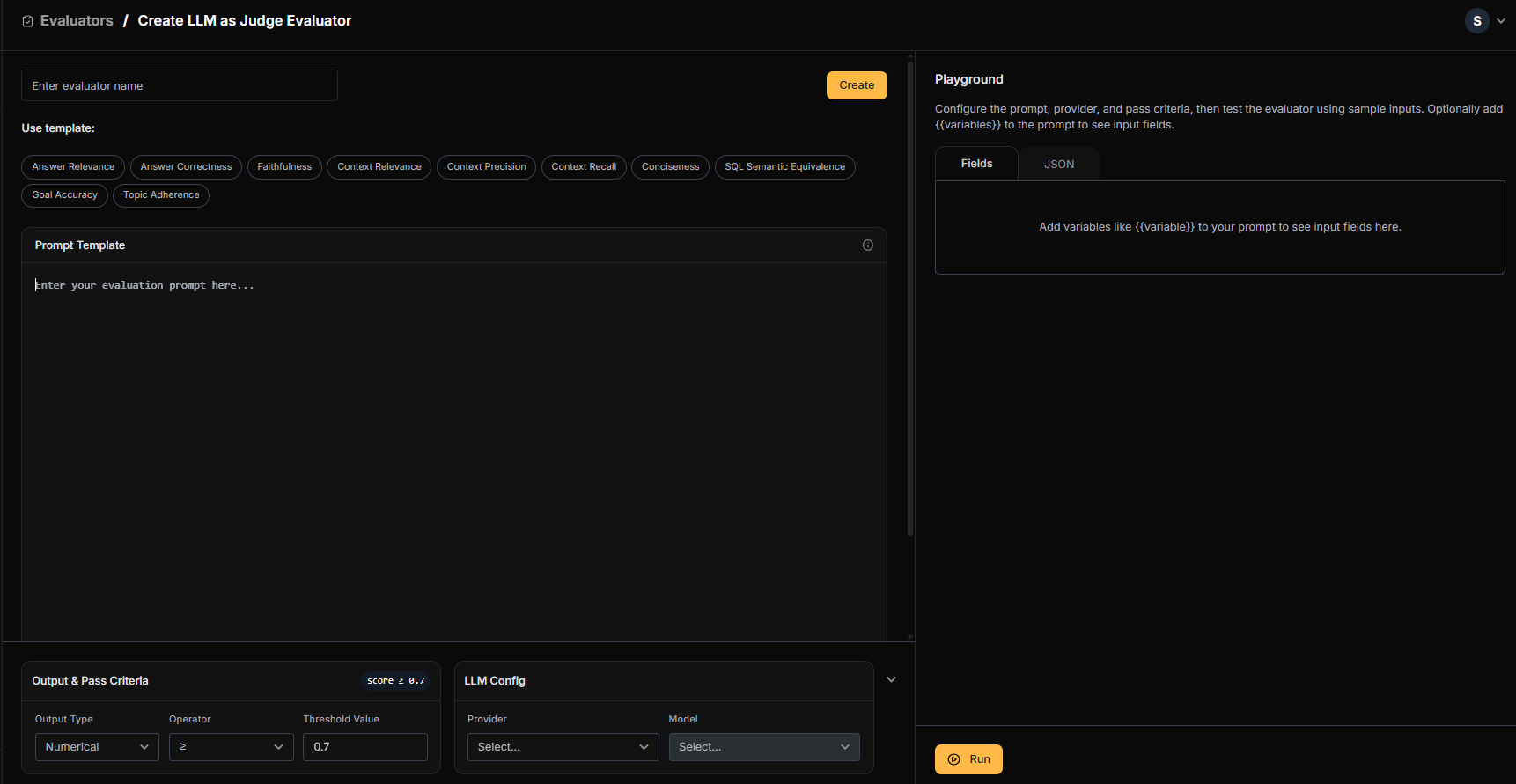 Provide a descriptive name (e.g., "Answer Correctness - Customer Support").
* Select a prebuilt template or write your own evaluation prompt
* Define variables using `{{variable_name}}` syntax
* Variables map to [dataset](/Evaluation/Datasets) fields, agent responses, or trace metadata
**Example prompt:**
```
Compare the following response to the expected answer.
Expected: {{expected_output}}
Actual: {{agent_response}}
Rate the correctness from 0-10.
```
| Output Type | Configuration |
| ------------- | ------------------------------------------------ |
| **Numerical** | Set threshold and operator (e.g., `> 7` to pass) |
| **Boolean** | Simple pass/fail evaluation |
Choose your preferred provider and model:
* OpenAI (GPT-4, GPT-3.5)
* Anthropic (Claude)
* Google (Gemini)
* Mistral
* Input sample data for each variable
* Run the evaluator in real-time
* Refine your prompt until results are consistent
### Code Evaluator Configuration
Use Code Evaluators for deterministic checks that don't require AI judgment.
Provide a descriptive name (e.g., "Answer Correctness - Customer Support").
* Select a prebuilt template or write your own evaluation prompt
* Define variables using `{{variable_name}}` syntax
* Variables map to [dataset](/Evaluation/Datasets) fields, agent responses, or trace metadata
**Example prompt:**
```
Compare the following response to the expected answer.
Expected: {{expected_output}}
Actual: {{agent_response}}
Rate the correctness from 0-10.
```
| Output Type | Configuration |
| ------------- | ------------------------------------------------ |
| **Numerical** | Set threshold and operator (e.g., `> 7` to pass) |
| **Boolean** | Simple pass/fail evaluation |
Choose your preferred provider and model:
* OpenAI (GPT-4, GPT-3.5)
* Anthropic (Claude)
* Google (Gemini)
* Mistral
* Input sample data for each variable
* Run the evaluator in real-time
* Refine your prompt until results are consistent
### Code Evaluator Configuration
Use Code Evaluators for deterministic checks that don't require AI judgment.
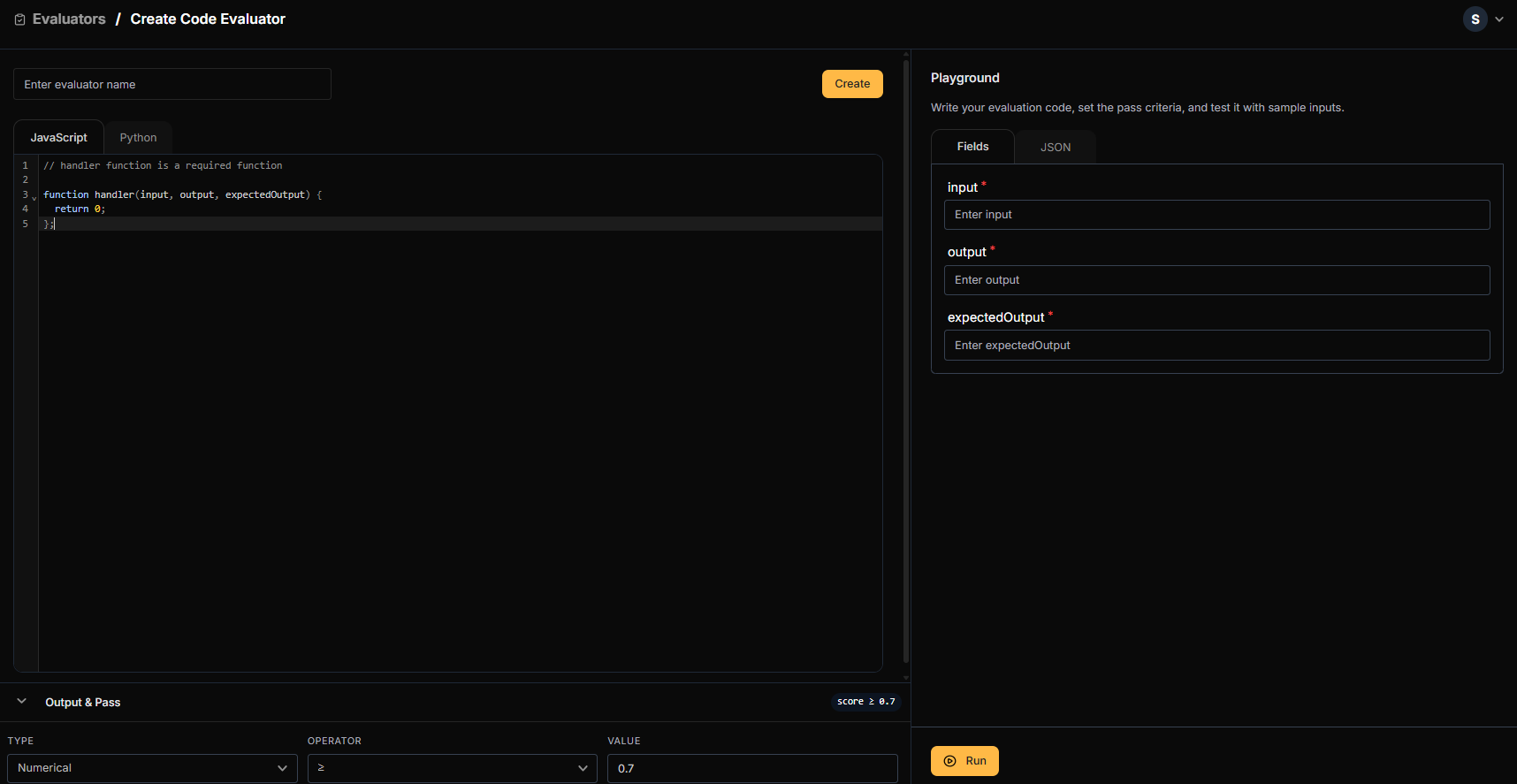 Provide a descriptive name (e.g., "JSON Schema Validator").
Use the code editor to write JavaScript or Python. A `handler` function is required.
**JavaScript example:**
```javascript theme={null}
function handler(input) {
try {
const parsed = JSON.parse(input.agent_response);
return parsed.hasOwnProperty('name') && parsed.hasOwnProperty('email');
} catch {
return false;
}
}
```
**Python example:**
```python theme={null}
import json
def handler(input):
try:
parsed = json.loads(input["agent_response"])
return "name" in parsed and "email" in parsed
except:
return False
```
| Output Type | Configuration |
| ------------- | --------------------------------------------------- |
| **Numerical** | Set threshold and operator (e.g., `>= 0.8` to pass) |
| **Boolean** | Return `true`/`false` directly from your code |
* Input sample data
* Execute your code in real-time
* Debug and refine until it handles edge cases correctly
Once created, your evaluator appears in **My Evaluators** and becomes available when [creating datasets](/Evaluation/Datasets).
## Library
The Library contains pre-built evaluators ready to use or customize.
Provide a descriptive name (e.g., "JSON Schema Validator").
Use the code editor to write JavaScript or Python. A `handler` function is required.
**JavaScript example:**
```javascript theme={null}
function handler(input) {
try {
const parsed = JSON.parse(input.agent_response);
return parsed.hasOwnProperty('name') && parsed.hasOwnProperty('email');
} catch {
return false;
}
}
```
**Python example:**
```python theme={null}
import json
def handler(input):
try:
parsed = json.loads(input["agent_response"])
return "name" in parsed and "email" in parsed
except:
return False
```
| Output Type | Configuration |
| ------------- | --------------------------------------------------- |
| **Numerical** | Set threshold and operator (e.g., `>= 0.8` to pass) |
| **Boolean** | Return `true`/`false` directly from your code |
* Input sample data
* Execute your code in real-time
* Debug and refine until it handles edge cases correctly
Once created, your evaluator appears in **My Evaluators** and becomes available when [creating datasets](/Evaluation/Datasets).
## Library
The Library contains pre-built evaluators ready to use or customize.
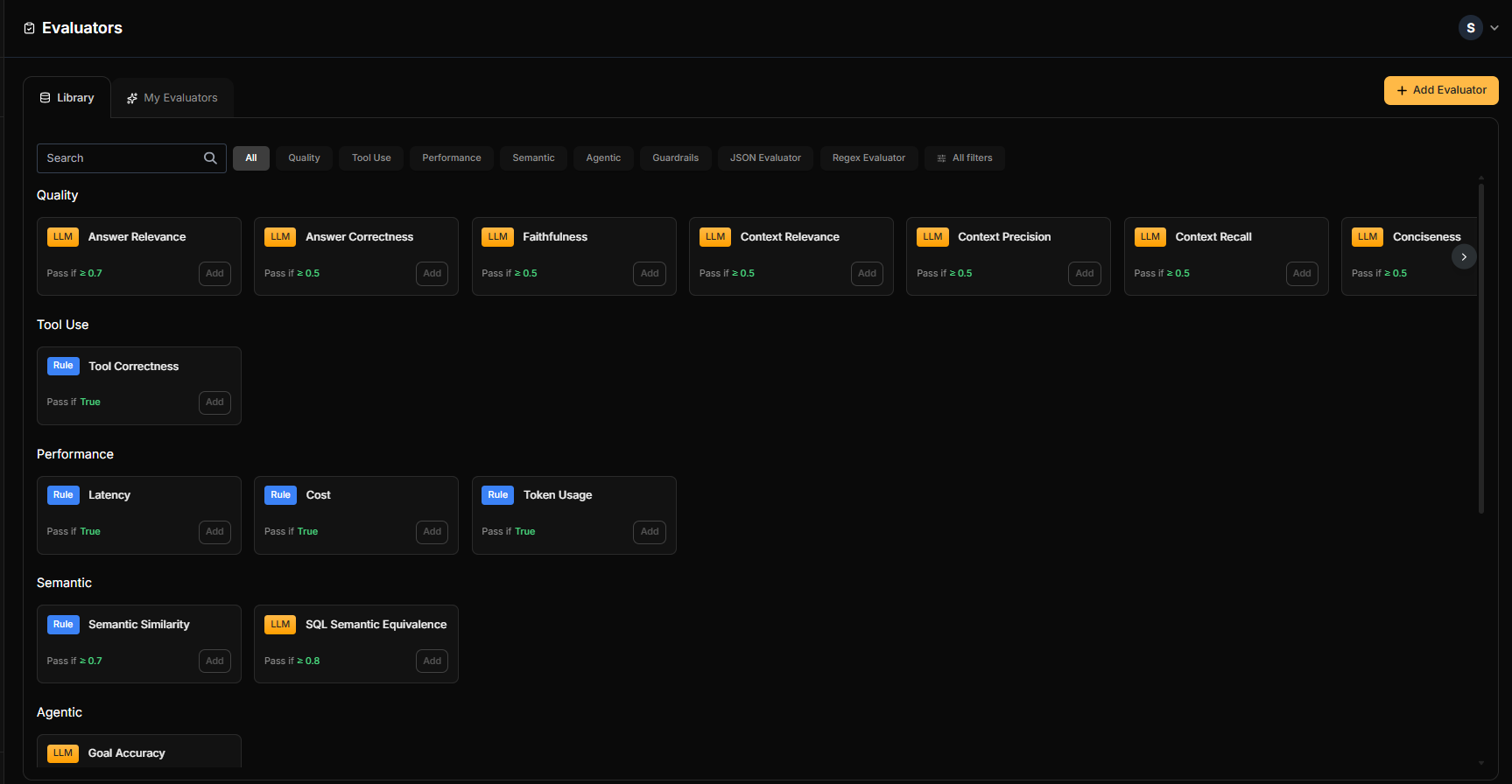 | Category | Description | Type |
| ------------------- | ------------------------------------------- | ------------ |
| **Quality** | Answer correctness, relevance, completeness | LLM as Judge |
| **Tool Use** | Validates proper function/tool calling | LLM as Judge |
| **Performance** | Response time, token efficiency | Code |
| **Semantic** | Meaning preservation, context understanding | LLM as Judge |
| **Agentic** | Decision-making, multi-step reasoning | LLM as Judge |
| **Guardrails** | Content safety, toxicity, compliance | LLM as Judge |
| **JSON Evaluator** | Schema validation, structure checks | Code |
| **Regex Evaluator** | Pattern matching, format validation | Code |
### Customizing Pre-built Evaluators
Start with a library evaluator and tailor it to your needs:
Find an evaluator that matches your use case.
Opens the configuration window with pre-filled settings.
* Modify the prompt template
* Adjust variables and mappings
* Change pass/fail thresholds
Validate your changes with sample data.
Click **Create** to save to **My Evaluators**.
## Using Evaluators in Datasets
Once created, evaluators become available when building [datasets](/Evaluation/Datasets):
1. Create or edit a dataset
2. In the evaluator selection step, choose from **Library** or **My Evaluators**
3. Map variables to connect evaluator inputs to your data
4. Run evaluations and view results in [Test Runs](/Evaluation/TestRuns)
## Best Practices
### Choosing the Right Evaluator Type
| Use Case | Recommended Type |
| ------------------------------------- | ------------------------- |
| "Is this answer correct?" | LLM as Judge |
| "Is the JSON valid?" | Code Evaluator |
| "Is the response helpful?" | LLM as Judge |
| "Does it match this regex?" | Code Evaluator |
| "Is content safe for users?" | LLM as Judge (Guardrails) |
| "Did the agent call the right tools?" | LLM as Judge (Agentic) |
### Writing Effective LLM Prompts
* **Be specific**: Define exactly what "correct" or "good" means
* **Provide examples**: Include sample inputs and expected scores
* **Set clear scales**: "Rate 1-10" is better than "rate quality"
* **Test edge cases**: Validate with ambiguous or tricky inputs
### Testing Before Deployment
Always use the Playground before adding evaluators to production datasets:
* Test with representative samples from your actual data
* Include edge cases and potential failure scenarios
* Verify pass/fail thresholds produce expected results
## Related
* [Evaluation Overview](/Evaluation/Evaluation-overview) - Understand the full evaluation framework
* [Datasets](/Evaluation/Datasets) - Create test cases that use your evaluators
* [Test Runs](/Evaluation/TestRuns) - View evaluation results and scores
* [Quick Start: Evaluation](/quick-start/QuickStart_Evals) - Get started with evaluations
| Category | Description | Type |
| ------------------- | ------------------------------------------- | ------------ |
| **Quality** | Answer correctness, relevance, completeness | LLM as Judge |
| **Tool Use** | Validates proper function/tool calling | LLM as Judge |
| **Performance** | Response time, token efficiency | Code |
| **Semantic** | Meaning preservation, context understanding | LLM as Judge |
| **Agentic** | Decision-making, multi-step reasoning | LLM as Judge |
| **Guardrails** | Content safety, toxicity, compliance | LLM as Judge |
| **JSON Evaluator** | Schema validation, structure checks | Code |
| **Regex Evaluator** | Pattern matching, format validation | Code |
### Customizing Pre-built Evaluators
Start with a library evaluator and tailor it to your needs:
Find an evaluator that matches your use case.
Opens the configuration window with pre-filled settings.
* Modify the prompt template
* Adjust variables and mappings
* Change pass/fail thresholds
Validate your changes with sample data.
Click **Create** to save to **My Evaluators**.
## Using Evaluators in Datasets
Once created, evaluators become available when building [datasets](/Evaluation/Datasets):
1. Create or edit a dataset
2. In the evaluator selection step, choose from **Library** or **My Evaluators**
3. Map variables to connect evaluator inputs to your data
4. Run evaluations and view results in [Test Runs](/Evaluation/TestRuns)
## Best Practices
### Choosing the Right Evaluator Type
| Use Case | Recommended Type |
| ------------------------------------- | ------------------------- |
| "Is this answer correct?" | LLM as Judge |
| "Is the JSON valid?" | Code Evaluator |
| "Is the response helpful?" | LLM as Judge |
| "Does it match this regex?" | Code Evaluator |
| "Is content safe for users?" | LLM as Judge (Guardrails) |
| "Did the agent call the right tools?" | LLM as Judge (Agentic) |
### Writing Effective LLM Prompts
* **Be specific**: Define exactly what "correct" or "good" means
* **Provide examples**: Include sample inputs and expected scores
* **Set clear scales**: "Rate 1-10" is better than "rate quality"
* **Test edge cases**: Validate with ambiguous or tricky inputs
### Testing Before Deployment
Always use the Playground before adding evaluators to production datasets:
* Test with representative samples from your actual data
* Include edge cases and potential failure scenarios
* Verify pass/fail thresholds produce expected results
## Related
* [Evaluation Overview](/Evaluation/Evaluation-overview) - Understand the full evaluation framework
* [Datasets](/Evaluation/Datasets) - Create test cases that use your evaluators
* [Test Runs](/Evaluation/TestRuns) - View evaluation results and scores
* [Quick Start: Evaluation](/quick-start/QuickStart_Evals) - Get started with evaluations