> ## Documentation Index
> Fetch the complete documentation index at: https://docs.getnetra.ai/llms.txt
> Use this file to discover all available pages before exploring further.
# Datasets
> Build and manage evaluation datasets in Netra. Create structured test cases with inputs, expected outputs, and metadata to benchmark your AI system.
Datasets are the foundation of your evaluation pipeline. They define what you're testing—the inputs, expected outputs, and metadata that [Evaluators](/Evaluation/Evaluators) use to score your AI system's performance. Build them from real production [traces](/Observability/Traces/overview) or create them manually for comprehensive coverage.
## Why Datasets Matter
Datasets transform ad-hoc testing into systematic quality assurance:
| Benefit | Description |
| -------------------------- | --------------------------------------------------------------------------- |
| **Reproducibility** | Run the same tests across model updates, prompt changes, and code releases |
| **Real-World Coverage** | Convert production traces into test cases that reflect actual user behavior |
| **Regression Detection** | Compare results over time to catch quality degradation early |
| **Objective Benchmarking** | Measure performance against defined criteria, not gut feeling |
## Dataset Dashboard
Navigate to **Evaluation → Datasets** from the left navigation panel to access your datasets.
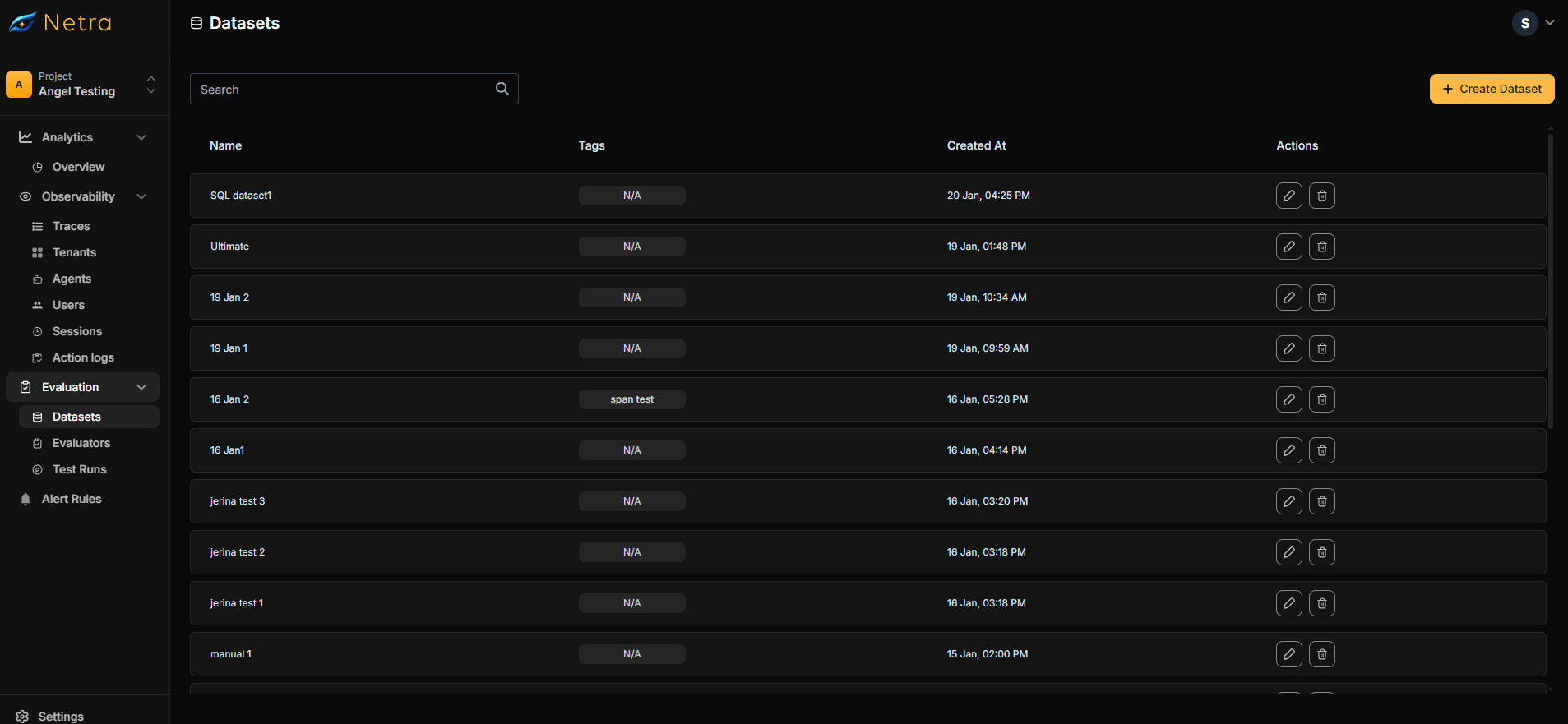 | Column | Description |
| ---------------- | ---------------------------------------------- |
| **Dataset Name** | Unique identifier for the test suite |
| **Tags** | Metadata labels for filtering and organization |
| **Created At** | Timestamp for version tracking |
| **Actions** | Quick access to edit or delete datasets |
## Creating a Dataset
There are two ways to create a dataset:
Convert real production interactions into test cases (Recommended)
Build test suites from scratch in the dashboard
### Creating Dataset from Traces
The fastest way to build meaningful test cases is to capture real interactions from your production system. This ensures your evaluations reflect actual user behavior.
Navigate to **Observability → [Traces](/Observability/Traces/overview)** and locate an interaction you want to use as a test case.
Click the **Add to Dataset** button on the trace.
Choose to create a new dataset or add to an existing one.
In the creation form:
* Enter a dataset name (e.g., "Customer Support QA")
* Add optional tags for organization
* Review and edit the input prompt
* Provide the expected output
* Include any relevant metadata from the trace
Click **Next** and choose [evaluators](/Evaluation/Evaluators) to score this test case:
* Browse the [evaluator library](/Evaluation/Evaluators#library)
* Or select from your saved evaluators in **My Evaluators**
Configure how evaluator variables connect to your data:
| Source | Use Case |
| ------------------ | ------------------------------------------------------------- |
| **Dataset field** | Use values defined in your test case (input, expected output) |
| **Agent response** | Use the actual LLM output at evaluation time |
| **Execution data** | Use metadata from the trace (latency, tokens, model) |
Click **Create Dataset** to finalize.
### Creating Dataset from Dashboard
For comprehensive test coverage, create datasets manually with carefully crafted test cases.
Click the **Create Dataset** button in the top right corner of the Datasets page.
| Column | Description |
| ---------------- | ---------------------------------------------- |
| **Dataset Name** | Unique identifier for the test suite |
| **Tags** | Metadata labels for filtering and organization |
| **Created At** | Timestamp for version tracking |
| **Actions** | Quick access to edit or delete datasets |
## Creating a Dataset
There are two ways to create a dataset:
Convert real production interactions into test cases (Recommended)
Build test suites from scratch in the dashboard
### Creating Dataset from Traces
The fastest way to build meaningful test cases is to capture real interactions from your production system. This ensures your evaluations reflect actual user behavior.
Navigate to **Observability → [Traces](/Observability/Traces/overview)** and locate an interaction you want to use as a test case.
Click the **Add to Dataset** button on the trace.
Choose to create a new dataset or add to an existing one.
In the creation form:
* Enter a dataset name (e.g., "Customer Support QA")
* Add optional tags for organization
* Review and edit the input prompt
* Provide the expected output
* Include any relevant metadata from the trace
Click **Next** and choose [evaluators](/Evaluation/Evaluators) to score this test case:
* Browse the [evaluator library](/Evaluation/Evaluators#library)
* Or select from your saved evaluators in **My Evaluators**
Configure how evaluator variables connect to your data:
| Source | Use Case |
| ------------------ | ------------------------------------------------------------- |
| **Dataset field** | Use values defined in your test case (input, expected output) |
| **Agent response** | Use the actual LLM output at evaluation time |
| **Execution data** | Use metadata from the trace (latency, tokens, model) |
Click **Create Dataset** to finalize.
### Creating Dataset from Dashboard
For comprehensive test coverage, create datasets manually with carefully crafted test cases.
Click the **Create Dataset** button in the top right corner of the Datasets page.
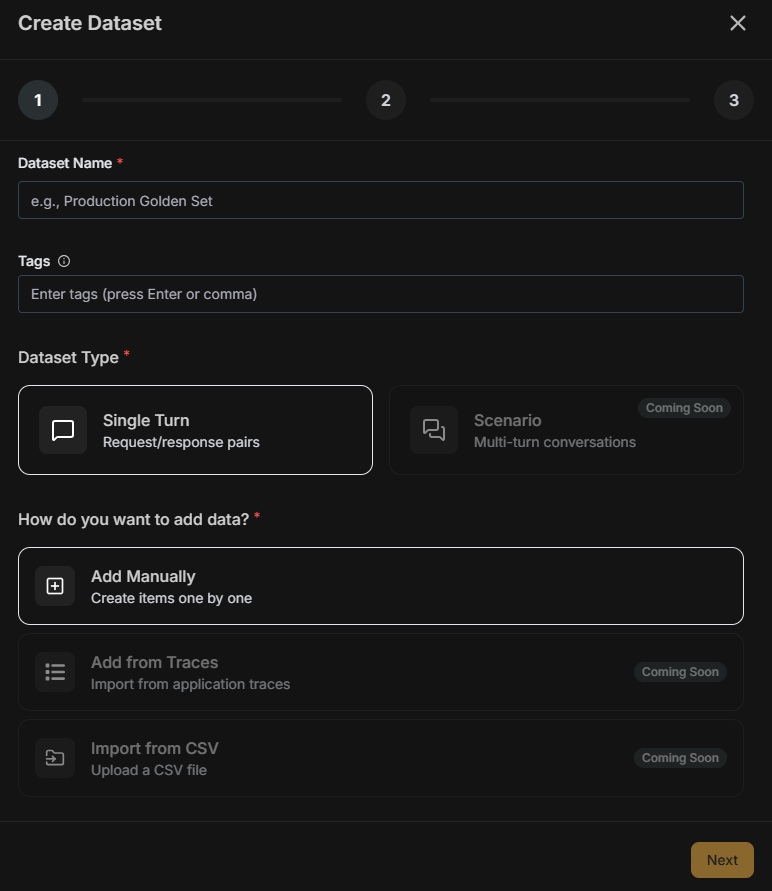 Fill in the dataset details:
| Field | Description |
| --------------- | --------------------------------------------------------------------- |
| **Name** | A descriptive identifier for your test suite |
| **Tags** | Labels for filtering (e.g., "production", "edge-cases", "v2-prompts") |
| **Type** | **Single Turn** for request/response pairs |
| **Data Source** | **Add manually** to create items one by one |
**Scenario** (multi-turn conversations), **Import from traces**, and **Import from CSV** are coming soon.
Fill in the dataset details:
| Field | Description |
| --------------- | --------------------------------------------------------------------- |
| **Name** | A descriptive identifier for your test suite |
| **Tags** | Labels for filtering (e.g., "production", "edge-cases", "v2-prompts") |
| **Type** | **Single Turn** for request/response pairs |
| **Data Source** | **Add manually** to create items one by one |
**Scenario** (multi-turn conversations), **Import from traces**, and **Import from CSV** are coming soon.
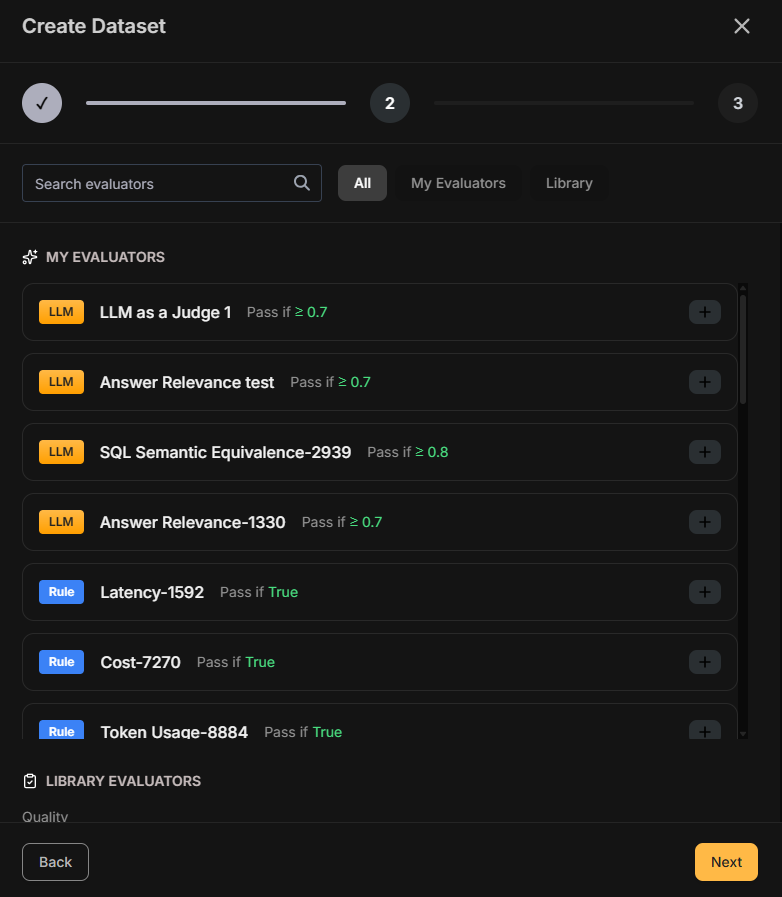 Click **Next** and select [evaluators](/Evaluation/Evaluators) from the library or your saved configurations.
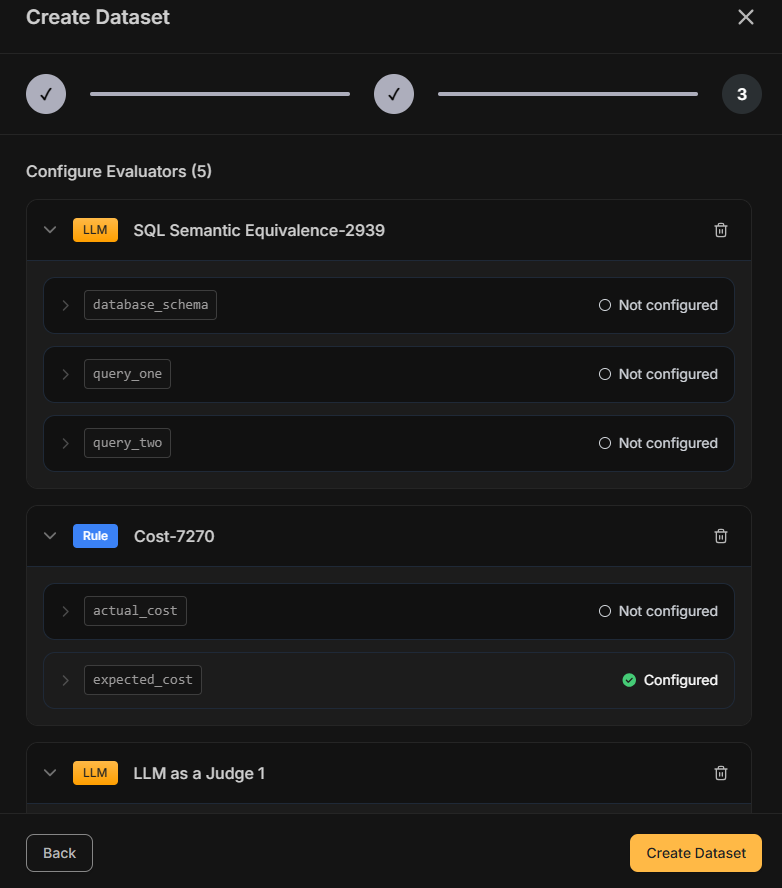 Configure variable mappings to connect evaluator inputs to your dataset fields.
Click **Create Dataset** to complete the process.
## Running an Evaluation
Once your dataset is configured with evaluators, trigger a test run via the SDK.
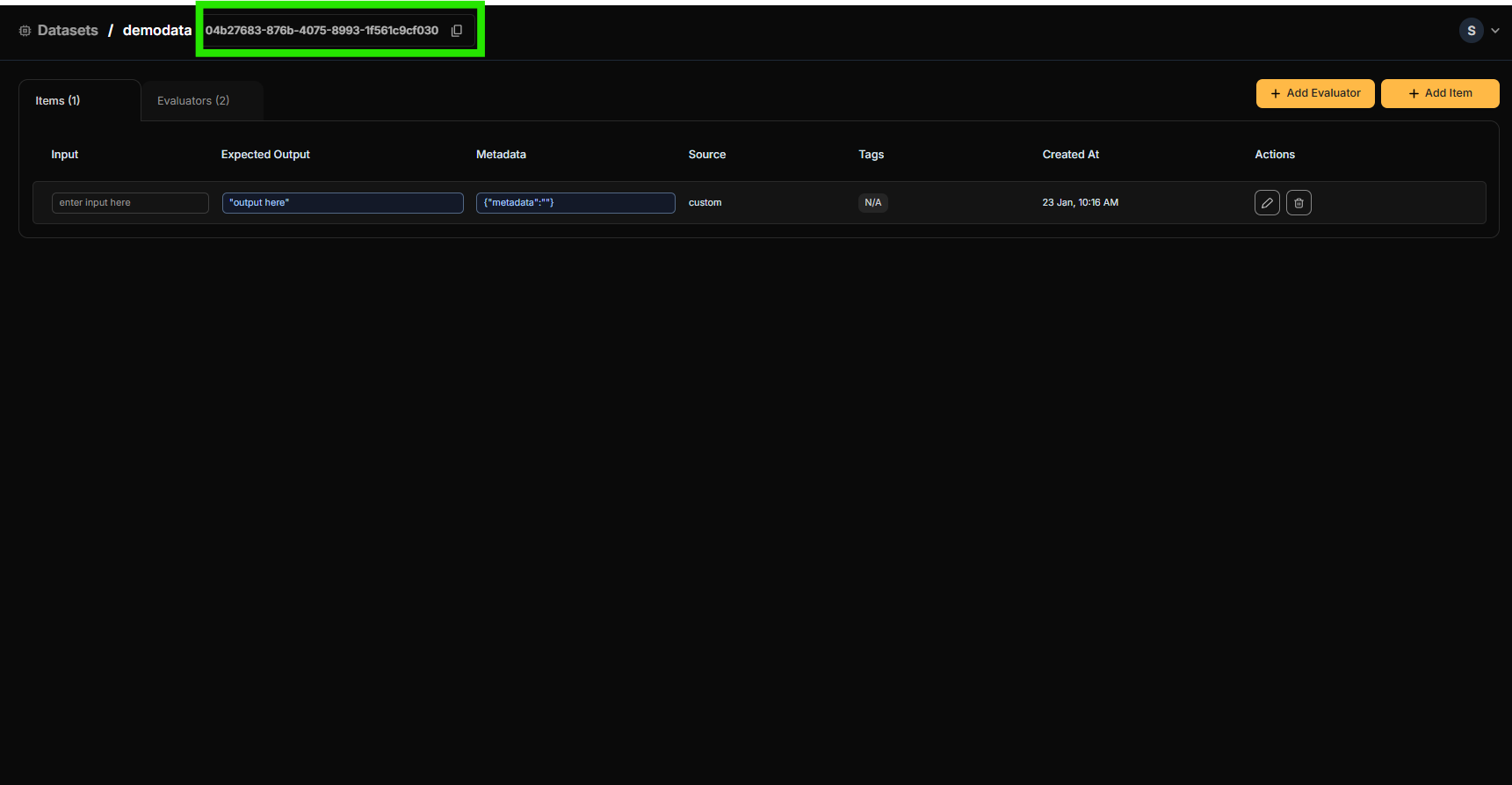
Open your dataset and copy the **Dataset ID** displayed at the top of the page.
Configure variable mappings to connect evaluator inputs to your dataset fields.
Click **Create Dataset** to complete the process.
## Running an Evaluation
Once your dataset is configured with evaluators, trigger a test run via the SDK.
Open your dataset and copy the **Dataset ID** displayed at the top of the page.
 Use the Dataset ID to fetch the dataset and run a test suite. The task function receives the `input` field from each dataset item and should return the generated output as a string.
```python Python theme={null}
from netra import Netra
Netra.init(app_name="my-app")
def my_task(input_data):
# Your AI logic — takes the input from each dataset item
# and returns the generated output as a string
return response
dataset = Netra.evaluation.get_dataset(dataset_id="your-dataset-id")
result = Netra.evaluation.run_test_suite(
name="My Evaluation",
data=dataset,
task=my_task,
)
```
```typescript TypeScript theme={null}
import { Netra } from "netra-sdk";
await Netra.init({ appName: "my-app" });
async function myTask(inputData: string): Promise {
// Your AI logic — takes the input from each dataset item
// and returns the generated output as a string
return response;
}
const dataset = await Netra.evaluation.getDataset("your-dataset-id");
const result = await Netra.evaluation.runTestSuite(
"My Evaluation",
dataset,
myTask,
);
```
The output is compared against `expectedOutput` by the evaluators attached to the dataset. See the SDK reference for [Python](/sdk-reference/evaluation/python) and [TypeScript](/sdk-reference/evaluation/typescript) for the full API.
Monitor progress and results in [Test Runs](/Evaluation/TestRuns).
## Best Practices
### Organizing Datasets
* **Use descriptive names**: "Customer Support - Refund Requests" is better than "Dataset 1"
* **Tag consistently**: Create a tagging convention (e.g., by feature, model version, or test type)
* **Version your datasets**: Include version numbers in tags when testing prompt iterations
### Building Effective Test Cases
* **Cover edge cases**: Include unusual inputs, long prompts, and potential failure scenarios
* **Balance quantity and quality**: A smaller dataset of high-quality test cases beats a large dataset of weak ones
* **Include negative tests**: Add cases where the expected behavior is to refuse or ask for clarification
### Maintaining Datasets
* **Update regularly**: Add new test cases from production traces as you discover new patterns
* **Remove outdated cases**: Delete test cases that no longer reflect current requirements
* **Review failed cases**: Investigate failures to determine if the AI is wrong or the expected output needs updating
## Related
* [Evaluation Overview](/Evaluation/Evaluation-overview) - Understand the full evaluation framework
* [Evaluators](/Evaluation/Evaluators) - Configure scoring logic for your datasets
* [Test Runs](/Evaluation/TestRuns) - Analyze evaluation results
* [Traces](/Observability/Traces/overview) - Source data for creating datasets from production
Use the Dataset ID to fetch the dataset and run a test suite. The task function receives the `input` field from each dataset item and should return the generated output as a string.
```python Python theme={null}
from netra import Netra
Netra.init(app_name="my-app")
def my_task(input_data):
# Your AI logic — takes the input from each dataset item
# and returns the generated output as a string
return response
dataset = Netra.evaluation.get_dataset(dataset_id="your-dataset-id")
result = Netra.evaluation.run_test_suite(
name="My Evaluation",
data=dataset,
task=my_task,
)
```
```typescript TypeScript theme={null}
import { Netra } from "netra-sdk";
await Netra.init({ appName: "my-app" });
async function myTask(inputData: string): Promise {
// Your AI logic — takes the input from each dataset item
// and returns the generated output as a string
return response;
}
const dataset = await Netra.evaluation.getDataset("your-dataset-id");
const result = await Netra.evaluation.runTestSuite(
"My Evaluation",
dataset,
myTask,
);
```
The output is compared against `expectedOutput` by the evaluators attached to the dataset. See the SDK reference for [Python](/sdk-reference/evaluation/python) and [TypeScript](/sdk-reference/evaluation/typescript) for the full API.
Monitor progress and results in [Test Runs](/Evaluation/TestRuns).
## Best Practices
### Organizing Datasets
* **Use descriptive names**: "Customer Support - Refund Requests" is better than "Dataset 1"
* **Tag consistently**: Create a tagging convention (e.g., by feature, model version, or test type)
* **Version your datasets**: Include version numbers in tags when testing prompt iterations
### Building Effective Test Cases
* **Cover edge cases**: Include unusual inputs, long prompts, and potential failure scenarios
* **Balance quantity and quality**: A smaller dataset of high-quality test cases beats a large dataset of weak ones
* **Include negative tests**: Add cases where the expected behavior is to refuse or ask for clarification
### Maintaining Datasets
* **Update regularly**: Add new test cases from production traces as you discover new patterns
* **Remove outdated cases**: Delete test cases that no longer reflect current requirements
* **Review failed cases**: Investigate failures to determine if the AI is wrong or the expected output needs updating
## Related
* [Evaluation Overview](/Evaluation/Evaluation-overview) - Understand the full evaluation framework
* [Evaluators](/Evaluation/Evaluators) - Configure scoring logic for your datasets
* [Test Runs](/Evaluation/TestRuns) - Analyze evaluation results
* [Traces](/Observability/Traces/overview) - Source data for creating datasets from production