> ## Documentation Index
> Fetch the complete documentation index at: https://docs.getnetra.ai/llms.txt
> Use this file to discover all available pages before exploring further.
# Tracing LangChain Agents
> Trace LangChain ReAct agents with Netra. Capture reasoning loops, tool calls, and decision points to debug and optimize multi-step AI agent workflows.
This cookbook shows you how to add **complete observability** to LangChain ReAct agents—tracing each step of the reasoning loop, capturing tool invocations with latency breakdowns, and understanding your agent's decision-making process.
Run the complete notebook in your browser
All company names (TaskBot, ShopFlow) and scenarios in this cookbook are entirely fictional and used for demonstration purposes only.
## What You'll Learn
Capture each iteration of thought → action → observation with Netra spans
Monitor tool invocations with latency, inputs, outputs, and cost
Understand why your agent made specific decisions using trace analysis
Enrich traces with user IDs, session context, and custom attributes
**Prerequisites:**
* Python >=3.10, \<3.14
* OpenAI API key
* Netra API key ([Get started here](/quick-start/Overview))
* LangChain installed
***
## Why Trace Agents?
Unlike simple LLM calls, agents involve multi-step reasoning that can fail in subtle ways:
| Failure Mode | Symptom | What Tracing Reveals |
| --------------------- | ------------------------------ | ----------------------------------------- |
| Wrong tool selection | Agent uses incorrect tool | Tool call sequence, decision reasoning |
| Infinite loops | Agent repeats actions | Iteration count, repeated patterns |
| Hallucinated tools | Agent calls non-existent tool | Tool names vs. available tools |
| Premature termination | Agent stops before completion | Final state, missing steps |
| Over-escalation | Agent escalates simple queries | Escalation triggers, query classification |
Without visibility into the reasoning loop, debugging these failures requires guesswork.
***
## The ReAct Pattern
ReAct (Reasoning + Acting) agents follow an iterative loop:
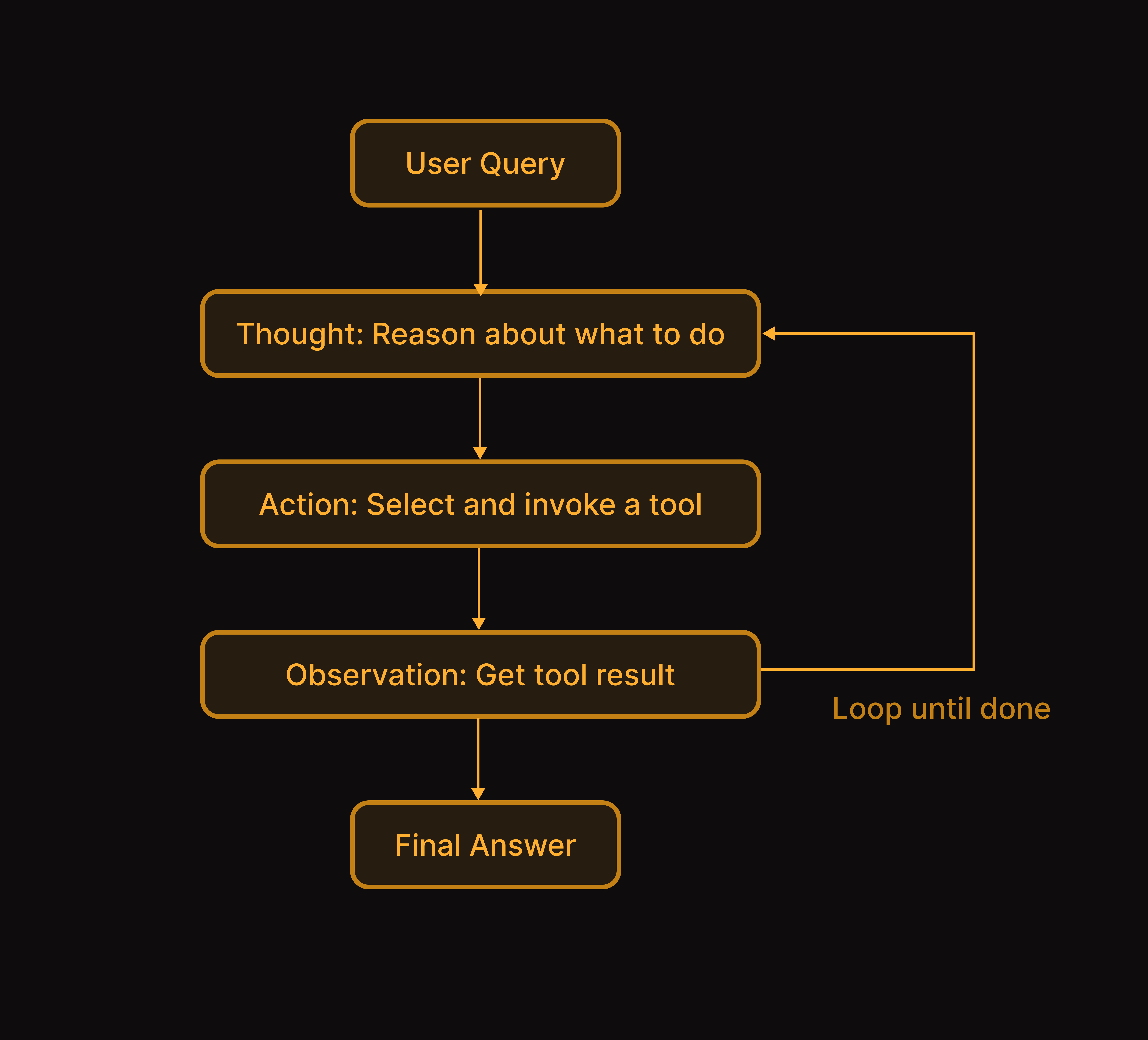 Netra captures each iteration as nested spans, giving you visibility into the agent's decision-making process.
***
## Building the Example Agent
### Installation
```bash theme={null}
pip install netra-sdk langchain langchain-openai openai
```
### Environment Setup
```bash theme={null}
export NETRA_API_KEY="your-netra-api-key"
export NETRA_OTLP_ENDPOINT="your-netra-otlp-endpoint"
export OPENAI_API_KEY="your-openai-api-key"
```
### Mock Data and Tools
First, let's define a simple agent with multiple tools:
```python theme={null}
from typing import Dict, List
from langchain.tools import tool
from langchain_openai import ChatOpenAI
from langchain.agents import create_react_agent
# Mock databases
TICKETS = {
"TKT-001": {"id": "TKT-001", "subject": "Return policy question", "status": "open"},
"TKT-002": {"id": "TKT-002", "subject": "Damaged item", "status": "open", "order_id": "ORD-12345"},
}
ORDERS = {
"ORD-12345": {"id": "ORD-12345", "status": "delivered", "items": ["Headphones"], "total": 79.99},
}
KNOWLEDGE_BASE = [
{"title": "Return Policy", "content": "Items can be returned within 30 days."},
{"title": "Refund Processing", "content": "Refunds processed in 5-7 business days."},
]
@tool
def lookup_ticket(ticket_id: str) -> str:
"""Look up a ticket by its ID to get details about the issue."""
ticket = TICKETS.get(ticket_id.upper())
if not ticket:
return f"No ticket found with ID: {ticket_id}"
return f"Ticket {ticket['id']}: {ticket['subject']} (Status: {ticket['status']})"
@tool
def search_kb(query: str) -> str:
"""Search the knowledge base for information about policies or procedures."""
query_lower = query.lower()
results = [a for a in KNOWLEDGE_BASE if query_lower in a["title"].lower()]
if not results:
return "No relevant articles found."
return "\n".join([f"**{a['title']}**: {a['content']}" for a in results])
@tool
def check_order_status(order_id: str) -> str:
"""Check the status of an order including shipping information."""
order = ORDERS.get(order_id.upper())
if not order:
return f"No order found with ID: {order_id}"
return f"Order {order['id']}: {order['status']}, Items: {order['items']}, Total: ${order['total']}"
@tool
def escalate_to_human(ticket_id: str, reason: str) -> str:
"""Escalate a ticket to a human operator for complex issues."""
return f"Ticket {ticket_id} escalated. Reason: {reason}. A specialist will respond within 1 hour."
```
### Create the Agent
```python theme={null}
# Initialize the LLM
model = ChatOpenAI(model="gpt-4o-mini", temperature=0)
# Define tools
tools = [lookup_ticket, search_kb, check_order_status, escalate_to_human]
# Create the agent
agent = create_react_agent(
model,
tools,
prompt="""You are TaskBot, an AI assistant for ShopFlow e-commerce platform.
You help users with:
- Order status and tracking
- Return and refund requests
- Policy questions
- Escalating complex issues
Use tools to look up information before responding.
Escalate to human operators when the user is frustrated or you cannot resolve the issue."""
)
```
***
## Adding Netra Observability
### Initialize Netra with Auto-Instrumentation
Netra provides auto-instrumentation for LangChain that captures agent execution automatically:
```python theme={null}
from netra import Netra
from netra.instrumentation.instruments import InstrumentSet
# Initialize Netra with LangChain and OpenAI instrumentation
Netra.init(
app_name="taskbot",
environment="development",
trace_content=True,
instruments={InstrumentSet.OPENAI, InstrumentSet.LANGCHAIN},
)
```
With auto-instrumentation enabled, Netra automatically captures:
* Agent execution spans
* LLM calls with prompts and completions
* Tool invocations with inputs and outputs
* Token usage and costs
### Tracing Agent Execution with Decorators
For more control, wrap your agent handler with the `@agent` decorator:
```python theme={null}
from netra.decorators import agent
@agent(name="taskbot-agent")
def handle_request(query: str, user_id: str = None) -> dict:
"""Handle a user request with full tracing."""
# Set user context if provided
if user_id:
Netra.set_user_id(user_id)
# Execute the agent
result = agent.invoke({
"messages": [{"role": "user", "content": query}]
})
return {
"query": query,
"response": result["messages"][-1].content,
}
```
### Adding Custom Span Attributes
Enrich tool traces with custom attributes for better filtering and analysis:
```python theme={null}
from netra import Netra, SpanType
@tool
def lookup_ticket_traced(ticket_id: str) -> str:
"""Look up a ticket with custom span attributes."""
with Netra.start_span("ticket-lookup", as_type=SpanType.TOOL) as span:
span.set_attribute("ticket_id", ticket_id)
ticket = TICKETS.get(ticket_id.upper())
if ticket:
span.set_attribute("ticket_status", ticket["status"])
span.set_attribute("ticket_priority", ticket.get("priority", "normal"))
span.set_attribute("found", True)
else:
span.set_attribute("found", False)
if not ticket:
return f"No ticket found with ID: {ticket_id}"
return f"Ticket {ticket['id']}: {ticket['subject']} (Status: {ticket['status']})"
```
***
## Running Sample Requests
Let's test the agent with different query types to see tracing in action.
### Simple Query: FAQ Lookup
```python theme={null}
# Single-tool query - should use search_kb
response = handle_request(
query="What is your return policy?",
user_id="user-001",
)
print(response["response"])
```
**Expected behavior**: Agent uses `search_kb` once and returns the policy information.
### Order Status Query
```python theme={null}
# Order status query - should use check_order_status
response = handle_request(
query="Where is my order ORD-12345?",
user_id="user-002",
)
print(response["response"])
```
**Expected behavior**: Agent uses `check_order_status` and provides tracking information.
### Multi-Step Query
```python theme={null}
# Multi-step workflow - should use multiple tools
response = handle_request(
query="I have ticket TKT-002 about a damaged item. Can you check the order status?",
user_id="user-003",
)
print(response["response"])
```
**Expected behavior**: Agent uses `lookup_ticket` to get context, then `check_order_status` to verify the order.
### Escalation Scenario
```python theme={null}
# Escalation scenario - should detect urgency
response = handle_request(
query="I've been waiting 3 weeks and need urgent help! I want to speak to someone immediately!",
user_id="user-004",
)
print(response["response"])
```
**Expected behavior**: Agent recognizes urgency and uses `escalate_to_human`.
***
## Viewing Traces in Netra
After running requests, navigate to **Observability → Traces** in Netra. You'll see the full agent execution flow:
Netra captures each iteration as nested spans, giving you visibility into the agent's decision-making process.
***
## Building the Example Agent
### Installation
```bash theme={null}
pip install netra-sdk langchain langchain-openai openai
```
### Environment Setup
```bash theme={null}
export NETRA_API_KEY="your-netra-api-key"
export NETRA_OTLP_ENDPOINT="your-netra-otlp-endpoint"
export OPENAI_API_KEY="your-openai-api-key"
```
### Mock Data and Tools
First, let's define a simple agent with multiple tools:
```python theme={null}
from typing import Dict, List
from langchain.tools import tool
from langchain_openai import ChatOpenAI
from langchain.agents import create_react_agent
# Mock databases
TICKETS = {
"TKT-001": {"id": "TKT-001", "subject": "Return policy question", "status": "open"},
"TKT-002": {"id": "TKT-002", "subject": "Damaged item", "status": "open", "order_id": "ORD-12345"},
}
ORDERS = {
"ORD-12345": {"id": "ORD-12345", "status": "delivered", "items": ["Headphones"], "total": 79.99},
}
KNOWLEDGE_BASE = [
{"title": "Return Policy", "content": "Items can be returned within 30 days."},
{"title": "Refund Processing", "content": "Refunds processed in 5-7 business days."},
]
@tool
def lookup_ticket(ticket_id: str) -> str:
"""Look up a ticket by its ID to get details about the issue."""
ticket = TICKETS.get(ticket_id.upper())
if not ticket:
return f"No ticket found with ID: {ticket_id}"
return f"Ticket {ticket['id']}: {ticket['subject']} (Status: {ticket['status']})"
@tool
def search_kb(query: str) -> str:
"""Search the knowledge base for information about policies or procedures."""
query_lower = query.lower()
results = [a for a in KNOWLEDGE_BASE if query_lower in a["title"].lower()]
if not results:
return "No relevant articles found."
return "\n".join([f"**{a['title']}**: {a['content']}" for a in results])
@tool
def check_order_status(order_id: str) -> str:
"""Check the status of an order including shipping information."""
order = ORDERS.get(order_id.upper())
if not order:
return f"No order found with ID: {order_id}"
return f"Order {order['id']}: {order['status']}, Items: {order['items']}, Total: ${order['total']}"
@tool
def escalate_to_human(ticket_id: str, reason: str) -> str:
"""Escalate a ticket to a human operator for complex issues."""
return f"Ticket {ticket_id} escalated. Reason: {reason}. A specialist will respond within 1 hour."
```
### Create the Agent
```python theme={null}
# Initialize the LLM
model = ChatOpenAI(model="gpt-4o-mini", temperature=0)
# Define tools
tools = [lookup_ticket, search_kb, check_order_status, escalate_to_human]
# Create the agent
agent = create_react_agent(
model,
tools,
prompt="""You are TaskBot, an AI assistant for ShopFlow e-commerce platform.
You help users with:
- Order status and tracking
- Return and refund requests
- Policy questions
- Escalating complex issues
Use tools to look up information before responding.
Escalate to human operators when the user is frustrated or you cannot resolve the issue."""
)
```
***
## Adding Netra Observability
### Initialize Netra with Auto-Instrumentation
Netra provides auto-instrumentation for LangChain that captures agent execution automatically:
```python theme={null}
from netra import Netra
from netra.instrumentation.instruments import InstrumentSet
# Initialize Netra with LangChain and OpenAI instrumentation
Netra.init(
app_name="taskbot",
environment="development",
trace_content=True,
instruments={InstrumentSet.OPENAI, InstrumentSet.LANGCHAIN},
)
```
With auto-instrumentation enabled, Netra automatically captures:
* Agent execution spans
* LLM calls with prompts and completions
* Tool invocations with inputs and outputs
* Token usage and costs
### Tracing Agent Execution with Decorators
For more control, wrap your agent handler with the `@agent` decorator:
```python theme={null}
from netra.decorators import agent
@agent(name="taskbot-agent")
def handle_request(query: str, user_id: str = None) -> dict:
"""Handle a user request with full tracing."""
# Set user context if provided
if user_id:
Netra.set_user_id(user_id)
# Execute the agent
result = agent.invoke({
"messages": [{"role": "user", "content": query}]
})
return {
"query": query,
"response": result["messages"][-1].content,
}
```
### Adding Custom Span Attributes
Enrich tool traces with custom attributes for better filtering and analysis:
```python theme={null}
from netra import Netra, SpanType
@tool
def lookup_ticket_traced(ticket_id: str) -> str:
"""Look up a ticket with custom span attributes."""
with Netra.start_span("ticket-lookup", as_type=SpanType.TOOL) as span:
span.set_attribute("ticket_id", ticket_id)
ticket = TICKETS.get(ticket_id.upper())
if ticket:
span.set_attribute("ticket_status", ticket["status"])
span.set_attribute("ticket_priority", ticket.get("priority", "normal"))
span.set_attribute("found", True)
else:
span.set_attribute("found", False)
if not ticket:
return f"No ticket found with ID: {ticket_id}"
return f"Ticket {ticket['id']}: {ticket['subject']} (Status: {ticket['status']})"
```
***
## Running Sample Requests
Let's test the agent with different query types to see tracing in action.
### Simple Query: FAQ Lookup
```python theme={null}
# Single-tool query - should use search_kb
response = handle_request(
query="What is your return policy?",
user_id="user-001",
)
print(response["response"])
```
**Expected behavior**: Agent uses `search_kb` once and returns the policy information.
### Order Status Query
```python theme={null}
# Order status query - should use check_order_status
response = handle_request(
query="Where is my order ORD-12345?",
user_id="user-002",
)
print(response["response"])
```
**Expected behavior**: Agent uses `check_order_status` and provides tracking information.
### Multi-Step Query
```python theme={null}
# Multi-step workflow - should use multiple tools
response = handle_request(
query="I have ticket TKT-002 about a damaged item. Can you check the order status?",
user_id="user-003",
)
print(response["response"])
```
**Expected behavior**: Agent uses `lookup_ticket` to get context, then `check_order_status` to verify the order.
### Escalation Scenario
```python theme={null}
# Escalation scenario - should detect urgency
response = handle_request(
query="I've been waiting 3 weeks and need urgent help! I want to speak to someone immediately!",
user_id="user-004",
)
print(response["response"])
```
**Expected behavior**: Agent recognizes urgency and uses `escalate_to_human`.
***
## Viewing Traces in Netra
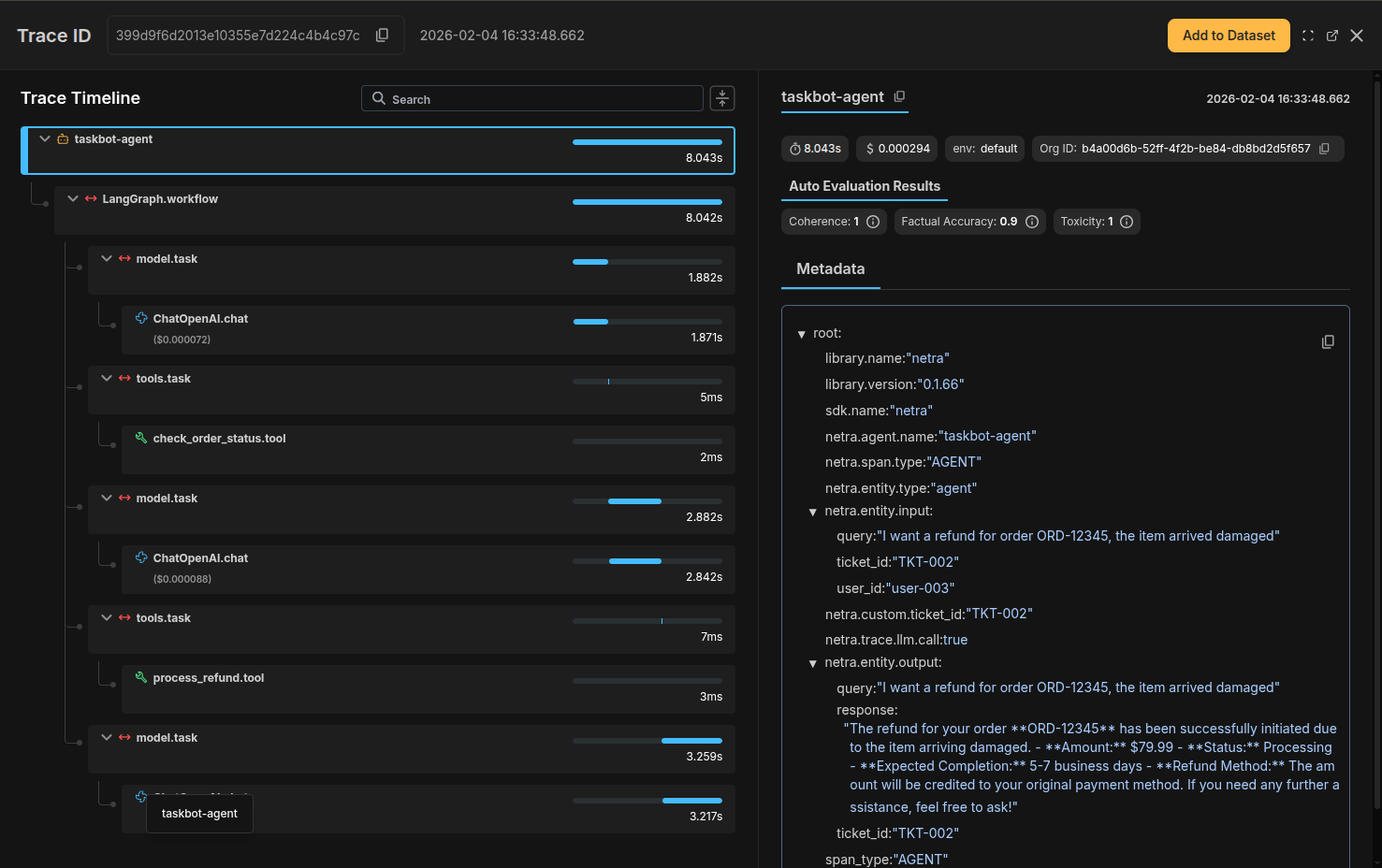
After running requests, navigate to **Observability → Traces** in Netra. You'll see the full agent execution flow:
 ### What the Trace Shows
* **Parent span**: The overall agent execution
* **LLM calls**: Each reasoning step with prompts and completions
* **Tool calls**: Each tool invocation with inputs, outputs, and latency
* **Token usage**: Cumulative token counts and costs
### Filtering and Analysis
Use Netra's filtering to analyze agent behavior:
| Filter | Use Case |
| ------------------------------- | ---------------------------------- |
| `tool.name = escalate_to_human` | Find all escalation decisions |
| `user_id = user-004` | Debug a specific user's experience |
| `latency > 5000ms` | Find slow agent executions |
| `status = error` | Identify failed requests |
***
## Summary
You've learned how to add comprehensive observability to LangChain agents:
* **Auto-instrumentation** captures agent execution with minimal code
* **Custom spans** add business context to tool calls
* **Trace analysis** reveals reasoning patterns and failure modes
* **Session tracking** connects multi-turn conversations
### Key Takeaways
1. ReAct agents need visibility into the reasoning loop—trace each thought, action, and observation
2. Tool call tracing reveals latency bottlenecks and decision patterns
3. Custom attributes enable filtering by query type, user, and business context
4. Session IDs connect related requests for conversation analysis
***
## See Also
Add systematic evaluation to measure tool selection accuracy
Complete LangChain instrumentation guide
Deep dive into agent observability features
Understanding trace structure and analysis
### What the Trace Shows
* **Parent span**: The overall agent execution
* **LLM calls**: Each reasoning step with prompts and completions
* **Tool calls**: Each tool invocation with inputs, outputs, and latency
* **Token usage**: Cumulative token counts and costs
### Filtering and Analysis
Use Netra's filtering to analyze agent behavior:
| Filter | Use Case |
| ------------------------------- | ---------------------------------- |
| `tool.name = escalate_to_human` | Find all escalation decisions |
| `user_id = user-004` | Debug a specific user's experience |
| `latency > 5000ms` | Find slow agent executions |
| `status = error` | Identify failed requests |
***
## Summary
You've learned how to add comprehensive observability to LangChain agents:
* **Auto-instrumentation** captures agent execution with minimal code
* **Custom spans** add business context to tool calls
* **Trace analysis** reveals reasoning patterns and failure modes
* **Session tracking** connects multi-turn conversations
### Key Takeaways
1. ReAct agents need visibility into the reasoning loop—trace each thought, action, and observation
2. Tool call tracing reveals latency bottlenecks and decision patterns
3. Custom attributes enable filtering by query type, user, and business context
4. Session IDs connect related requests for conversation analysis
***
## See Also
Add systematic evaluation to measure tool selection accuracy
Complete LangChain instrumentation guide
Deep dive into agent observability features
Understanding trace structure and analysis